# W3DS Documentation
Every page of https://docs.w3ds.metastate.foundation, concatenated. Generated at build time.
---
# Getting Started with W3DS
Source: https://docs.w3ds.metastate.foundation/docs/Getting%20Started/getting-started
# Getting Started with W3DS
Welcome to **W3DS (Web 3.0 Data Spaces)** — a decentralized data synchronization protocol that puts users in control of their data. For definitions of key terms (eVault, W3ID, MetaState, Post-Platform, etc.), see the [Glossary](/docs/W3DS%20Basics/glossary).
## What is W3DS?
W3DS is a protocol that enables seamless data synchronization across multiple platforms while ensuring users own and control their data. Instead of platforms storing user data in silos, W3DS allows users to store their data in their own [**eVaults**](/docs/W3DS%20Basics/glossary#evault) and have platforms sync from these vaults.
## Core Concept
The fundamental principle of W3DS is simple: **Users, groups, and objects own their own eVaults**. All data about a person, group, or object is stored in their eVault, and platforms act as frontends that display and interact with this data, while also serving as caches and aggregators for improved performance and user experience.
### Key Principles
1. **Data Ownership & Decentralized Storage**: Users own their data, not platforms. Each user has their own eVault for data storage, ensuring true data ownership and control.
2. **Platform Independence & Automatic Synchronization**: Platforms are interchangeable frontends that automatically synchronize data, while also serving as caches and aggregators. Data created on one platform automatically appears on all platforms, enabling true interoperability across the ecosystem.
## How It Works: A Simple Example
Imagine User A creates a post on **Blabsy** (a social media platform):
1. User A posts "Hello, world!" on Blabsy
2. Blabsy's Web3 Adapter syncs the post to User A's eVault
3. User A's eVault stores the post and notifies all registered platforms
4. **Pictique** (another social media platform) receives the notification
5. Pictique creates the post locally - User A's post automatically appears on Pictique through the synchronization system
This is the power of W3DS: your data follows you across all platforms automatically.
## Architecture Overview
```mermaid
graph TB
subgraph Users["Users & Groups"]
UserA[User A
eName: @user-a.w3id]
UserB[User B
eName: @user-b.w3id]
Group1[Group 1
eName: @group-1.w3id]
end
subgraph EVaults["eVaults"]
EVaultA[User A's eVault]
EVaultB[User B's eVault]
EVaultG1[Group 1's eVault]
end
subgraph Platforms["Platforms"]
Blabsy[Blabsy]
Pictique[Pictique]
OtherPlatform[Other Platforms]
end
subgraph Infrastructure["Infrastructure"]
Registry[Registry Service
W3ID Resolution]
EVaultCore[eVault Core
GraphQL API]
end
UserA -->|Owns| EVaultA
UserB -->|Owns| EVaultB
Group1 -->|Owns| EVaultG1
Blabsy -->|Read/Write| EVaultA
Pictique -->|Read/Write| EVaultA
OtherPlatform -->|Read/Write| EVaultA
EVaultA -->|Webhooks| Blabsy
EVaultA -->|Webhooks| Pictique
EVaultA -->|Webhooks| OtherPlatform
Blabsy -.->|Resolve eName| Registry
Pictique -.->|Resolve eName| Registry
OtherPlatform -.->|Resolve eName| Registry
EVaultCore -->|Store Data| EVaultA
style UserA fill:#e1f5ff,color:#000000
style EVaultA fill:#fff4e1,color:#000000
style Blabsy fill:#e8f5e9,color:#000000
style Pictique fill:#e8f5e9,color:#000000
style Registry fill:#f3e5f5,color:#000000
style EVaultCore fill:#f3e5f5,color:#000000
```
## Key Components
### eVault Core
The [eVault Core](/docs/Infrastructure/eVault) is the central storage system that manages user data. It provides:
- **GraphQL API** for storing and retrieving data using MetaEnvelope storage for structured data
- **Webhook delivery** to notify platforms of data changes
- **Access control** via ACLs (Access Control Lists)
### Web3 Adapter
The [Web3 Adapter](/docs/Infrastructure/Web3-Adapter) is a library that platforms use to:
- Handle bidirectional data synchronization between local databases and eVaults
- Convert between platform-specific schemas and global ontology schemas
### Registry Service
The [Registry Service](/docs/Infrastructure/Registry) provides:
- **W3ID resolution**: Maps eNames (like `@user-a.w3id`) to eVault URLs
- **Key binding certificates**: Stores user public keys for signature verification (used when platforms verify user signatures during authentication). See [eVault — Key Binding Certificates](/docs/Infrastructure/eVault#key-binding-certificates) and [Registry](/docs/Infrastructure/Registry).
- **Platform registration**: Tracks active platforms for webhook delivery
### Platforms
**Platforms** are applications that:
- Display and interact with user data
- Act as caches and aggregators for improved performance
- Sync data to/from user eVaults
- Convert between local and global data schemas
- Handle webhooks to receive data updates
## Data Flow
When a user creates data on a platform:
```text
User Action → Platform Database → Web3 Adapter → User's eVault → Webhooks → All Platforms
```
1. **User Action**: User creates a post, message, or other data
2. **Platform Database**: Platform stores data locally
3. **Web3 Adapter**: Adapter converts data to global schema and syncs to eVault
4. **User's eVault**: eVault stores the data as a [MetaEnvelope](/docs/Infrastructure/eVault#data-model)
5. **Webhooks**: eVault sends webhooks to all registered platforms (except the originating one)
6. **All Platforms**: Other platforms receive webhooks and create the data locally
> **Note**: This is a simplified overview of the data flow. The current implementation uses a basic webhook delivery mechanism. For production deployments, platforms should implement message delivery queues to handle eVault and platform downtime gracefully, ensuring reliable data synchronization.
### Detailed Data Flow Sequence
The following sequence diagram shows the detailed interactions between components, including the Web3 Adapter's internal implementation:
```mermaid
sequenceDiagram
participant User as User
participant Platform as Platform
participant LocalDB as Platform Database
participant Adapter as Web3 Adapter
participant Registry as Registry Service
participant EVault as User's eVault
participant OtherPlatforms as Other Platforms
User->>Platform: Create post
Platform->>LocalDB: Store post locally
Platform->>Adapter: Trigger sync
Adapter->>Adapter: Convert to global schema
(ontology mapping)
Adapter->>Registry: Resolve eName to eVault URL
Registry-->>Adapter: Return eVault URL
Adapter->>EVault: POST GraphQL mutation
(storeMetaEnvelope)
EVault->>EVault: Store MetaEnvelope
EVault-->>Adapter: Return stored MetaEnvelope
Adapter-->>Platform: Sync complete
EVault->>EVault: Wait 3 seconds
(prevent ping-pong)
EVault->>Registry: Get active platforms
Registry-->>EVault: Return platform list
EVault->>OtherPlatforms: POST webhook
(data change notification)
OtherPlatforms->>OtherPlatforms: Process webhook
(create post locally)
```
### Registration Sequence
The following sequence diagram shows how a new user registers and creates their eVault, illustrating the roles of the [Provisioner](/docs/W3DS%20Basics/Links) (production URL) and [Registry](/docs/Infrastructure/Registry) services:
```mermaid
sequenceDiagram
participant User as User
participant Wallet as eID Wallet
participant Provisioner as Provisioner Service
participant Registry as Registry Service
participant EVault as eVault Core
User->>Wallet: Initiate onboarding
Wallet->>Wallet: Generate hardware keys
(ECDSA P-256)
Wallet->>Provisioner: POST /provision
(eName, publicKey)
Provisioner->>EVault: Create eVault instance
EVault-->>Provisioner: eVault URL
Provisioner->>Registry: Register eName → eVault URL
Registry->>Registry: Store W3ID mapping
Registry->>Registry: Issue key binding certificate
(JWT with public key)
Registry-->>Provisioner: Registration complete
Provisioner->>EVault: Store public key
(for signature verification)
EVault-->>Provisioner: Public key stored
Provisioner-->>Wallet: eVault URL + certificate
Wallet->>Wallet: Store eVault URL
Wallet-->>User: Onboarding complete
```
The [Provisioner](/docs/W3DS%20Basics/Links) hosts `/provision`; the [Registry](/docs/Infrastructure/Registry) resolves eNames and issues key binding certificates; [eVault Core](/docs/Infrastructure/eVault) stores user data.
## Next Steps
- Learn more about [W3DS Basics](/docs/W3DS%20Basics/getting-started) - Deep dive into eVault ownership and data flow
- Understand [Authentication](/docs/W3DS%20Protocol/Authentication) - How users authenticate with platforms
- Learn about [Signing](/docs/W3DS%20Protocol/Signing) - Signature creation and verification
- Explore [Signature Formats](/docs/W3DS%20Protocol/Signature-Formats) - Technical details on cryptographic signatures
- Read the [Data Ownership Rules](/docs/W3DS%20Basics/Data-Ownership-Rules) - Where data lives, and why the eVault is the source of truth
- Build a platform with the [Post Platform Guide](/docs/Post%20Platform%20Guide/getting-started) - Step-by-step guide to creating a W3DS-compatible platform
- Building with an AI coding agent? Load the [W3DS agent skill](/docs/Post%20Platform%20Guide/ai-agent-skill) first - it keeps the agent grounded in these docs instead of guessing
---
# GitW3 overview
Source: https://docs.w3ds.metastate.foundation/docs/GitW3/overview
# GitW3 overview
[GitW3](https://git.w3ds.metastate.foundation) is the W3DS-aware Git forge. It hosts source code and normal collaborative Git workflows, while connecting a platform repository to its permanent W3DS identity, published versions, PPA certificates, and verifiable deployment records.
GitW3 is built around one rule: the repository is the source of truth for the platform metadata that W3DS publishes. The metadata lives beside the code in `.w3ds/platform.json`, and changes made from the GitW3 **W3DS** tab become ordinary commits on the default branch.
## What GitW3 manages
| Item | Meaning | Where you work with it |
| --- | --- | --- |
| Repository | Source code, issues, pull requests, tags, and releases | The regular repository tabs and Git |
| Platform manifest | Version-controlled W3DS metadata | `.w3ds/platform.json` and the **W3DS** tab |
| Platform eName | The permanent identity of the platform across releases | Provisioned automatically and shown on the **W3DS** tab |
| Version eName | The identity of one exact released version | Derived from a stable Git release |
| PPA certificate | Approval for one exact platform version | Apply and follow the review from the **W3DS** tab |
| Deployment eName | A verifiable record of one running deployment | Created from the **Deploy** tab |
The platform eName remains stable when the code, release, or deployment changes. Each released software version and each deployment receives its own identity so that W3DS records can refer to an exact artifact or running instance.
:::important GitW3 records deployments; it does not host them
The **Deploy** flow creates W3DS identities and attestations. Continue using your normal hosting provider or deployment pipeline to run the application.
:::
## The normal platform lifecycle
```mermaid
flowchart LR
A[Sign in with W3DS] --> B[Create or port a repository]
B --> C[Platform manifest committed]
C --> D[Permanent platform eName provisioned]
D --> E[Publish a stable release]
E --> F[Sign and submit PPA application]
F --> G[PPA certificate granted]
G --> H[Register and sign a deployment]
```
Identity and profile publication happen asynchronously. Git pushes and repository creation do not wait synchronously for every W3DS service. The status shown on the **W3DS** tab updates as the publisher completes or retries the work.
## Choose the right starting path
- **Make a new platform** creates a repository, an initial README, and `.w3ds/platform.json`. Use it when the application does not already have a W3DS identity.
- **Port an existing app** creates an empty destination first. You then move the existing Git history and W3DS integration, transfer an existing eName if there is one, and explicitly activate the public cutover.
- A regular code import is not the same as porting a W3DS platform. Use the guided port flow when an existing platform identity must remain intact.
Continue with [Sign in and manage your account](./sign-in-and-account), [Create a new platform](./create-a-platform), or [Port an existing application](./port-an-existing-application).
## Before you begin
You need:
- an eID wallet with a W3DS identity;
- Git installed locally if you will clone or push code;
- an SSH key or a GitW3 personal access token for command-line Git authentication; and
- repository owner or organization permissions for actions such as PPA submission and migration activation.
For application integration work, GitW3 can give a supported coding agent the current W3DS skill:
```bash
npx skills add MetaState-Prototype-Project/prototype@w3ds
```
The skill helps the agent use current protocol concepts and ontology identifiers. It does not replace review, tests, or secret handling.
---
# Sign in and manage your account
Source: https://docs.w3ds.metastate.foundation/docs/GitW3/sign-in-and-account
# Sign in and manage your account
GitW3 web access uses **Sign in with W3DS**. There is no username-and-password web login for users.
1. Open [git.w3ds.metastate.foundation](https://git.w3ds.metastate.foundation).
2. Select **Sign in with W3DS**.
3. Scan the QR code with your eID wallet, or select **Open your wallet** when the wallet is on the same device.
4. Review and approve the sign-in request in the wallet.
5. Keep the browser page open until GitW3 completes the redirect.
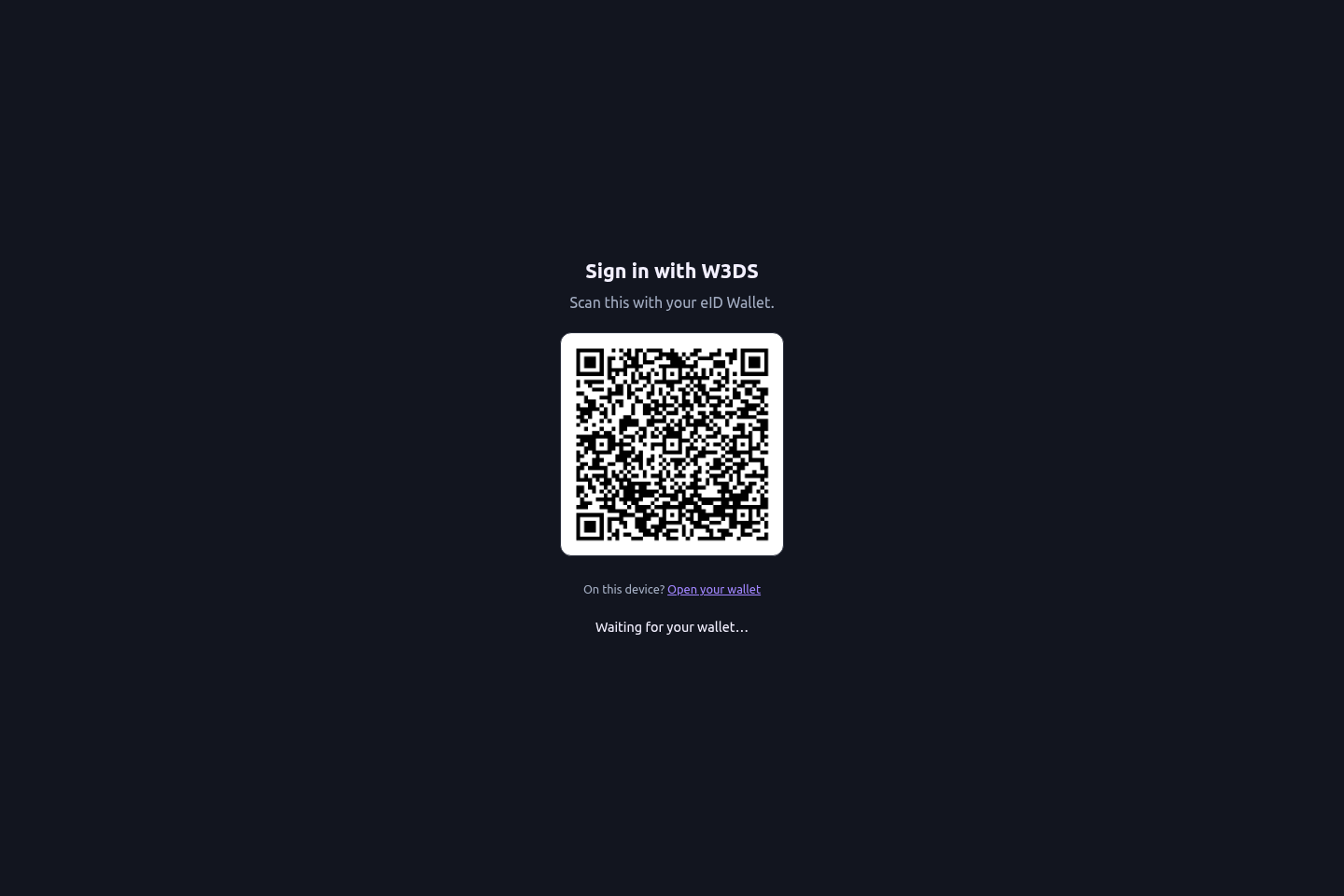
The QR code is a short-lived request. Reload the page and start again if it expires.
## Your GitW3 identity
Your GitW3 username is derived from your W3DS eName. GitW3 displays a cosmetic `@` in front of user and organization names to make their identity clear.
:::note The `@` is presentation only
Do not add or remove characters in a clone URL. Copy the exact HTTP or SSH URL shown by the repository. Internally, GitW3 uses the owner name without the cosmetic `@` in URL paths and Git coordinates.
:::
At sign-in, GitW3 also makes a best-effort lookup of the newest person profile in Awareness-as-a-Service (AaaS):
- the AaaS `displayName` or equivalent name becomes the friendly display name;
- the AaaS avatar becomes the account avatar when it is a valid permitted HTTP(S) image; and
- if AaaS is unavailable, sign-in still succeeds and the existing or wallet-provided profile remains in place.
Because profile enrichment happens during sign-in, sign out and sign in again after changing your W3DS person profile if GitW3 still shows the previous name or avatar.
## Browser sign-in versus Git authentication
The wallet signs you into the website, but command-line Git needs its own credential:
- **SSH:** add your public key under **User settings → SSH / GPG Keys**, then use the SSH clone URL. This is the recommended day-to-day setup.
- **HTTPS:** create a personal access token under **User settings → Applications** and use it as the password when Git prompts. Do not use a wallet secret or try to invent a GitW3 password.
Treat a personal access token like a password. Give it only the permissions required for the task, store it in a credential manager, and revoke it if exposed.
## Sign-in troubleshooting
- **The wallet did not open:** scan the QR code instead, or make sure the wallet is registered as the handler for its link type.
- **The QR code expired:** reload the sign-in page and approve the new request.
- **The approval finished but the browser did not move:** keep the original tab open, then retry once with a fresh request.
- **The displayed name or avatar is old:** sign out and back in to trigger AaaS enrichment again.
- **`git push` asks for a password:** the browser session is not a Git credential. Configure SSH or use a personal access token over HTTPS.
---
# Create a new platform
Source: https://docs.w3ds.metastate.foundation/docs/GitW3/create-a-platform
# Create a new platform
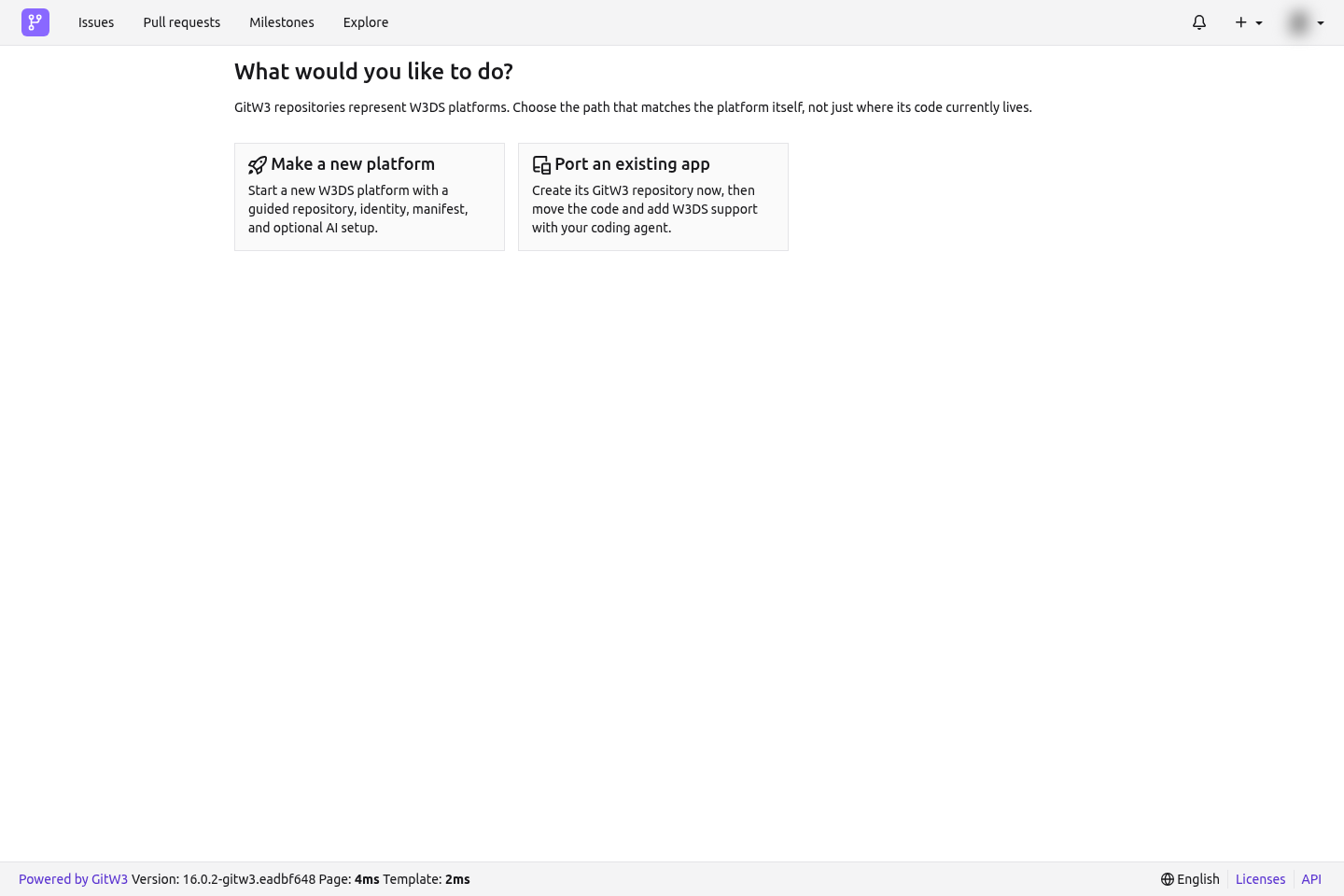
Use **Make a new platform** when the application does not already have a W3DS platform identity. GitW3 creates the repository and initial manifest, then provisions the permanent platform eName asynchronously.
From the **+** menu, select **New repository**, then choose **Make a new platform**.
## Step 1: Repository
Choose the owner and describe where the code will live:
1. Select your user or an organization as **Owner**.
2. Decide whether the repository is private.
3. Enter the human-facing **Display name**.
4. Confirm the default branch, normally `main`.
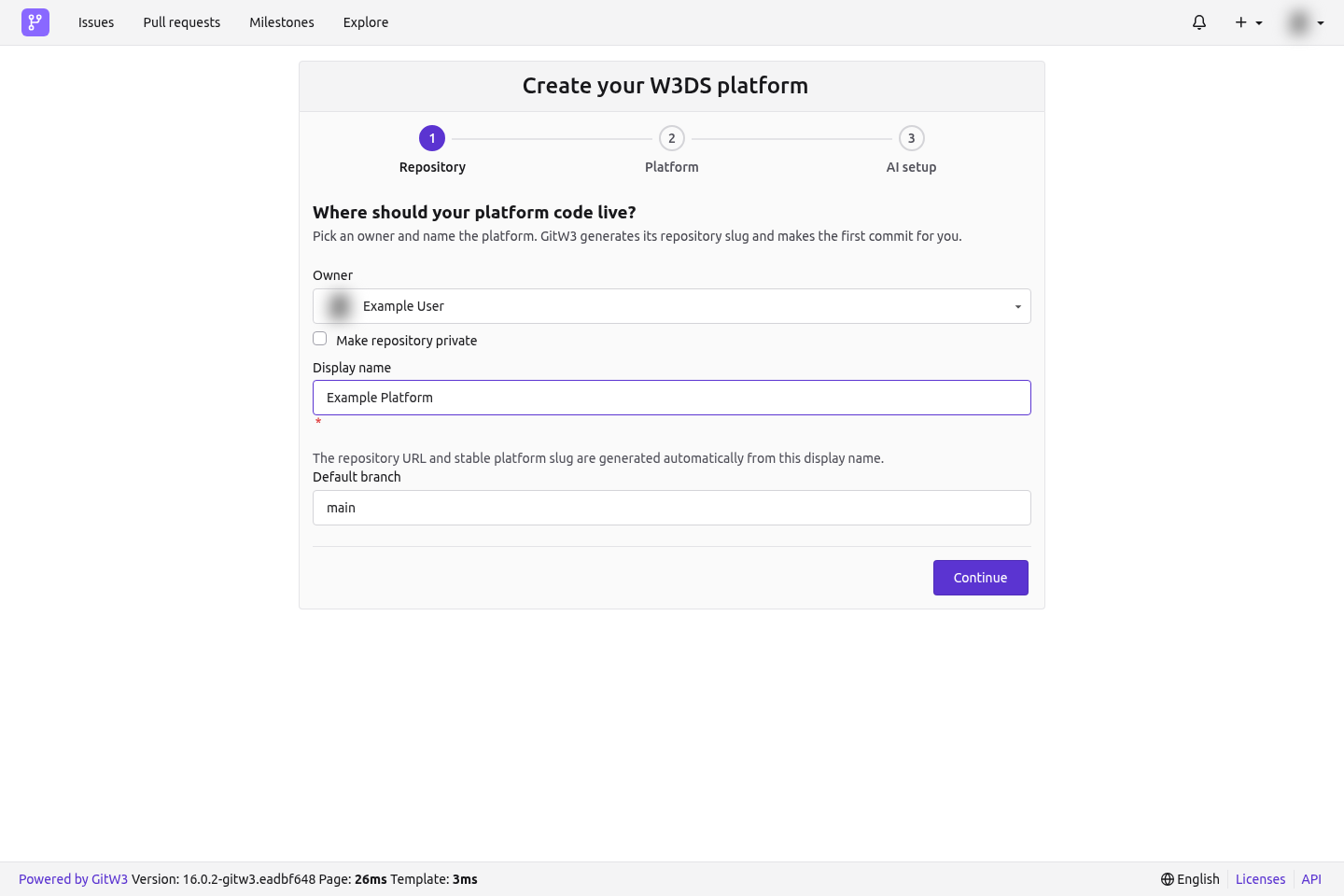
You do not choose a repository slug. GitW3 derives a URL-safe repository name and the initial stable `platformName` from the display name. If that name is already used under the owner, GitW3 adds a numeric suffix safely.
The display name can change later. Treat `platformName` as the permanent machine-facing identity; GitW3 will not change it when the friendly name changes.
## Step 2: Platform details
Enter the information W3DS needs to describe the platform:
- **Description:** a concise explanation of what the platform does;
- **Application domains:** one or more domains from the W3DS ontology;
- **Application URL:** the public URL, if the application is already deployed; and
- **Logo URL:** an optional public image URL.
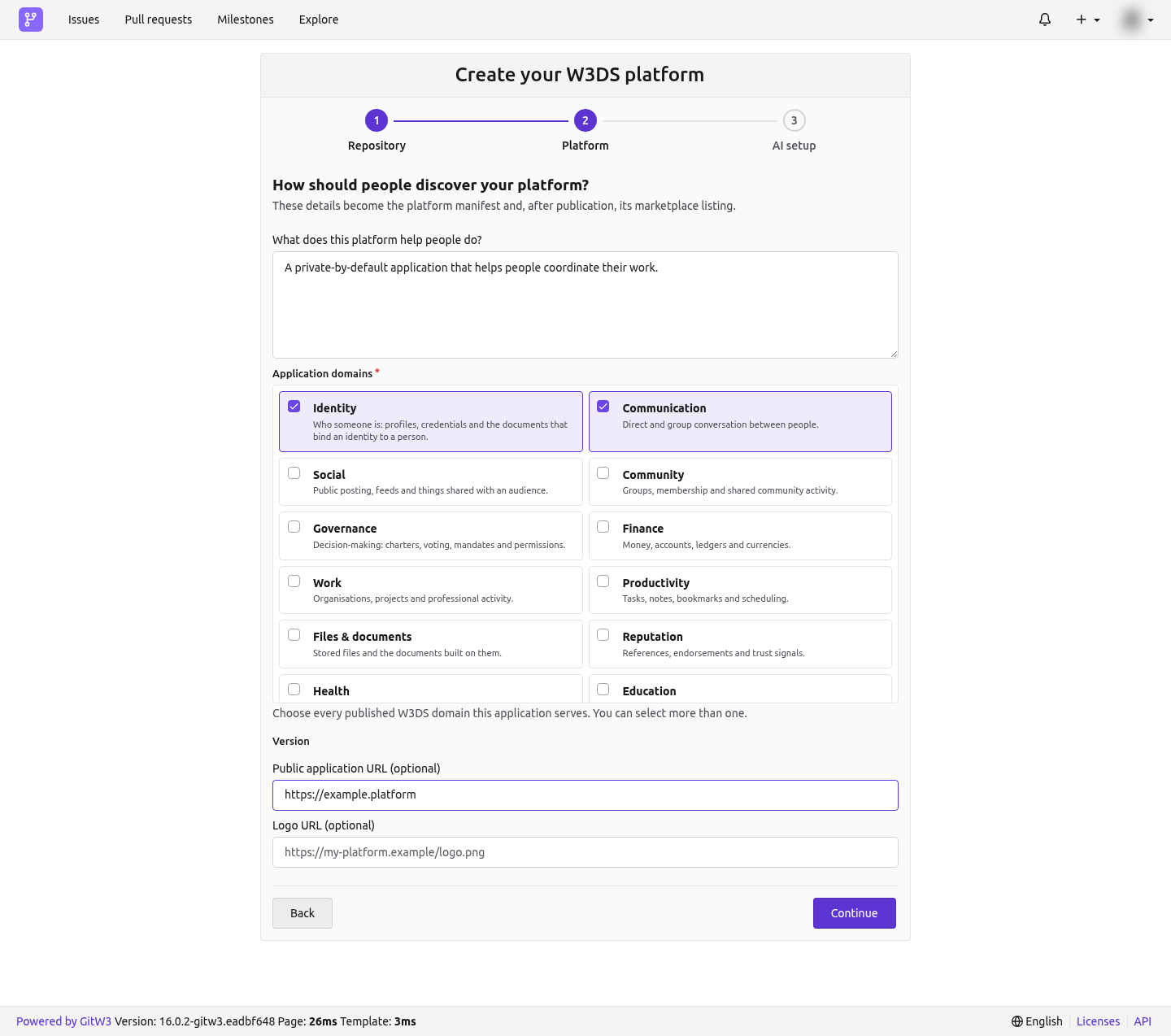
The version is controlled by Git releases, not entered in this form. The initial version is `0.1.0` until a stable semantic release becomes the repository's published version.
You can leave the application URL empty while building. It is required before applying for PPA.
## Step 3: AI setup
Choose whether GitW3 should show the quick install for the W3DS coding-agent skill.
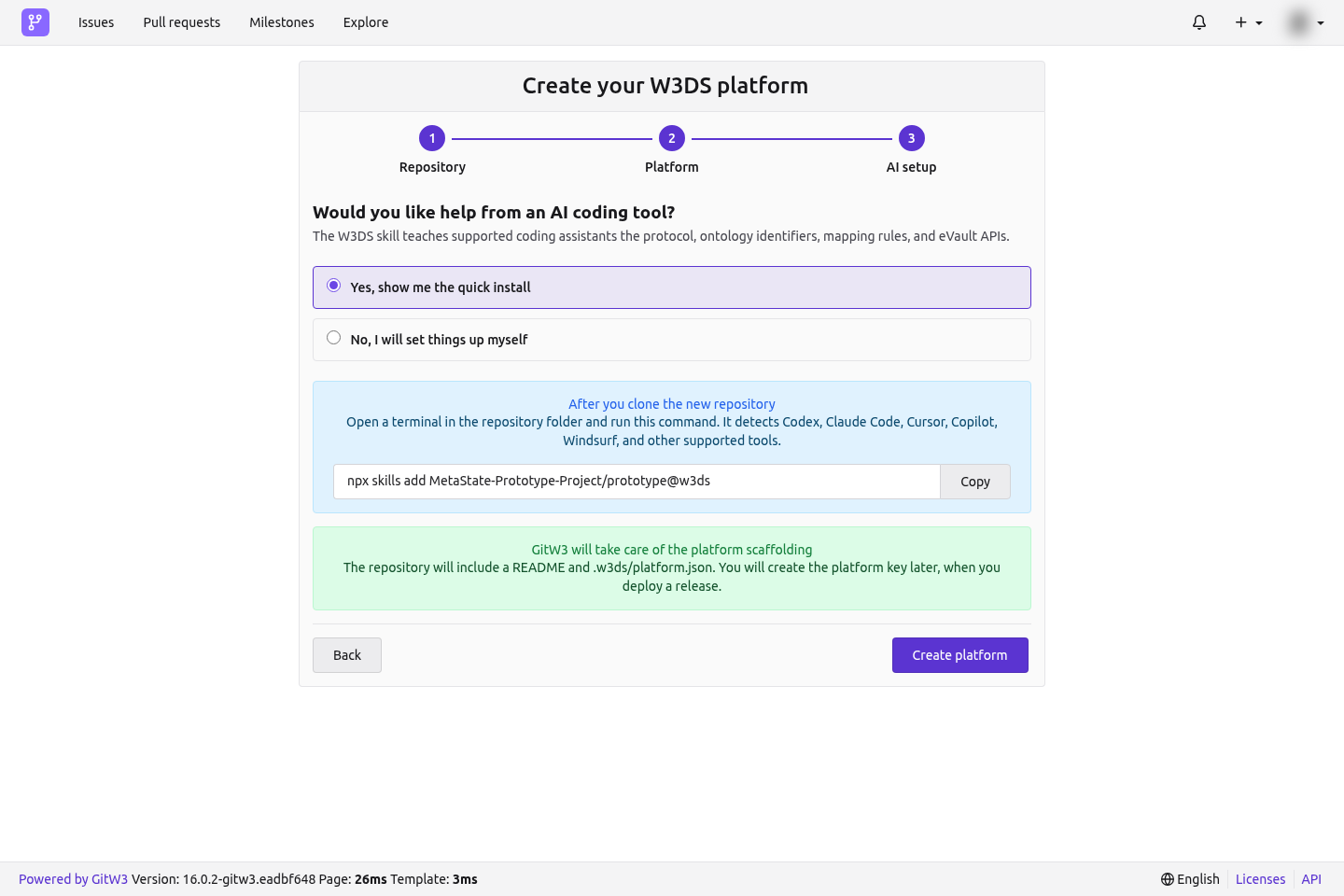
The command works with supported agents including Codex, Claude Code, Cursor, Copilot, and Windsurf:
```bash
npx skills add MetaState-Prototype-Project/prototype@w3ds
```
Select **Create platform**. GitW3 creates:
- the repository;
- an initial README;
- `.w3ds/platform.json`; and
- the first commit on the default branch.
It does not create or expose a reusable platform private key. The permanent platform identity and its eVault are provisioned automatically without an application or deployment key.
## After creation
The welcome page shows the permanent eName as soon as publication completes. Keep the page open or return to the **W3DS** tab later; provisioning continues in the background.
Next:
1. Clone the repository and push the application code.
2. Open the **W3DS** tab and confirm the manifest and identity status.
3. Add the public application URL when the deployment is reachable.
4. Publish a stable semantic release such as `v0.1.0`.
5. Apply for a PPA certificate for that exact version.
6. Register a deployment from the **Deploy** tab.
See [The platform manifest and W3DS workspace](./platform-manifest-and-workspace) for the generated file and editable fields.
---
# Port an existing application
Source: https://docs.w3ds.metastate.foundation/docs/GitW3/port-an-existing-application
# Port an existing application
The guided port flow separates moving code from transferring a live W3DS identity. It creates an empty destination first, lets you integrate and push safely, stages any existing eName migration, and changes the public platform only when an administrator explicitly activates the cutover.
Use this path for an existing application, especially when it already has `.w3ds` configuration or a permanent platform eName. Do not use the generic repository import flow as a substitute for the guided W3DS port.
## Create the destination
From **New repository**, choose **Port an existing app**.
1. Select the destination owner.
2. Choose whether the new repository is private.
3. Enter the application's display name.
4. Confirm the destination default branch.
5. Select **Create destination repository**.
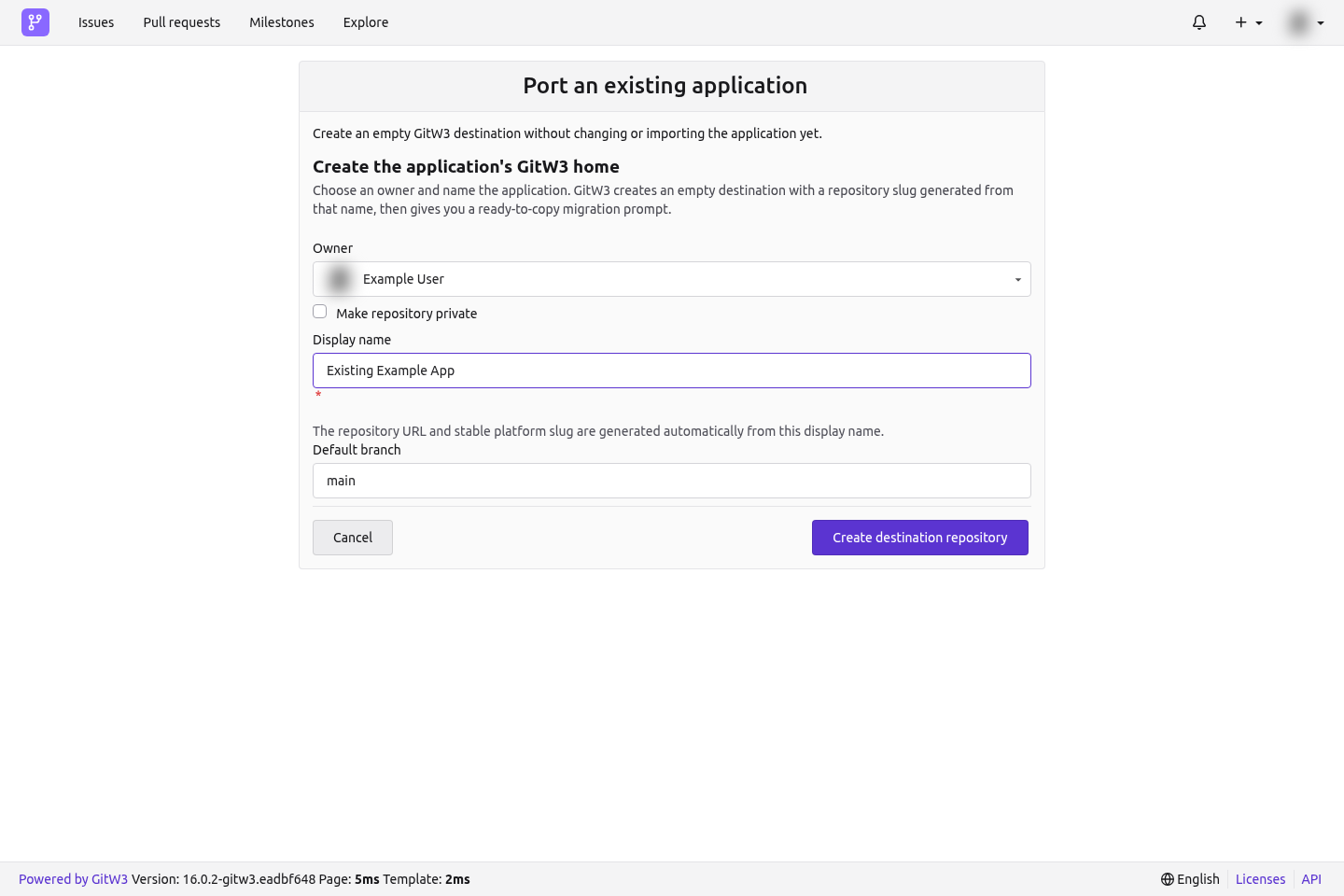
GitW3 generates the repository slug from the display name. At this point it creates only an empty destination: it does not pull, modify, or publish the existing application.
The handoff page remains available at:
```text
https://git.w3ds.metastate.foundation///onboarding/port
```
You can leave and return to that URL at any time.
## Step 1: Push the application
The first handoff step shows the repository's exact HTTP and SSH remotes and a **Copy migration prompt** button. Give that prompt to a coding agent from inside the application's existing local Git checkout.
The generated prompt tells the agent to:
- inspect the existing branch, remotes, `.w3ds` directory, and eName before editing;
- install the current W3DS skill;
- preserve the application's behavior and complete Git history;
- create a manifest only when no W3DS identity already exists;
- preserve any existing eName exactly;
- rename an existing `origin` to the first available upstream-style name;
- set GitW3 as the new `origin`;
- run relevant checks; and
- push the current `HEAD` to the GitW3 default branch without rewriting history.
The prompt contains repository coordinates only. It never contains the application token or another credential.
### Move the history manually
If the existing checkout already has an `origin`, preserve it first:
```bash
git remote -v
git remote rename origin upstream
git remote add origin https://git.w3ds.metastate.foundation//.git
git push -u origin HEAD:main
```
If `upstream` is already used, choose `upstream-2` or another unused name. If there is no `origin`, skip the rename. Copy the real URL and default branch from the handoff page rather than typing them from memory.
Before pushing, ensure one of these states is true:
- **New to W3DS:** a valid `.w3ds/platform.json` exists with `ename` set to `null`.
- **Existing W3DS platform:** the existing `.w3ds` content and eName remain intact.
Never invent an eName, token, migration proof, ontology identifier, endpoint, or credential. Never force-push unless you have independently reviewed and approved the history rewrite.
After the default branch contains application code, return to the handoff and select **Check for pushed code**. GitW3 then unlocks step 2.
## Step 2: Migrate the existing eName
Skip this transfer when the application has no existing eName; continue to the repository's **W3DS** tab with the unclaimed manifest from step 1.
When an existing permanent eName is present:
1. Enter that platform eName and its current platform token.
2. Select **Review and sign migration**.
3. Review the source platform and exact destination repository in the connected eID wallet.
4. Approve the signed transfer statement.
GitW3 checks that:
- the token resolves exactly one valid `PlatformProfile` for that eName;
- the connected wallet is an author of the platform profile;
- the destination manifest is readable; and
- the manifest does not already contain a conflicting identity.
The raw token is sent to W3DS for validation and is not stored by GitW3. GitW3 retains only a one-way fingerprint, so you will need the original token again for final activation.
After the wallet signature is verified, GitW3 commits the staged migration proof to the repository. The live public platform still has not changed.
:::note Legacy profiles without authors
If an older profile names no human authors, the signed migration enters an administrator review queue. Approval stages the repository but still does not activate the public cutover.
:::
## Step 3: Activate the public cutover
Before activation:
1. Review the staged identity and repository manifest.
2. Confirm the complete application is on the default branch.
3. Publish the required stable release and ensure its version matches the manifest.
4. Open the repository's **W3DS** tab as a repository or organization administrator.
5. Re-enter the exact original platform token.
6. Select **Activate migration** and confirm the irreversible management transfer.
Activation revokes the original token for `PlatformProfile` writes and transfers live management to this GitW3 repository. Until that final action succeeds, the old public listing remains in control.
## Stop instead of guessing when
- authentication to either remote fails;
- the GitW3 destination is unexpectedly non-empty;
- local and destination histories conflict;
- an existing eName would be removed or replaced;
- `.w3ds/platform.json` is invalid;
- the connected wallet is not an author of the existing profile; or
- a push would require rewriting history.
Fix the underlying issue, then return to the same handoff URL. The flow is designed to be resumed later.
---
# Work with repositories
Source: https://docs.w3ds.metastate.foundation/docs/GitW3/work-with-repositories
# Work with repositories
A GitW3 repository supports the familiar Git forge workflow: clone, branch, commit, push, review pull requests, track issues, tag versions, and publish releases. Platform repositories add **W3DS** and **Deploy** tabs to that workflow.
## Clone a repository
Open the repository and copy the exact URL from its **HTTP** or **SSH** clone control.
### SSH
Add your public SSH key under **User settings → SSH / GPG Keys**, then:
```bash
git clone
cd
```
SSH is the easiest option for regular development because Git can authenticate with your local agent.
### HTTPS
Create a personal access token under **User settings → Applications**, then:
```bash
git clone
```
When prompted, use your GitW3 account name as the username and the personal access token as the password. Store it in an operating-system credential manager rather than in a remote URL or shell script.
The `@` displayed before eNames in the UI is cosmetic. Always use the owner and repository coordinates from the clone control exactly as shown.
## Use an existing local checkout
Inspect the current state before changing remotes:
```bash
git status
git branch --show-current
git remote -v
```
To preserve an old `origin` and make GitW3 the new one:
```bash
git remote rename origin upstream
git remote add origin
git push -u origin HEAD:main
```
Change `main` if the GitW3 repository uses another default branch. If this is an existing W3DS application, follow the complete [guided port flow](./port-an-existing-application) instead of treating the remote change as the entire migration.
## Day-to-day collaboration
A typical change uses a short-lived branch and a pull request:
```bash
git switch -c feat/my-change
# edit and test
git add
git commit -m "feat: describe the change"
git push -u origin feat/my-change
```
Then open **Pull requests → New pull request**, choose the source and target branches, review the diff, and request review. Repository permissions and branch protection determine who can push or merge.
Use:
- **Issues** for bugs, tasks, and discussion;
- **Pull requests** for reviewable branch changes;
- **Actions** for configured automation and checks;
- **Packages** for artifacts supported by the repository; and
- **Releases** to publish stable platform versions.
## Platform-specific tabs
- **W3DS** shows live publication status, identity readiness, manifest details, visibility, PPA state, and any staged migration.
- **Deploy** creates signed W3DS records for a PPA-certified release. It does not run the application's hosting pipeline.
Edits made in the **W3DS** tab commit `.w3ds/platform.json` to the default branch. Pull before making related local changes so that you do not accidentally create competing manifest edits.
## Publish a stable release
GitW3 takes the platform version from the latest published stable release. Use a semantic version tag such as `v1.2.3`:
```bash
git switch main
git pull --ff-only
git tag -a v1.2.3 -m "Release v1.2.3"
git push origin v1.2.3
```
Then open **Releases → New release**, select the tag, add release notes, and publish it as a stable release. Drafts, prereleases, and non-semantic tags do not satisfy the W3DS stable-release requirement.
GitW3 normalizes a leading `v`, so `v1.2.3` becomes manifest version `1.2.3`. See [Releases and PPA certification](./releases-and-ppa) before applying for certification.
## Credentials and safe automation
- Give personal access tokens the smallest useful scope and rotate them periodically.
- Use deploy keys or a dedicated service identity for repository automation instead of a person's broad token where possible.
- Never commit wallet secrets, migration tokens, personal access tokens, or `w3ds-deployment-key.json`.
- Protect the default branch and require checks for repositories that publish production platforms.
---
# Platform manifest and W3DS workspace
Source: https://docs.w3ds.metastate.foundation/docs/GitW3/platform-manifest-and-workspace
# Platform manifest and W3DS workspace
Every GitW3 platform repository owns a manifest at `.w3ds/platform.json`. It is version-controlled platform metadata and the source from which GitW3 publishes the platform profile to W3DS.
## Manifest shape
A newly created platform starts with the following core fields:
```json
{
"schemaVersion": 1,
"platformName": "example-platform",
"displayName": "Example Platform",
"description": "A short description of the platform.",
"version": "0.1.0",
"ename": null,
"url": "https://example.invalid",
"logoUrl": "https://example.invalid/logo.png",
"domains": ["productivity", "work"],
"inSubmission": false,
"submissionVersion": "",
"isDraft": true
}
```
Use real W3DS ontology domain identifiers from the GitW3 selector. The values above are illustrative.
## Who controls each field
| Field | Control and behavior |
| --- | --- |
| `schemaVersion` | Manifest format version. Do not change it without a supported schema migration. |
| `platformName` | Stable machine-facing platform slug derived at creation. Immutable after identity creation. |
| `displayName` | Human-facing name. Editable by permitted repository users. |
| `description` | Human-facing platform description. |
| `version` | Synchronized from the latest stable semantic GitW3 release; do not manually bump it. |
| `ename` | Permanent platform eName. Initially `null`, then written by the publisher or preserved by the port flow. Immutable once assigned. |
| `url` | Public application URL. Required for PPA submission. |
| `logoUrl` | Optional public logo URL. |
| `domains` | One or more supported W3DS application-domain identifiers. |
| `inSubmission` | Whether the current release statement is in the PPA review flow. Managed by the signed application workflow. |
| `submissionVersion` | Version associated with the current signed PPA submission. |
| `isDraft` | Controls whether the synchronized platform profile is hidden from the public marketplace. |
Migration and PPA workflows can add proof fields. Never fabricate, copy between platforms, or hand-edit cryptographic proof material.
## The W3DS workspace
Open a platform repository and select **W3DS**. The page is organized around the platform lifecycle:
1. **Live publication status** reports the publisher's current state and latest result.
2. **What happens next** tracks manifest, permanent identity, application URL, and stable release readiness.
3. **Marketplace visibility** switches the profile between draft and published.
4. **Platform details** edits the display name, description, domains, application URL, and logo URL.
5. **PPA certificate** shows the requirement checklist, signed application, review conversation, and current decision.
Repository or organization permissions control who may edit details, change visibility, apply for PPA, or activate a migration. Read-only visitors see the manifest-backed values without the edit controls.
## Saving changes
Saving through the W3DS workspace creates a normal commit on the default branch. GitW3 checks the last observed commit so it does not silently overwrite a newer manifest change.
For changes made locally:
1. Pull the latest default branch.
2. Edit only supported, non-managed fields.
3. Validate the JSON and domain identifiers.
4. Commit and push normally.
5. Open the **W3DS** tab and watch publication status.
Do not manually change `platformName`, an assigned `ename`, release-controlled `version`, or signed proof fields.
## Identity and publication are asynchronous
After the initial manifest reaches the default branch, GitW3's publisher:
- reserves and publishes the permanent platform eName;
- provisions the platform eVault without an application key;
- writes the assigned eName back to the manifest; and
- synchronizes the platform profile and its visibility.
Repository creation and Git pushes remain available while this happens. Temporary W3DS failures are retried; refresh the **W3DS** tab to see the current state. Repository administrators can see a detailed last error when intervention is required.
The platform eName gets the platform eVault. Version eNames are Registry records for exact releases and do not create additional eVaults.
## Draft versus published
New platforms begin as drafts. A synchronized draft profile is hidden from the marketplace but still belongs to the repository. Use **Publish platform** in the W3DS workspace when the profile is ready to be discoverable; use **Make draft** to hide it again without deleting its stable identity.
---
# Releases and PPA certification
Source: https://docs.w3ds.metastate.foundation/docs/GitW3/releases-and-ppa
# Releases and PPA certification
PPA certification applies to one exact released version of a platform. Publishing new code or a new version does not inherit the previous version's certificate.
## Prepare the platform
The **PPA certificate** section on the repository's **W3DS** tab shows a checklist. Before an application can be signed, the repository needs:
- a ready permanent W3DS platform identity;
- at least one supported application domain;
- a public application URL;
- a published stable semantic Git release; and
- a repository or organization owner/admin signed in with an eID wallet.
## Publish the release
1. Merge and test the exact commit you intend to release.
2. Create a semantic version tag such as `v1.2.3`.
3. Push the tag to GitW3.
4. Open **Releases → New release**.
5. Select the tag, write release notes, leave it as a stable release, and publish.
GitW3 normalizes `v1.2.3` to platform version `1.2.3`, binds the version to the release commit, derives its version eName, and synchronizes the manifest. Wait for the **W3DS** tab to report the release as ready before applying.
Avoid mutable or ambiguous release tags. A draft, prerelease, or non-semantic tag such as `latest` does not become the W3DS platform version.
## Sign and submit the PPA application
Only a repository or organization owner/admin can submit the release.
1. Open the repository's **W3DS** tab.
2. Review every PPA checklist item and the exact version shown.
3. Select **Sign and apply for PPA certificate**.
4. Scan the QR code or open the connected eID wallet.
5. Review the release statement as your displayed eName.
6. Approve it and keep the dialog open until GitW3 verifies the signature.
The signing request is one-time and expires after 15 minutes. GitW3 validates the connected wallet's Registry certificate and P-256 signature. When verification succeeds, it commits the submission proof with `inSubmission: true` and stores the signed platform profile in the platform eVault.
Never invent or manually paste a submission proof into the manifest.
## Follow the review
The PPA area records the conversation for the current version, including:
- the original signed application;
- the signing actor and recorded time;
- the submitted, granted, or denied state;
- a reviewer reason when one was published; and
- signed responses and reapplications.
Possible states are:
| State | Meaning |
| --- | --- |
| Ready to apply | All prerequisites are satisfied and the version has no active decision. |
| Application submitted | The signed statement is stored and waiting in the PPA review queue. |
| PPA certificate granted | That exact version may be used in the GitW3 deployment flow. |
| PPA application denied | Address the decision and submit a signed response if reapplying. |
After a denial, enter a concise response explaining what changed or why the version should be reconsidered, then select **Sign and reapply**. The response becomes part of the next signed release statement and review history.
## Release a new version
For `v1.2.4` or any later version:
1. Publish a new stable release.
2. Wait for the manifest and version eName to synchronize.
3. Review the PPA checklist for the new version.
4. Sign and submit a new application.
The certificate for `1.2.3` remains a record for `1.2.3`; it does not certify `1.2.4`. The **Deploy** tab only enables releases for which PPA granted a certificate for the exact normalized version.
---
# Register a deployment
Source: https://docs.w3ds.metastate.foundation/docs/GitW3/deploy-a-release
# Register a deployment
The GitW3 **Deploy** tab registers a verifiable W3DS deployment identity for a published release. It binds the exact code version, deployment environment, connected deployer, and a public application key.
:::important
This flow does not upload or run the application. Deploy the code with your normal hosting provider or pipeline, then use the generated key in that server or runtime when PP-Auth integration is available.
:::
## Prerequisites
Before starting, confirm:
- the platform eName is ready;
- a stable semantic release is published;
- PPA has granted a certificate for that exact version;
- you are signed in with the eID wallet that will act as the deployer; and
- the W3DS deployment publisher is available.
Every deployment belongs to the connected deployer's eName. It does not claim that the platform authors or release committers operated the deployment.
## Step 1: Choose release
Open **Deploy** and select a PPA-certified release. The release binds the version tag and exact commit to the stable platform eName. Uncertified releases remain unavailable.
You can register additional versions later without replacing earlier records.
## Step 2: Describe deployment
Enter a human-friendly name such as `Singapore production`, then choose an environment:
- Production
- Staging
- Development
- Custom
These values distinguish multiple deployments of the same release. They do not configure a hosting region, DNS record, or deployment pipeline.
## Step 3: Bind an application key
Choose one of two key paths:
### Generate a deployment key
This is recommended for a first deployment. GitW3 generates an ECDSA P-256 key pair in the browser and downloads `w3ds-deployment-key.json` immediately. The backup uses the `w3ds-deployment-key-v1` format and contains:
- algorithm metadata for ECDSA P-256 with SHA-256;
- the `z`-prefixed public key;
- the base64-encoded PKCS#8 private key; and
- a creation timestamp.
Confirm that the file was downloaded and stored safely before continuing.
### Use an existing public key
Choose this path when your runtime or secret manager already controls a compatible W3DS P-256 key. Paste only the `z`-prefixed public key. Do not upload or paste the private key into GitW3.
:::danger The private key is shown only through the download
GitW3 receives the public key and cannot recover the private key. Never commit `w3ds-deployment-key.json`, paste it into chat, expose it through an API, or ship it in a browser or mobile bundle.
:::
Store the private file in the hosting provider's secret manager or a read-only server mount. Prefer an environment variable such as `W3DS_DEPLOYMENT_KEY_FILE` that points to the mounted file instead of putting key material in an environment variable.
## Step 4: Review and sign
Review the release, deployment name, environment, deployer identity, and key handling confirmation. GitW3 reserves two identities:
- a **deployment eName** bound to the deployment's public key and connected deployer; and
- a **software-version eName** bound to the stable platform eName, release version, and exact Git commit.
Select **Create identities and continue to wallet**, then scan or open the eID wallet. One wallet signature covers both documents. Nothing is provisioned until the signature is verified.
## Publication and server integration
The deployment card progresses through publishing, waiting for W3DS, published, or needs-attention states. After publication it shows both eNames and a **Use AI to configure the server** helper.
That generated prompt contains the verified public deployment context but not the private key. It asks a coding assistant to:
- inspect the existing server runtime and deployment method;
- add a server-only loader for `w3ds-deployment-key-v1`;
- validate P-256/SHA-256 and ensure the private key derives the expected public key;
- keep key loading unreachable from client code;
- use a secret manager or read-only mount; and
- leave a narrow PP-Auth integration boundary without inventing an unpublished SDK or protocol.
Keep the downloaded private-key file local when using that prompt. PP-Auth SDK integration is marked as coming soon in GitW3; do not invent a package name, endpoint, token format, or wire protocol.
## Rotation and recovery
If the private key is lost, GitW3 cannot restore it. Register a new deployment identity and update the server secret through a controlled rollout. Keep the old secret available only for the rollback window, verify the new public-key match at startup, then revoke or destroy the old secret according to your hosting policy.
---
# Troubleshooting GitW3
Source: https://docs.w3ds.metastate.foundation/docs/GitW3/troubleshooting
# Troubleshooting GitW3
Start with the repository's **W3DS** tab. It reads current W3DS publication state whenever the page loads, and repository administrators can see the publisher's detailed last error.
## Sign-in and profile
### The wallet QR expired
Reload the sign-in page and approve a new request. Wallet sign-in requests are intentionally short-lived.
### The name or avatar is stale
GitW3 enriches the local account from the newest W3DS person profile in AaaS during sign-in. Sign out and sign in again. AaaS failure does not block authentication, so an older profile may remain during an outage.
### A username-and-password form appears
The production user login should offer **Sign in with W3DS**, not a local password form. Make sure you are using `https://git.w3ds.metastate.foundation/user/login` and report the page URL and time to the GitW3 operator. Do not enter a reused password into an unexpected form.
## Clone and push
### Browser sign-in works, but Git rejects credentials
The browser wallet session does not authenticate command-line Git. Add an SSH key and use the SSH clone URL, or create a personal access token and use it as the HTTPS password.
### The remote owner starts with `@`
The UI `@` is cosmetic. Replace a hand-typed URL with the exact HTTP or SSH URL from the repository clone control.
### Pushes go to the old provider
Inspect remotes:
```bash
git remote -v
```
For a ported application, preserve the old remote under `upstream` and make the GitW3 URL `origin`. Return to the repository's `/onboarding/port` page for the exact generated instructions.
## Manifest and identity publication
### The platform eName is still pending
Provisioning is asynchronous and GitW3 retries temporary W3DS failures. Confirm `.w3ds/platform.json` exists on the default branch, then refresh the **W3DS** tab. If the administrator view shows a persistent error, report that exact error without including secrets.
### GitW3 says the manifest is invalid
Validate that `.w3ds/platform.json` is well-formed JSON and contains the supported schema. Do not fix it by inventing an eName or proof. Compare the core fields with [Platform manifest and W3DS workspace](./platform-manifest-and-workspace), preserve any existing assigned identity, and push the correction to the default branch.
### A W3DS workspace edit conflicts
Another commit changed the default branch after the page loaded. Pull or reload, review the newer manifest, and apply the edit again. GitW3 deliberately refuses to overwrite the newer commit silently.
### The marketplace listing is missing
Check all three states:
1. the permanent identity is ready;
2. the profile synchronization completed; and
3. `isDraft` is `false` through the **Publish platform** visibility control.
A draft profile remains hidden even when its identity is ready.
## Existing application port
### eName migration says to push first
The destination default branch has not received the application. Push the existing checkout, including a valid `.w3ds/platform.json`, then use **Check for pushed code** on the handoff page. Step 2 is intentionally locked until code exists.
### The existing eName conflicts with the manifest
Stop. GitW3 will not replace a different eName already present in the destination manifest. Verify that you selected the correct source application and destination repository before making any change.
### The token is rejected
Use the current raw token for the exact existing platform eName. GitW3 must find exactly one matching valid `PlatformProfile`, and the connected wallet must be named as an author. The token is not retained, so the same original value is required again during activation.
### The wallet is not an author
Sign in with an eID wallet named by the existing platform profile. For a legacy profile with no authors, complete the signed request and wait for site administrator review.
### The migration is staged but the old listing is still live
That is expected. Staging does not cut over the public platform. Publish the required stable release, then have a repository or organization administrator open **W3DS**, review the staged migration, re-enter the original token, and explicitly activate it.
## Releases and PPA
### The release requirement is not ready
Publish a stable release with a semantic tag such as `v1.2.3`. Draft releases, prereleases, and non-semantic tags do not control the platform version. Wait for the publisher to synchronize the normalized version before applying.
### The PPA button is disabled
Check the on-page requirements: stable identity, domains, public application URL, stable release, owner/admin permissions, and a connected eID wallet. Every item must be ready for the exact current version.
### The signing request expired
Close the dialog and start a fresh application. Do not reuse a signing URL or attempt to construct a proof manually.
### A prior version was granted, but deployment is disabled
PPA decisions are version-scoped. Publish and obtain a certificate for the exact new version selected in the deployment wizard.
## Deployment
### No release can be selected
Confirm that the release is stable, semantic, synchronized to the platform manifest, and granted a PPA certificate for that exact normalized version.
### The downloaded deployment key is missing
Do not continue under the assumption that GitW3 can recover it. Generate a new key before signing if the wizard is still open, or register a new deployment identity if the signed deployment has already been published.
### Publication is waiting for W3DS
Leave the deployment record intact and refresh later. GitW3 separates repository availability from W3DS publisher retries. If the status becomes **Needs attention**, report the displayed failure to the operator without sharing the private key.
### The server key does not match the deployment
Fail closed. Derive the public key from the PKCS#8 private key and compare it to the public key shown on the deployment record. Never work around a mismatch by changing the expected key in code; mount the correct secret or create a new deployment identity.
## Information safe to include in a support report
Include the repository path, page URL, approximate time, release tag, public eNames, public deployment key, displayed status, and a sanitized error message. Never include wallet secrets, personal access tokens, migration tokens, session cookies, or the contents of `w3ds-deployment-key.json`.
---
# Glossary
Source: https://docs.w3ds.metastate.foundation/docs/W3DS%20Basics/glossary
# Glossary
Definitions of key terms used across the W3DS and MetaState documentation. Where a concept is explained in more detail elsewhere, a link is provided.
---
## Access
The ability to retrieve or interact with data or services based on permissions and [authentication](#authentication). In W3DS, access to eVault data is governed by the record's own access policy — [granular access control](/docs/W3DS%20Protocol/Access-Control) or the legacy [ACL](/docs/Infrastructure/eVault#access-control) array — and by [resolution](/docs/Infrastructure/Registry#get-resolve) of identities.
---
## Access Control List (ACL)
The rules stored inside a record saying who may do what with it. Held in the record's `_acl` block as [grants](#grant), [denials](#denial), and ontology conditions, so the rules travel with the data when it syncs rather than living in a table beside it. The older `acl` string array is the same idea without per-verb granularity. See [Access Control](/docs/W3DS%20Protocol/Access-Control).
---
## Authentication
The process of verifying the identity of a user or identifier. In W3DS, users authenticate using their [W3ID](/docs/W3DS%20Basics/W3ID) via the `w3ds://auth` protocol; see [Authentication](/docs/W3DS%20Protocol/Authentication) for details.
---
## Authorized Agent
A user or software that has been authorized by another user to act on their behalf. Examples: Bob allows Alice to act on his behalf to file taxes; Bob authorizes a social network app to perform certain operations on his behalf, which may require the app to sign for him. See [eVault Key Delegation](/docs/Infrastructure/eVault-Key-Delegation) for delegation in the prototype.
---
## Charter
A cryptographically signed document outlining group governance, rules, and regulations. Groups in MetaState can have charters that define how the group operates and who can perform which actions.
---
## Credential
A set of data relating to an identifier that is signed by an issuing party (e.g. a school diploma). See [Verifiable Credential (VC)](#verifiable-credential-vc).
---
## Denial
An entry in an [ACL](#access-control-list-acl) that removes access from a party, either by naming its [eName](#web-30-identifier-w3id--ename) or by stating a condition it must clear. A denial overrides any grant — it is the one place where a more specific rule does not win, because deny always does.
---
## eID (ePassport)
A document, similar to X.509, which binds a user's [W3ID](#web-30-identifier-w3id-ename) and the user's [Public Key](#public-key). It is signed by a [digital] notary participating in PKI. See [eID Wallet](/docs/Infrastructure/eID-Wallet) for how the prototype uses eID and key binding.
---
## eIDAS 2.0
An updated European Union regulation aimed at enhancing the security and reliability of electronic identification and trust services.
---
## Entity
A non-human object within the MetaState such as an organization, a platform, a business, a [Group](#group), a device, etc. that has its own [eVault](#evault) and can hold or verify credentials.
---
## Envelope
The smallest unit of data in an [eVault](#evault), addressable by its unique identifier and [ontology](/docs/Infrastructure/Ontology) reference. Each envelope has an attached ontological definition, and its MetaEnvelope carries the access policy that defines who is allowed to do what with it. See [eVault — Data Model](/docs/Infrastructure/eVault#data-model) for how Envelopes are stored and used.
---
## eVault
A secure storage location or server for the management of data and credentials of a [User](#user), [Post-Platform](#post-platform-and-or-service), or [Group](#group). In W3DS, each user or group has their own eVault identified by a [W3ID](/docs/W3DS%20Basics/W3ID). See [eVault](/docs/Infrastructure/eVault) for the full architecture and API.
---
## Grant
An entry in an [ACL](#access-control-list-acl) pairing a party's [eName](#web-30-identifier-w3id--ename) with the permissions it holds, as a bitmask of Read, Create, Update and Delete. Where several grants could apply, only the most specific is used — a grant to a user beats one to a platform, which beats one to a group — and less specific grants do not add to it.
---
## Group
An [Entity](#entity): a reference to a number of users within the MetaState that holds its own [W3ID](#web-30-identifier-w3id-ename) and [eVault](#evault). It is often seen as a "group" in social networks. In an [ACL](#access-control-list-acl) a group eName is resolved to its members' eNames when a decision is made, so naming a group stays correct as its membership changes.
---
## Interoperability Profile
A set of technical standards and protocols that enable different systems to work together seamlessly. W3DS uses a shared [ontology](/docs/Infrastructure/Ontology) and [Web 3 Protocol](#web-3-protocol) as part of its interoperability profile.
---
## Key Rotation
The practice of changing cryptographic keys to enhance security on a regular basis or in an emergency. See also [Revoked keys / e-passports] (e.g. when an eID or key is revoked and a new one must be issued).
---
## MetaState
The name of the current social-oriented project that uses the [Web 3.0 Data Space (W3DS)](#w3ds) architecture. It uses [eVaults](#evault) and unique identifiers, allowing [Post-Platforms](#post-platform-and-or-service) to access data from a user's eVault and interact with it based on [authorization](#access) and permissions. See [Getting Started](/docs/Getting%20Started/getting-started) for an overview.
---
## MetaState Prototype
The current project to deliver the Prototype of the MetaState at TRL6, with the minimum required features and developments to produce the required functionality.
---
## MetaEnvelope
To group related pieces of data, [Envelopes](#envelope) are linked together using a **MetaEnvelope**. Each MetaEnvelope has its own ID and points to the individual envelopes it includes. This makes it easy to bundle related info, track changes over time, and move or reference sets of data as one unit. It also helps fix duplicates by pointing everything to the correct version of an entity. See [eVault — Data Model](/docs/Infrastructure/eVault#data-model) and [Awareness Protocol](/docs/W3DS%20Protocol/Awareness-Protocol) for how MetaEnvelopes are stored and synced.
---
## Ontology Dictionary
A service that maps keys as defined in a [Post-Platform](#post-platform-and-or-service) to the schema definition of how data is referenced when stored in an [eVault](#evault). Example: a post platform might refer to a name as `"firstName"` but it is stored as `"given_name"` in the vault; the [Web3 Adapter](/docs/Infrastructure/Web3-Adapter) stores the reference so that when the platform refers to `"firstName"`, it means write/update/get `"given_name"` on the vault. See [Ontology](/docs/Infrastructure/Ontology) and [Web3 Adapter](/docs/Infrastructure/Web3-Adapter) for implementation.
---
## Physical Binding Documents
Signed documents by the Root CA in the system that state that an [eName](/docs/W3DS%20Basics/W3ID) belongs to a user who owns a certain physical identity document.
---
## Post-Platform (and/or Service)
A service or platform that can operate with [eVaults](#evault) in the W3DS (dataless) mode. Post-platforms sync data with eVaults via the [Web3 Adapter](/docs/Infrastructure/Web3-Adapter) and [Awareness Protocol](/docs/W3DS%20Protocol/Awareness-Protocol). See [Post Platform Guide](/docs/Post%20Platform%20Guide/getting-started).
---
## Private Key
A cryptographic key kept secret (e.g. in the crypto-engine of the phone) by its owner, used for digital signatures and decryption. See [Signing](/docs/W3DS%20Protocol/Signing) and [eID Wallet](/docs/Infrastructure/eID-Wallet).
---
## Provisioner
Software that creates, controls, and updates [eVaults](#evault). In the prototype, it is the "cloud service provider" software that creates eVaults. See [Getting Started — Provisioning](/docs/Getting%20Started/getting-started#provisioning-flow) for the flow.
---
## Public Key
A cryptographic key derived from the corresponding [Private Key](#private-key). It can be freely shared in the form of an e-passport (public key certificate) and is used for encryption and signature verification. See [Registry — Key binding](/docs/Infrastructure/Registry#key-binding-certificates) and [eVault — Key Binding](/docs/Infrastructure/eVault#key-binding-certificates).
---
## Registry
A [Post-Platform](#post-platform-and-or-service) service for discovering, storing, and retrieving information about identifiers and their eVaults/IP. In W3DS, the [Registry](/docs/Infrastructure/Registry) resolves [eNames](/docs/W3DS%20Basics/W3ID) to eVault URLs and provides entropy and key binding certificates.
---
## Resolution
The process of retrieving and verifying keys or identifiers using their specific syntax to query the corresponding network or [Registry](/docs/Infrastructure/Registry). See [Registry — Resolve](/docs/Infrastructure/Registry#get-resolve) and [W3ID — Registry Resolution](/docs/W3DS%20Basics/W3ID#registry-resolution-ename).
---
## Search Platform
A platform that provides search/discovery service to other platforms that need to find certain users, groups, files, etc.
---
## Selective Disclosure
The ability to share only specific parts of data from within a [Credential](#credential) or information set.
---
## User
An individual who owns and controls their digital identity and [eVault](#evault), interacting within the MetaState via any service of their choice.
---
## User Flow
The sequence of steps a user takes to complete a task or interaction within a system.
---
## User Journey
The overall experience and path a user follows when interacting within an interactive MetaState experience.
---
## Verification
The process of confirming the authenticity and validity of an identity, [Credential](#credential), action, or claim. In W3DS, platforms verify signatures using public keys resolved via the [Registry](/docs/Infrastructure/Registry) and [eVault](/docs/Infrastructure/eVault) (e.g. `/whois`).
---
## Verifiable Credential (VC)
A standardized data model format for [credentials](#credential) that can be cryptographically signed and verified.
---
## W3DS
**Web 3.0 Data Space**: the basic architecture scheme used in the MetaState Prototype. It is a protocol that enables data synchronization across multiple platforms while ensuring users own and control their data in [eVaults](/docs/Infrastructure/eVault). See [Getting Started](/docs/Getting%20Started/getting-started).
---
## Web 3.0 Identifier (W3ID / eName)
A globally or locally unique, persistent identifier for people, [eVaults](#evault), [Groups](#group), [Post-Platforms](#post-platform-and-or-service), docs, or triples. It enables verifiable, persistent, and decentralized digital identity.
The Web 3.0 Identifier format is `@` for global identifiers (eNames), e.g. `@50e8400-e29b-41d4-a716-446655440000`. Local identifiers are plain UUIDs.
See [W3ID](/docs/W3DS%20Basics/W3ID) for format, resolution, and usage.
---
## Web3 Adapter
Software that runs next to a [Post-Platform](#post-platform-and-or-service) and is responsible for syncing the platform's DB with all relevant [eVaults](#evault). It maps local schema to the global [ontology](/docs/Infrastructure/Ontology) and handles [Awareness Protocol](/docs/W3DS%20Protocol/Awareness-Protocol) webhooks. See [Web3 Adapter](/docs/Infrastructure/Web3-Adapter).
---
## Web 3 Protocol
The query language that a [Web3 Adapter](#web3-adapter) (or a Post-Platform without a Web3 Adapter) uses to talk to an [eVault](#evault). In the prototype, this is implemented as the [eVault GraphQL API](/docs/Infrastructure/eVault#graphql-api).
---
## Web Triad
A **Digital Self** triad: (1) [eName](/docs/W3DS%20Basics/W3ID) (W3ID), (2) ePassport ([eID](#eid-epassport)), (3) [eVault](#evault).
---
# W3DS Basics
Source: https://docs.w3ds.metastate.foundation/docs/W3DS%20Basics/getting-started
# W3DS Basics
This document provides a deep dive into the core concepts of W3DS (Web 3 Data Spaces), including [eVault](/docs/W3DS%20Basics/glossary#evault) ownership, data synchronization, and the webhook notification system. See the [Glossary](/docs/W3DS%20Basics/glossary) for other terms.
## eVault Ownership Model
In W3DS, **every user, group, and object owns their own eVault**. This is the fundamental principle that enables data portability and platform independence.
### What is an eVault?
An **eVault** is a personal data store identified by a [W3ID](/docs/W3DS%20Basics/W3ID) (also called an **eName**). It's where all data about a person, group, or object is stored in a standardized format called [MetaEnvelopes](/docs/Infrastructure/eVault#data-model).
### Ownership Structure
- **Users**: Each user has their own eVault (e.g., `@user-a.w3id`)
- **Groups**: Each group has its own eVault (e.g., `@group-1.w3id`)
- **Objects**: Important objects can have their own eVaults
### Key Characteristics
1. **Persistent Identity**: The W3ID (eName) never changes, even if the eVault URL changes
2. **User Control**: Users control access to their eVault via ACLs (Access Control Lists). Note: While the ACL system exists, there is currently no platform that allows users to change ACLs for their data - this functionality is planned for future releases.
3. **Platform Agnostic**: Platforms don't own the data - they only display it
4. **Decentralized**: Each eVault can be hosted independently
## Data Flow: Platform → eVault → All Platforms
The W3DS data flow ensures that data created on one platform automatically appears on all other platforms. Here's how it works:
### Step-by-Step Flow
Let's trace what happens when **User A creates a post on Blabsy**:
```mermaid
sequenceDiagram
participant UserA as User A
participant Blabsy as Blabsy Platform
participant BlabsyDB as Blabsy Database
participant Web3Adapter as Web3 Adapter
participant EVault as User A's eVault
participant Pictique as Pictique Platform
participant OtherPlatform as Other Platforms
UserA->>Blabsy: Creates post "Hello, world!"
Blabsy->>BlabsyDB: Store post locally
BlabsyDB->>Web3Adapter: Entity change detected
Web3Adapter->>Web3Adapter: Convert to global schema
Web3Adapter->>EVault: storeMetaEnvelope(post data)
EVault->>EVault: Store as MetaEnvelope
Note over EVault: Wait 3 seconds
(prevent ping-pong)
EVault->>Pictique: POST /api/webhook (post data)
EVault->>OtherPlatform: POST /api/webhook (post data)
Pictique->>Pictique: Convert to local schema
Pictique->>Pictique: Create post in local DB
OtherPlatform->>OtherPlatform: Convert to local schema
OtherPlatform->>OtherPlatform: Create post in local DB
Note over UserA,Pictique: User A now has the post
on Pictique without visiting it!
```
### Detailed Breakdown
#### 1. User Creates Post on Blabsy
User A opens Blabsy and creates a post with the text "Hello, world!". Blabsy stores this in its local PostgreSQL database.
#### 2. Web3 Adapter Detects Change
The platform needs to detect when data changes in its local database. This can be implemented using:
- **Database triggers**: Set up triggers that fire on INSERT/UPDATE/DELETE operations
- **ORM event listeners**: If using an ORM, hook into entity lifecycle events (afterInsert, afterUpdate, etc.)
- **Change data capture (CDC)**: Monitor database transaction logs
- **Application-level hooks**: Call the adapter directly after database operations
The adapter must receive:
- The changed entity data (as a dictionary/object)
- The table name or entity type
- Optionally, a list of participant eNames if the entity involves multiple users
When a post is created, the platform should extract all relevant fields from the database record and pass them to the adapter's change handler along with the table name "posts".
#### 3. Convert to Global Schema
The Web3 Adapter converts the local post data to the global ontology schema. For example:
- Local: `{ text: "Hello, world!", images: [...] }`
- Global: `{ content: "Hello, world!", mediaUrls: [...] }`
This conversion uses mapping rules defined in `mapping.json` files.
#### 4. Sync to User's eVault
The adapter makes an HTTP POST request to the eVault's GraphQL endpoint. The request must include:
**HTTP Request Details**:
- **Method**: POST
- **URL**: `{evaultUrl}/graphql` (where evaultUrl is resolved from the user's [eName](/docs/W3DS%20Basics/W3ID) via [Registry](/docs/Infrastructure/Registry))
- **Headers**:
- `Content-Type: application/json`
- `X-ENAME: @user-a.w3id` (the owner's eName)
- **Body**: GraphQL mutation
**GraphQL Mutation**:
```graphql
mutation CreateMetaEnvelope($input: MetaEnvelopeInput!) {
createMetaEnvelope(input: $input) {
metaEnvelope {
id
ontology
parsed
}
errors {
message
code
}
}
}
```
**Variables**:
```json
{
"input": {
"ontology": "550e8400-e29b-41d4-a716-446655440001",
"payload": {
"content": "Hello, world!",
"mediaUrls": [],
"authorId": "...",
"createdAt": "2025-01-24T10:00:00Z"
},
"acl": ["*"]
}
}
```
**Response**: The eVault returns a payload containing the created MetaEnvelope with a global ID (or errors if the operation failed). The ID should be stored for future reference.
**Implementation Notes**:
- Use any HTTP client library in your language (requests in Python, http in Go, fetch in JavaScript, etc.)
- The GraphQL request is a standard HTTP POST with JSON body
- The X-ENAME header identifies which eVault to write to
- Handle network errors and retry logic as needed
#### 5. eVault Stores MetaEnvelope
The [eVault](/docs/Infrastructure/eVault) stores the data as a [MetaEnvelope](/docs/Infrastructure/eVault#data-model), which is a flat graph structure of Envelopes. Each field becomes a separate Envelope node in Neo4j.
#### 6. Durable Webhook Delivery
The eVault commits an outbox event with the MetaEnvelope write. AaaS ingests it,
then sends it to matching platforms **except** the one that made the request
(Blabsy). Both handoffs are restart-safe and retry automatically.
The webhook payload contains:
```json
{
"eventId": "7fd6c06c-80ae-4137-9d62-c15af53f92cf",
"id": "global-id-123",
"w3id": "@user-a.w3id",
"schemaId": "550e8400-e29b-41d4-a716-446655440001",
"data": {
"content": "Hello, world!",
"mediaUrls": [],
"authorId": "...",
"createdAt": "2025-01-24T10:00:00Z"
},
"operation": "create",
"streamVersion": 1,
"occurredAt": "2026-09-15T03:00:00.000Z"
}
```
#### 7. Platforms Receive Webhooks
Pictique and other platforms receive the webhook at their `/api/webhook` endpoint. The platform must implement an HTTP POST handler that:
1. **Parse the webhook payload**: Extract `id`, `w3id`, `schemaId`, and `data` from the JSON request body
2. **Find the mapping**: Look up the mapping configuration using the `schemaId`. The mapping defines how to convert between global ontology fields and local database fields.
3. **Convert from global to local schema**: Transform the data using the mapping rules:
- Map field names (e.g., `content` → `text`, `mediaUrls` → `images`)
- Handle nested references (e.g., `authorId` might need to resolve to a local user ID)
- Convert data types if needed
- Handle array transformations
4. **Check if entity exists**: Query the ID mapping table/database to see if a local entity already exists for this global ID. The mapping stores pairs of `(globalId, localId)`.
5. **Create or update entity**:
- If mapping exists: Update the existing local entity with the new data
- If no mapping: Create a new entity in the local database and store the mapping
6. **Store the ID mapping**: Save the relationship between the global ID and the newly created/updated local entity ID for future lookups.
7. **Return success**: Send HTTP 200 OK response to acknowledge receipt of the webhook.
**Implementation Requirements**:
- HTTP server with POST endpoint handler
- JSON parsing library
- Database access (SQL or NoSQL)
- ID mapping storage (database table, key-value store, or in-memory cache with persistence)
- Field mapping logic (can be implemented as a simple dictionary/object transformation)
#### 8. Result
User A now has the post on Pictique (and all other platforms) without ever visiting them!
## Webhook Notification System
The webhook system is how eVaults notify platforms of data changes.
### Webhook Delivery Process
```mermaid
flowchart TD
Start([Data Stored in eVault]) --> Delay[Wait 3 seconds]
Delay --> GetPlatforms[Get Active Platforms from Registry]
GetPlatforms --> Filter[Filter out Requesting Platform]
Filter --> SendWebhooks[Send POST to /api/webhook]
SendWebhooks --> Success{Success?}
Success -->|Yes| LogSuccess[Log Success]
Success -->|No| LogError[Log Error Continue]
LogSuccess --> End([Complete])
LogError --> End
```
### Webhook Payload Structure
Every webhook contains:
- **id**: The global ID of the MetaEnvelope
- **w3id**: The eName (W3ID) of the owner
- **schemaId**: The ontology schema ID (W3ID)
- **data**: The actual data in global ontology format
- **evaultPublicKey**: The eVault's public key (for verification)
### Platform Webhook Handling
Platforms must implement a webhook endpoint that:
1. Receives the webhook payload
2. Finds the mapping using `schemaId`
3. Converts global data to local schema using `fromGlobal()`
4. Checks if entity exists using global ID mapping
5. Creates or updates the entity
6. Stores the ID mapping
See the [Webhook Controller Guide](/docs/Post%20Platform%20Guide/webhook-controller) for implementation details.
## MetaEnvelopes and Ontology Schemas
### MetaEnvelopes
A **MetaEnvelope** is the storage format in eVaults. It's a flat graph structure where:
- Each MetaEnvelope represents one entity (post, user, message, etc.)
- Each field becomes a separate Envelope node
- Envelopes are linked to the MetaEnvelope via `LINKS_TO` relationships
### Ontology Schemas
[Ontology schemas](/docs/Infrastructure/Ontology) define the global data format. They're JSON Schema files that specify:
- Field names and types
- Required fields
- Validation rules
- Schema IDs (W3IDs) — see [Ontology](/docs/Infrastructure/Ontology) for the schema registry
Example: `SocialMediaPost` schema defines fields like `content`, `mediaUrls`, `authorId`, etc.
All platforms must map their local schemas to these global schemas. See [Mapping Rules](/docs/Post%20Platform%20Guide/mapping-rules) for details.
## W3ID (eName) System
[W3ID](/docs/W3DS%20Basics/W3ID) (also called **eName**) is the persistent identifier for users, groups, and objects.
### Format
- Global IDs: `@` (e.g., `@e4d909c2-5d2f-4a7d-9473-b34b6c0f1a5a`)
- Local IDs: `@/` (for objects within an eVault)
### Resolution
W3IDs are resolved to eVault URLs via the [Registry Service](/docs/Infrastructure/Registry):
```
GET /resolve?w3id=@user-a.w3id
→ Returns: https://evault.example.com/users/user-a
```
### Key Properties
1. **Persistent**: Never changes, even if eVault URL changes
2. **Globally Unique**: W3ID-based ensures uniqueness
3. **Loosely Bound to Keys**: Can rotate keys without changing W3ID
4. **Resolvable**: Registry maps W3ID to current eVault URL
## Data Ownership and ACLs
### Access Control Lists (ACLs)
[ACLs](/docs/Infrastructure/eVault#access-control) determine who can access data in an eVault. Common patterns:
- `["*"]`: Public access (anyone can read)
- `["@user-a.w3id"]`: Only User A can access
- `["@user-a.w3id", "@user-b.w3id"]`: User A and User B can access
### Ownership Model
- **Data Creator**: The user who creates data owns it
- **eVault Owner**: The user whose eVault stores the data
- **Platform Access**: Platforms can read/write based on ACLs
## Platform Independence
One of the key benefits of W3DS is **platform independence**:
1. **No Vendor Lock-in**: Users can switch platforms without losing data
2. **Multi-Platform Presence**: Data automatically appears on all platforms
3. **Platform Competition**: Platforms compete on features, not data ownership
4. **User Choice**: Users choose platforms based on UX, not data availability
## Example: Complete Post Flow
Here's a complete example showing all components working together:
```mermaid
graph LR
subgraph UserA["User A"]
A1[Creates Post]
end
subgraph Blabsy["Blabsy Platform"]
B1[Local DB]
B2[Web3 Adapter]
end
subgraph EVault["User A's eVault"]
E1[Store MetaEnvelope]
E2[Webhook System]
end
subgraph Pictique["Pictique Platform"]
P1[Webhook Handler]
P2[Local DB]
end
A1 -->|1. Create| B1
B1 -->|2. Change Event| B2
B2 -->|3. Convert Schema| E1
E1 -->|4. Store| E2
E2 -->|5. Webhook| P1
P1 -->|6. Convert & Store| P2
style A1 fill:#e1f5ff,color:#000000
style E1 fill:#fff4e1,color:#000000
style P2 fill:#e8f5e9,color:#000000
```
## Next Steps
- [Links](/docs/W3DS%20Basics/Links) — Production URLs for Provisioner, Registry, Ontology
- [Ontology](/docs/Infrastructure/Ontology) — Schema registry and available schemas
- Learn about [Authentication](/docs/W3DS%20Protocol/Authentication) - How users authenticate
- Understand [Signing](/docs/W3DS%20Protocol/Signing) - Signature creation and verification
- Explore [Signature Formats](/docs/W3DS%20Protocol/Signature-Formats) - Cryptographic details
- Build a platform with the [Post Platform Guide](/docs/Post%20Platform%20Guide/getting-started)
---
# Data Ownership Rules
Source: https://docs.w3ds.metastate.foundation/docs/W3DS%20Basics/Data-Ownership-Rules
# Data Ownership Rules
This page is the rule set for anyone — human or coding agent — deciding **where a piece of data lives**. Everything else in the Post Platform Guide tells you how to move data. This tells you what belongs where, and why.
## The rule
W3DS states the principle in [Getting Started](/docs/Getting%20Started/getting-started#core-concept):
> **Users, groups, and objects own their own eVaults**. All data about a person, group, or object is stored in their eVault, and platforms act as frontends that display and interact with this data, while also serving as caches and aggregators for improved performance and user experience.
Stated as a rule you can apply while building:
> **The eVault is the source of truth. Anything a platform stores is a projection of it.**
Those two sentences are the same claim. "Cache and aggregator" is not a loophole that lets a platform own data — it is permission to keep a fast local copy of data that is authoritative somewhere else. A platform database is not forbidden. A platform database that is the *only* place some user data exists is.
This is what separates a W3DS-native application from a conventional one with synchronisation bolted on. Both have a local database. Only one of them can be deleted without losing anything.
## The reconstructability test
One question decides almost every case:
> **If the platform database were dropped and rebuilt by replaying the relevant eVaults, what would be lost?**
- **Nothing that matters** — the database is a projection. This is correct, and it is how [Pictique, Blabsy and eCurrency](/docs/Post%20Platform%20Guide/getting-started) work.
- **Something a user would miss** — that data has no home but yours. You have taken ownership of it without meaning to. Fix the design before writing more code.
Apply the test per entity type, not per application. A platform is usually correct about its posts and wrong about the one table someone added in a hurry.
### Worked cases
| Data | Reconstructable? | Verdict |
|---|---|---|
| A user's posts, mapped and synced to their eVault | Yes — replay from the author's eVault | Projection. Correct. |
| A draft the user never published, stored only in your Postgres | No | **Violation.** Drafts are the user's data; give them an ontology and an owner, or do not persist them. |
| A login session, a nonce, a job queue row | Nothing to reconstruct | Operational state. Correct — see below. |
| `(localId, globalId)` mapping rows | Rebuildable, but only by re-syncing | Operational state. Correct, and required. |
| A cached avatar URL resolved from a `w3ds://file` URI | Yes — re-dereference | Cache. Correct, if it can be re-derived. |
## What every persisted entity needs
Before a new entity type is persisted anywhere, three things must be true:
1. **An ontology.** A `schemaId` resolved from the [Ontology service](/docs/Infrastructure/Ontology), not invented. If nothing fits, [propose one](/docs/Infrastructure/Ontology#proposing-a-new-ontology) — do not proceed with a made-up identifier.
2. **A resolvable owner.** An `ownerEnamePath` that resolves to an eName for *every* row, not most of them. As [Web3 Adapter](/docs/Infrastructure/Web3-Adapter) puts it: "Data is always written to that owner's eVault." The owner is the data subject — the person or group the data is *about* — not the platform that happened to receive the write.
3. **A write path to the eVault.** A named call site: a `handleChange` after the local write, or a direct eVault write for a stateless app. "We will add sync later" means the platform owns the data today.
If any of the three is missing, the entity is platform-owned. That is the thing this page exists to prevent.
## Legitimate local-only state
The rule is about *user* data. These are operational and may live only on the platform:
- Sessions, auth nonces, and the short-lived session IDs from the [`w3ds://auth`](/docs/W3DS%20Protocol/Authentication) flow.
- Job queues, retry state, outbox rows, and dead letters.
- Rate limits, feature flags, and request logs.
- The `(localId, globalId)` mapping table the [Web3 Adapter](/docs/Infrastructure/Web3-Adapter) needs to avoid duplicating entities.
- Cached Registry resolutions and platform profile data — explicitly sanctioned in [Platform eVault registration](/docs/Post%20Platform%20Guide/platform-evault-registration), which tells platforms to save `w3id` and `uri` locally and reuse them on every boot.
- Derived indexes, search indexes, aggregates and denormalised read models built *from* eVault-sourced records.
The common thread: none of it is data about a user that a user would expect to take with them.
## What a projection may not do
- Be the only home for user data.
- Hold a field that has no counterpart in the entity's ontology. A column with nowhere to go in the mapping is data the platform has quietly claimed.
- Be read in preference to eVault-derived state when the eVault is reachable and current.
- Outlive the owner's decision to revoke access. Access policy is the owner's to set — see [Access Policy](/docs/W3DS%20Basics/Access-Policy) — and a projection that ignores a revocation is a copy the owner no longer consented to.
- Be treated as authoritative during a conflict. It is downstream by construction.
## Do not mirror what you can already observe
Duplication is its own failure. [File URIs](/docs/W3DS%20Protocol/File-URIs) makes the canonical version of this point: consuming the awareness packet is how a platform learns about a new blob — "there is no need to mirror the upload as a second envelope under the `File` ontology just to make it observable." The same reasoning applies generally. If a record is already observable through the Awareness Protocol, subscribing beats copying.
## Bounds on how much a projection can be trusted
Synchronisation is eventual, and the [Awareness Protocol](/docs/W3DS%20Protocol/Awareness-Protocol) is delivered at least once. Design the projection to tolerate all of this:
- **Last-write-wins.** No merge, no CRDT.
- **Per-stream ordering, not global ordering.** Events for one subscription and MetaEnvelope are ordered; independent streams are concurrent.
- **At-least-once delivery.** Retries and crash recovery can produce duplicates; the requesting platform is excluded from its own fanout.
- **A bounded subscriber retry window.** AaaS retries for 24 hours and then requires dead-letter replay.
Consequences for your code: webhook handling must deduplicate by **`eventId`** (not the MetaEnvelope `id`, which is shared by legitimate updates), reads must tolerate a record that has not arrived yet, and nothing user-visible should depend on two platforms agreeing at the same instant.
## Stateless applications
An application that writes directly to eVaults and keeps no local database does not need a [Web3 Adapter](/docs/Infrastructure/Web3-Adapter) at all — the adapter exists to keep a database in sync, and there is nothing to sync. This is the simplest way to be W3DS-native, and it is the right default for small applications.
## For coding agents
If you are an AI agent building on W3DS, these rules are enforced by the [W3DS agent skill](/docs/Post%20Platform%20Guide/ai-agent-skill). The short version: run the reconstructability test before persisting anything new, resolve every identifier instead of recalling it, and stop and ask rather than designing a platform that owns its users' data.
---
# W3ID
Source: https://docs.w3ds.metastate.foundation/docs/W3DS%20Basics/W3ID
# W3ID
[W3ID](/docs/W3DS%20Basics/glossary#web-30-identifier-w3id-ename) (Web 3 Identifier) is the main identifier for the whole W3DS ecosystem. W3IDs are UUID-based, persistent, and globally unique. When the term **eName** is used, it means a universally resolvable W3ID—one that can be resolved via the [Registry](/docs/Infrastructure/Registry) to an eVault (or service) endpoint.
## Overview
In W3DS, every user, group, eVault, and many objects are identified by a **W3ID**. The same identifier is used across platforms, eVaults, and the Registry. An **eName** is a W3ID that is registered in the Registry and can therefore be resolved to a concrete service URL (e.g. an eVault). So: **eName = W3ID + registered in the Registry**.
### Key Concepts
- **W3ID**: The primary identifier for entities in the ecosystem; UUID-based (see [RFC 4122](https://datatracker.ietf.org/doc/html/rfc4122)). Global W3IDs (eNames) start with `@`, local IDs are plain UUIDs.
- **eName**: A **universally resolvable** W3ID that is registered in the Registry. Resolving an eName via the Registry yields the eVault (or controller) URL for that identity. Format: `@`.
- **Global vs local**: Global IDs / eNames (e.g. `@e4d909c2-5d2f-4a7d-9473-b34b6c0f1a5a`) are the primary persistent identity. Local IDs (e.g. `f2a6743e-8d5b-43bc-a9f0-1c7a3b9e90d7`) refer to an object *within* an eVault.
## W3ID Format
The W3ID URI format is:
- **Global (eName)**: `@` (case insensitive). The number and positioning of dashes follow RFC 4122. Example: `@e4d909c2-5d2f-4a7d-9473-b34b6c0f1a5a`
- **Local**: `` — a UUID referring to an object within an eVault. Example: `f2a6743e-8d5b-43bc-a9f0-1c7a3b9e90d7`
The UUID namespace has range 2^122, which is far larger than the expected number of identities (e.g. 10^22), so collision risk is negligible.
## Registry Resolution (eName)
What makes a W3ID an **eName** is that it is registered in the [Registry](/docs/Infrastructure/Registry) and can be resolved to a service URL:
1. A client sends `GET /resolve?w3id=@e4d909c2-5d2f-4a7d-9473-b34b6c0f1a5a` to the Registry.
2. The Registry returns the eVault (or controller) URL for that W3ID.
3. The client can then call that URL (e.g. `/graphql`, `/whois`) with the eName in the `X-ENAME` header.
So **eName** means: a W3ID that is universally resolvable via the Registry. Users and groups typically have eNames; internal or local-only identifiers may be W3IDs that are not registered and thus not eNames.
## Where W3IDs Appear
```mermaid
graph LR
subgraph entities [Entities]
Users[Users]
Groups[Groups]
EVaults[eVaults]
MetaEnvelopes[MetaEnvelopes]
end
subgraph usage [Usage]
ACLs[ACLs]
KeyBinding[Key Binding]
Owner[Owner eVault]
end
Users --> W3ID[W3ID / eName]
Groups --> W3ID
EVaults --> W3ID
MetaEnvelopes --> Owner
Owner --> W3ID
ACLs --> W3ID
KeyBinding --> W3ID
```
- **Users and groups**: Each has a persistent W3ID (typically an eName). For a person, the W3ID is the long-lived anchor that connects keys (eID certificate, PKI) and the physical person (body characteristics, passport, friends).
- **eVaults**: An [eVault](/docs/Infrastructure/eVault) may have its own internal W3ID used for syncing between clones or by the hosting provider; the user’s eName is what identifies the “owner” of the vault.
- **MetaEnvelopes**: Each envelope has an owner (a W3ID/eName) and an optional global ID; see [eVault](/docs/Infrastructure/eVault). The W3ID URI scheme can be used to refer to an envelope (e.g. `@/`).
- **ACLs**: [Access control lists](/docs/Infrastructure/eVault#access-control) reference W3IDs (eNames) to indicate who can access data.
- **Key binding**: Public keys in the eVault are bound to the user’s W3ID (eName) via [key binding certificates](/docs/Infrastructure/eVault#key-binding-certificates) (issued by the [Registry](/docs/Infrastructure/Registry)).
## Key Binding and Recovery
The identifier is **loosely bound** to a set of keys: the W3ID is not derived from the keys. That allows:
- **Key rotation**: Keys can be changed (e.g. after compromise or device loss) without changing the W3ID.
- **Friend-based recovery**: A trust list (e.g. 2–3 friends or notaries) can verify identity and approve key changes. The user defines this list while they still have access to their keys.
- **eVault migration**: When a user migrates from one eVault to another, the [Registry](/docs/Infrastructure/Registry) can store also-known-as (redirect) records so that resolution of the same eName continues to work (e.g. requests for the old eVault W3ID are redirected to the new eVault).
## Document Binding
The identifier can be loosely bound to a passport via a binding document certified by a root CA, where the identifier is connected to entropy derived from passport details. Passport verification itself is out of scope for W3ID and is handled by the [eID Wallet](/docs/Infrastructure/eID-Wallet) application.
## Technical Requirements and Guarantees
- The identifier must be **globally persistent** and **unique**.
- The identifier must live in a namespace with range greater than 10^22.
- The identifier must support **rotation of secrets** and must be only **loosely bound** to keys.
- The identifier may be loosely tied to a binding document (e.g. passport).
## Implementation
The W3ID system is implemented in the `w3id` package (TypeScript) and provides:
- **W3IDBuilder**: Builder pattern for creating W3IDs (with entropy, namespace, global/local, signer, repository, next-key hash).
- **ID log manager**: Immutable, signed event logs for key rotation and identity updates.
- **JWT signing**: A W3ID with a signer can sign JWTs (e.g. for authentication or key binding certificates).
This package is useful to create W3IDs with keys or make them global, it is
consumed currently by [eID Wallet](/docs/Infrastructure/eID-Wallet) and [Web3 Adapter](/docs/Infrastructure/Web3-Adapter)
For implementation details (builder API, storage backends, logging format), see the `w3id` package in the repository.
## References
- [Glossary](/docs/W3DS%20Basics/glossary#web-30-identifier-w3id-ename) — W3ID / eName definition
- [Registry](/docs/Infrastructure/Registry) — eName resolution and key binding
- [eVault](/docs/Infrastructure/eVault) — Storage, ACLs, and key binding certificates
- [eID Wallet](/docs/Infrastructure/eID-Wallet) — Key management and onboarding
---
# eName
Source: https://docs.w3ds.metastate.foundation/docs/W3DS%20Basics/eName
# eName
An **eName** is a globally unique identifier that is a subset of [W3ID](/docs/W3DS%20Basics/W3ID). It is registered in the [Registry](/docs/Infrastructure/Registry) and can be resolved to access information about the identifier, its owner/controller, and the resources it references.
## Overview
While all W3IDs are UUID-based and globally unique, an **eName** is specifically registered in the Registry, making it resolvable to a service endpoint (typically an eVault). This resolution allows:
- **Information about the identifier itself** — metadata such as when it was created, its type, and current status
- **Information about the owner/controller** — who controls the eName, their public keys, and verification credentials
- **The resource it references** — the actual data or service (e.g., an eVault) associated with the eName
## eName Characteristics
```mermaid
graph TB
W3ID["W3ID (@UUID)"]
eName["eName (@UUID)"]
Registry["Registry
Resolution"]
Info["Identifier
Metadata"]
Owner["Owner/Controller
Info"]
Resource["Referenced
Resource"]
W3ID --> eName
eName --> Registry
eName --> Info
eName --> Owner
eName --> Resource
style eName fill:#e1f5ff,color:#000000
style Registry fill:#fff4e1,color:#000000
```
### Key Characteristics
- **Globally Unique**: eNames use UUID v5 namespaces, ensuring uniqueness across the entire ecosystem
- **Universally Resolvable**: Through the Registry, any eName can be resolved to its service endpoint
- **Owner-Bound**: Each eName is associated with an owner (person, organization, or entity) who controls it
- **Key-Bound**: eNames can be bound to cryptographic public keys for signing and authentication
- **Persistent**: Once registered, an eName remains valid (subject to Registry policies)
## eName vs W3ID
| Aspect | W3ID | eName |
|--------|----------------|-------|
| Format | `@` | `@` |
| Globally unique via Registry | No | Yes |
| Resolvable to service | No | Yes |
| Used in X-ENAME header | No | Yes (primary use) |
## Usage in eVault
Every eVault is identified by an eName. When making API calls to eVault, the `X-ENAME` header must contain the eName of the vault owner:
```http
X-ENAME: @e4d909c2-5d2f-4a7d-9473-b34b6c0f1a5a
```
The eName is used for:
- **Access Control**: Determining which vault data can be accessed
- **Data Isolation**: Ensuring users can only access their own data
- **Resolution**: Mapping the eName to the correct eVault service endpoint
## Related
- [W3ID](/docs/W3DS%20Basics/W3ID) — The full identifier system
- [Binding Documents](/docs/W3DS%20Basics/Binding-Documents) — Documents that tie users to their eNames
- [Registry](/docs/Infrastructure/Registry) — Service for resolving eNames
- [eVault](/docs/Infrastructure/eVault) — The storage system identified by eNames
---
# Binding Documents
Source: https://docs.w3ds.metastate.foundation/docs/W3DS%20Basics/Binding-Documents
# Binding Documents
**Binding documents** are a special type of [MetaEnvelope](/docs/W3DS%20Basics/glossary#metaenvelope) that tie a user to their [eName](/docs/W3DS%20Basics/eName). They establish the relationship between a person's identity and their globally unique identifier in the W3DS ecosystem.
## Overview
A binding document always contains:
- The **subject** — the eName being bound (prefixed with `@`)
- The **type** of binding — what kind of verification or claim this represents
- **Data** — type-specific payload containing verification details
- **Signatures** — cryptographic proofs from the user and optionally from counterparty verifiers
```mermaid
graph TB
subgraph BindingDocument["Binding Document (MetaEnvelope)"]
direction LR
Subject["subject
@uuid"]
Type["type
id_document | photograph | social_connection | self"]
Data["data
Type-specific payload"]
Signatures["signatures
[owner, counterparty1, ...]"]
end
User[User] -->|signs| Subject
Counterparty[Counterparty] -->|signs| Signatures
style BindingDocument fill:#e8f5e9,color:#000000
style Subject fill:#e1f5ff,color:#000000
style Type fill:#e1f5ff,color:#000000
style Data fill:#e1f5ff,color:#000000
style Signatures fill:#fff4e1,color:#000000
```
## Binding Document Types
### id_document
Binds an eName to a verified identity document (e.g., passport, driver's license).
```json
{
"type": "id_document",
"data": {
"vendor": "onfido",
"reference": "ref-12345",
"name": "John Doe"
}
}
```
**Data fields:**
- `vendor` — The verification vendor used
- `reference` — Vendor's reference ID for the verification
- `name` — The name verified against the ID document
### photograph
Binds an eName to a photograph (selfie or profile picture).
```json
{
"type": "photograph",
"data": {
"photoBlob": "base64encodedimage=="
}
}
```
**Data fields:**
- `photoBlob` — Base64-encoded photograph data
### social_connection
Binds an eName to a social connection or relationship claim between two parties.
```json
{
"type": "social_connection",
"data": {
"kind": "social_connection",
"name": "Alice Smith",
"parties": ["@ename-1", "@ename-2"],
"relation_description": "Known each other since university"
}
}
```
**Data fields:**
- `kind` — Discriminant field, always `"social_connection"`
- `name` — Name of the connected person or entity
- `parties` — Array of exactly two eNames identifying both participants in the connection
- `relation_description` — Arbitrary text describing the nature of the relationship
### self
A self-signed binding document where the user declares their identity.
```json
{
"type": "self",
"data": {
"name": "Bob Jones"
}
}
```
**Data fields:**
- `name` — Self-declared name
## Signatures
Every binding document must include at least the **owner's signature**. Counterparty signatures can be added to create multi-party verification chains.
```typescript
interface BindingDocumentSignature {
signer: string; // eName or keyID of who signed
signature: string; // Cryptographic signature
timestamp: string; // ISO 8601 timestamp
}
```
### Signature Flow
```mermaid
sequenceDiagram
participant User as User
participant eVault as eVault
participant Counterparty as Counterparty
User->>eVault: createBindingDocument(subject, type, data, ownerSignature)
eVault->>eVault: Store MetaEnvelope with owner signature
Note over eVault: Binding document now has
owner's signature
Counterparty->>eVault: createBindingDocumentSignature(bindingDocumentId, signature)
eVault->>eVault: Append counterparty signature
Note over eVault: Binding document now has
owner + counterparty signatures
```
## Storage
Binding documents are stored as **MetaEnvelopes** in eVault:
- **Ontology ID**: `b1d0a8c3-4e5f-6789-0abc-def012345678` (defined in `/services/ontology/schemas/binding-document.json`)
- **ID**: The MetaEnvelope ID serves as the binding document ID
- **ACL**: Restricted to the subject's eName
This means:
- Each binding document is a MetaEnvelope
- The MetaEnvelope ID is used to reference the binding document
- Access is controlled by the subject's eName in the ACL
## GraphQL API
eVault provides dedicated GraphQL operations for binding documents:
### Queries
```graphql
# Get a single binding document by ID
query {
bindingDocument(id: "meta-envelope-id") {
subject
type
data
signatures {
signer
signature
timestamp
}
}
}
# List binding documents with optional type filter
query {
bindingDocuments(type: id_document, first: 10) {
edges {
node {
subject
type
data
signatures {
signer
signature
timestamp
}
}
}
}
}
```
### Mutations
```graphql
# Create a new binding document
mutation {
createBindingDocument(input: {
subject: "@e4d909c2-5d2f-4a7d-9473-b34b6c0f1a5a"
type: id_document
data: {
vendor: "onfido"
reference: "ref-12345"
name: "John Doe"
}
ownerSignature: {
signer: "@e4d909c2-5d2f-4a7d-9473-b34b6c0f1a5a"
signature: "sig_abc123..."
timestamp: "2025-01-24T10:00:00Z"
}
}) {
metaEnvelopeId
bindingDocument {
subject
type
signatures {
signer
timestamp
}
}
errors {
message
code
}
}
}
# Add a signature to an existing binding document
mutation {
createBindingDocumentSignature(input: {
bindingDocumentId: "meta-envelope-id"
signature: {
signer: "@counterparty-uuid"
signature: "sig_counterparty_xyz..."
timestamp: "2025-01-24T11:00:00Z"
}
}) {
bindingDocument {
signatures {
signer
signature
timestamp
}
}
errors {
message
code
}
}
}
```
## Related
- [eName](/docs/W3DS%20Basics/eName) — The identifier that binding documents tie users to
- [W3ID](/docs/W3DS%20Basics/W3ID) — The broader identifier system
- [eVault](/docs/Infrastructure/eVault) — Where binding documents are stored
- [Ontology](/docs/Infrastructure/Ontology) — Schema definitions including binding-document schema
---
# Access Policy
Source: https://docs.w3ds.metastate.foundation/docs/W3DS%20Basics/Access-Policy
# Access Policy
Certification tells you what a platform was found to be. It does not tell you whether you want to deal with it. That is the eVault owner's decision, and an **access policy** is where they write it down.
It is a signed statement rather than a stored setting, so it travels with the owner and anyone can check it — the eVault enforcing it, a platform working out whether it is even worth asking, or the owner auditing what they agreed to months later.
## What an owner sets
| Term | Meaning |
|---|---|
| `minimumLevel` | The weakest certification level they will deal with. A platform certified below it is refused whatever its certificate grants. |
| `reputationEngine` | Whose reputation scores they accept, as an eName or host. Blank means reputation is not consulted at all. Today the network runs one service, so applications may reasonably fix this rather than ask. |
| `minimumReputation` | The score that engine must report for the platform. Null means no threshold, which is the common case. |
| `allowedDomains` | Null means "whatever the certificate grants" — the ordinary case. A list narrows it further. |
| `deniedDomains` | Refused outright, overriding both the certificate and the allow list. |
Naming the engine matters. A score is only meaningful relative to how it was calculated, so the owner elects which calculation they accept rather than inheriting whichever engine a platform happens to cite. A score from an engine the owner did not name counts as no score at all.
## A policy can only narrow
An owner permitting `finance` does not let a social platform reach finance data. The certificate gate runs first and independently: if `finance` is not in what the association granted the release, nothing in the owner's policy can put it there.
This ordering is the point. The owner's terms are a second lock, not a master key.
## The statement
```json
{
"subject": "@849c0221-6f3f-55f9-95f0-f3b0d2b3092f",
"minimumLevel": "L3",
"reputationEngine": "@ereputation.w3ds",
"minimumReputation": 40,
"allowedDomains": null,
"deniedDomains": ["health"],
"issuedAt": "2026-08-30T16:04:11.230Z",
"nonce": "0f1c…"
}
```
Signed by the owner's wallet over `w3ds:access-policy:v1:` + base64url(sha256(canonical statement)). The signer must be the subject: a policy signed by anyone else is somebody setting terms on a vault that is not theirs, and is rejected.
The newest statement for a subject is the one in force. An owner who has never set one is treated as requiring **L2** — the lowest level the framework issues to a release whose responsible people are identified at all.
Published as the `Access Policy` ontology (`c7a41f6d-95b8-4e2a-9c33-8f0d1b6e4a72`), domain `governance`.
## Permissions are a separate question
A policy says which platforms you will deal with. It does not say what they may *do* — reading your posts is not the same as writing to them.
That is what an [`AccessGrant`](https://github.com/MetaState-Prototype-Project/prototype/blob/main/services/ontology/schemas/accessGrant.json) is for: a grantee, a resource, and permissions written as `resource:Action` (`social:Read`, `finance:Write`). Grants are **deny by default** — a platform that is certified for a domain and permitted by your policy still needs a grant covering the operation it is attempting.
Grants are append-only. Changing what a platform may do writes a new revision rather than editing the old record, and withdrawing access marks the grant revoked while keeping the permissions it used to carry. So "your access was withdrawn" and "you never had access" stay distinguishable, which matters when explaining a refusal to someone.
The three gates run in order, and each can only narrow the one before it:
1. **The certificate** — was this release assessed for this domain?
2. **Your policy** — will you deal with this platform at all?
3. **The grants** — may it do this particular thing?
A grant cannot widen a certificate. Permitting `health:Read` to a platform never certified for `health` changes nothing.
## Where the record's own rules fit
The policy above is a signed statement about a *subject* — which platforms an owner will deal with at all. It is not stored in the data it protects.
[Access control](/docs/W3DS%20Protocol/Access-Control) is the other half: an `_acl` block inside each record, naming parties and the verbs they hold, plus ontology conditions admitting platforms that were never named. That block is what the eVault evaluates on each request, and it travels with the record when it syncs.
The two are separate gates and neither can widen the other.
## See also
- [Access Control](/docs/W3DS%20Protocol/Access-Control) — the per-record `_acl` policy the eVault enforces
- [Platform Authentication](/docs/W3DS%20Protocol/Platform-Authentication) — how a platform proves which release it is running
---
# Links
Source: https://docs.w3ds.metastate.foundation/docs/W3DS%20Basics/Links
# Links
Production base URLs for core W3DS infrastructure services.
| Service | Base URL |
|---------|----------|
| **Provisioner** | [https://provisioner.w3ds.metastate.foundation](https://provisioner.w3ds.metastate.foundation) |
| **Registry** | [https://registry.w3ds.metastate.foundation](https://registry.w3ds.metastate.foundation) |
| **Ontology** | [https://ontology.w3ds.metastate.foundation](https://ontology.w3ds.metastate.foundation) |
- **Provisioner**: [eVault provisioning](/docs/Infrastructure/eID-Wallet#onboarding-and-evault-creation) (e.g. creating a new eVault for a user).
- **Registry**: W3ID resolution, entropy, platform discovery, and (temporarily) key binding. See [Registry](/docs/Infrastructure/Registry).
- **Ontology**: Schema registry; list and fetch JSON schemas by W3ID. See [Ontology](/docs/Infrastructure/Ontology).
---
# eVault
Source: https://docs.w3ds.metastate.foundation/docs/Infrastructure/eVault
# eVault
[eVault](/docs/W3DS%20Basics/glossary#evault) is the core storage system for W3DS. It provides a GraphQL API for storing and retrieving user data, manages access control, and delivers webhooks to platforms when data changes.
## Overview
An **eVault** is a personal data store identified by a [W3ID](/docs/W3DS%20Basics/W3ID). Each user, group, or object has their own eVault where all their data is stored in a standardized format called [**MetaEnvelopes**](/docs/W3DS%20Basics/glossary#metaenvelope).
### Key Features
- **GraphQL API**: Store, retrieve, update, and search data
- **Access Control**: ACL-based permissions for data access
- **Webhook Delivery**: Automatic notifications to platforms when data changes
- **Key Binding**: Stores user public keys (generated in the eID wallet) for signature verification
## Architecture
eVault Core consists of several components:
```mermaid
graph TB
subgraph Client["Clients"]
Platform[Platforms]
Wallet[eID Wallet]
end
subgraph EVaultCore["eVault Core"]
GraphQL[GraphQL Server
/graphql]
HTTP[HTTP Server
/whois]
Webhook[Webhook Delivery]
AccessGuard[Access Guard
ACL Enforcement]
end
subgraph Storage["Storage"]
Neo4j[(Neo4j Database
MetaEnvelopes & Envelopes)]
end
subgraph External["External Services"]
Registry[Registry
W3ID Resolution]
end
Platform -->|GraphQL Mutations/Queries| GraphQL
Wallet -->|HTTP Requests| HTTP
GraphQL -->|Enforce ACLs| AccessGuard
GraphQL -->|Store/Query| Neo4j
GraphQL -->|Deliver Webhooks| Webhook
Webhook -->|Notify| Platform
AccessGuard -->|Resolve eName| Registry
HTTP -->|Store Data| Neo4j
style GraphQL fill:#e1f5ff,color:#000000
style Neo4j fill:#fff4e1,color:#000000
style Webhook fill:#e8f5e9,color:#000000
```
## Data Model
### MetaEnvelopes
A **MetaEnvelope** is the top-level container for an entity (post, user, message, etc.). It contains:
- **id**: Unique identifier (W3ID). Note: Only IDs registered in the Registry are guaranteed to be globally unique.
- **ontology**: Schema identifier (W3ID, e.g., "550e8400-e29b-41d4-a716-446655440001"). Schema W3IDs can be resolved to their schema definitions via the [Ontology](/docs/Infrastructure/Ontology) service. See [W3DS Basics](/docs/W3DS%20Basics/getting-started) for more information on ontology schemas.
- **acl**: Legacy access control list (who can access this data)
- **_acl**: The granular access policy — grants, denials, and ontology conditions. Takes precedence over `acl` when present. See [Access Control](/docs/W3DS%20Protocol/Access-Control).
- **envelopes**: Array of individual Envelope nodes
### Envelopes
Each field in a MetaEnvelope becomes a separate **Envelope** node in Neo4j:
- **id**: Unique identifier
- **fieldKey**: The field name from the payload (e.g., "content", "authorId", "createdAt") - this identifies which field in the payload this envelope represents
- **ontology**: Alias for fieldKey (kept for backward compatibility)
- **value**: The actual field value (string, number, object, array)
- **valueType**: Type of the value ("string", "number", "object", "array")
### Storage Structure
In Neo4j, the structure looks like:
```cypher
(MetaEnvelope {id, ontology, acl, aclBlock}) -[:LINKS_TO]-> (Envelope {id, value, valueType})
```
This graph always holds the current state. History is kept alongside it, never linked into it:
```cypher
(MetaEnvelopeHistory {metaEnvelopeId, eName, latestVersion})
(MetaEnvelopeVersion {metaEnvelopeId, eName, version, operation, ontology, acl, aclBlock, payloadJson, fieldsJson, requestingPlatform, author, restoredFromVersion, createdAt})
```
A removed record is relabelled `PrunedMetaEnvelope`, and its Envelopes `PrunedEnvelope`, so no read returns it while its data is kept.
This flat graph structure allows:
- Efficient field-level updates
- Flexible querying
- Easy reconstruction of the original object
**Trade-offs**:
- Increased storage overhead (each field becomes a separate node)
- More complex queries when reconstructing full objects
- Potential performance impact with deeply nested structures
### Binding Documents
A **Binding Document** is a special type of MetaEnvelope that ties a user to their [eName](/docs/W3DS%20Basics/eName). It establishes identity verification or claims through cryptographic signatures. See [Binding Documents](/docs/W3DS%20Basics/Binding-Documents) for full details.
Key characteristics:
- **Stored as MetaEnvelope**: Binding documents use the same MetaEnvelope structure, with ontology ID `b1d0a8c3-4e5f-6789-0abc-def012345678`
- **ID is MetaEnvelope ID**: The binding document is identified by its MetaEnvelope ID (no separate ID field)
- **Always signed**: Owner signature is required; counterparty signatures can be added
- **Types**: `id_document`, `photograph`, `social_connection`, `self`
## GraphQL API
eVault exposes a GraphQL API at `/graphql` for all data operations. All operations require the `X-ENAME` header to identify the eVault owner.
**Required Header for all operations:**
```http
X-ENAME: @user-a.w3id
```
### Queries
#### metaEnvelope
Retrieve a single MetaEnvelope by its ID.
**Query**:
```graphql
query {
metaEnvelope(id: "global-id-123") {
id
ontology
parsed
envelopes {
id
fieldKey
value
valueType
}
}
}
```
#### metaEnvelopes
Retrieve MetaEnvelopes with cursor-based pagination and optional filtering.
**Query**:
```graphql
query {
metaEnvelopes(
filter: {
ontologyId: "550e8400-e29b-41d4-a716-446655440001"
search: {
term: "hello"
caseSensitive: false
mode: CONTAINS
}
}
first: 10
after: "cursor-string"
) {
edges {
cursor
node {
id
ontology
parsed
}
}
pageInfo {
hasNextPage
hasPreviousPage
startCursor
endCursor
}
totalCount
}
}
```
**Filter Options**:
- `ontologyId`: Filter by ontology schema ID
- `search.term`: Search term to match against envelope values
- `search.caseSensitive`: Whether search is case-sensitive (default: false)
- `search.fields`: Specific field names to search within (optional)
- `search.mode`: `CONTAINS`, `STARTS_WITH`, or `EXACT` (default: CONTAINS)
**Pagination**:
- `first` / `after`: Forward pagination
- `last` / `before`: Backward pagination
#### metaEnvelopeHistory
Retrieve every recorded version of a MetaEnvelope, newest first. Each create, update and remove appends an immutable version holding the full payload as it stood after that write; nothing is overwritten. History stays readable after `removeMetaEnvelope`, guarded by the access policy the record last carried.
**Query**:
```graphql
query {
metaEnvelopeHistory(id: "global-id-123", first: 20) {
edges {
cursor
node {
version
operation
ontology
parsed
requestingPlatform
author
restoredFromVersion
createdAt
}
}
pageInfo {
hasNextPage
endCursor
}
totalCount
}
}
```
- `operation` is `create`, `update` or `delete`. A `delete` version has `parsed: null`.
- `requestingPlatform` is the platform that made the write. `author` is the user it said it acted for, taken from `X-ON-BEHALF-OF` or from a wallet-signed token. It is the caller's assertion, recorded for history, not proof of identity.
- `restoredFromVersion` is set on a version written by `rollbackMetaEnvelope`.
- Records written before versioning existed get a baseline `create` version from their state at their first later write. Its platform and author are unknown.
### Mutations
#### createMetaEnvelope
Create a new MetaEnvelope. Returns a structured payload with the created entity or errors.
**Mutation**:
```graphql
mutation {
createMetaEnvelope(input: {
ontology: "550e8400-e29b-41d4-a716-446655440001"
payload: {
content: "Hello, world!"
mediaUrls: []
authorId: "..."
createdAt: "2025-01-24T10:00:00Z"
}
acl: ["*"]
}) {
metaEnvelope {
id
ontology
parsed
envelopes {
id
fieldKey
value
}
}
errors {
field
message
code
}
}
}
```
#### updateMetaEnvelope
Update an existing MetaEnvelope. Returns a structured payload with the updated entity or errors.
**Mutation**:
```graphql
mutation {
updateMetaEnvelope(
id: "global-id-123"
input: {
ontology: "550e8400-e29b-41d4-a716-446655440001"
payload: {
content: "Updated content"
mediaUrls: []
}
acl: ["*"]
}
) {
metaEnvelope {
id
ontology
parsed
}
errors {
message
code
}
}
}
```
#### rollbackMetaEnvelope
Restore a MetaEnvelope to the state it had at an earlier version. Nothing is rewritten: the restore is written as a new version on top of the history, so the version number keeps increasing and the rollback can itself be rolled back.
- The payload is replaced exactly. Unlike `updateMetaEnvelope`, which patches, fields the earlier version did not have are pruned.
- The record keeps the access policy it has now, so restoring old data never restores old access.
- Rolling back a removed record brings it back. Access to it is decided by the policy it last carried.
- A version that records a removal cannot be restored. Use `removeMetaEnvelope` instead.
- Requires UPDATE permission.
**Mutation**:
```graphql
mutation {
rollbackMetaEnvelope(id: "global-id-123", version: 2) {
metaEnvelope { id parsed }
version
restoredFromVersion
errors { field message code }
}
}
```
Error codes: `VERSION_NOT_FOUND`, `VERSION_IS_DELETE`, `INVALID_VERSION`, `ROLLBACK_FAILED`.
#### removeMetaEnvelope
Remove a MetaEnvelope. Removal prunes rather than destroys: the record and its Envelopes disappear from every read, but their data is kept and the record's version history remains available through `metaEnvelopeHistory`. Returns a structured payload confirming the removal.
**Mutation**:
```graphql
mutation {
removeMetaEnvelope(id: "global-id-123") {
deletedId
success
errors {
message
code
}
}
}
```
#### bulkCreateMetaEnvelopes
Create multiple MetaEnvelopes in a single operation. This is optimized for bulk data import and migration scenarios. Returns a structured payload with per-item results and aggregated success/error counts.
**Mutation**:
```graphql
mutation {
bulkCreateMetaEnvelopes(
inputs: [
{
id: "custom-id-1" # Optional: preserve specific IDs during migration
ontology: "550e8400-e29b-41d4-a716-446655440001"
payload: {
content: "First item"
authorId: "..."
createdAt: "2025-02-04T10:00:00Z"
}
acl: ["*"]
}
{
# id omitted: will generate a new ID
ontology: "550e8400-e29b-41d4-a716-446655440001"
payload: {
content: "Second item"
authorId: "..."
createdAt: "2025-02-04T10:01:00Z"
}
acl: ["platform-a.w3id"]
}
]
skipWebhooks: false # Optional: set to true to skip webhook delivery
) {
results {
id # ID of the created envelope (or attempted ID if failed)
success # Whether this individual item succeeded
error # Error message if failed (null if succeeded)
}
successCount # Total number of successful creates
errorCount # Total number of failed creates
errors { # Global errors (usually empty)
message
code
}
}
}
```
**Features**:
- **Batch Creation**: Create multiple MetaEnvelopes in a single request
- **ID Preservation**: Optionally specify IDs for created envelopes (useful for migrations)
- **Partial Success**: Returns individual results for each item, allowing some to succeed and others to fail
- **Webhook Control**: `skipWebhooks` parameter can suppress webhook delivery (requires platform authorization)
**Use Cases**:
- **Data Migration**: Import existing data from another system while preserving IDs
- **Bulk Import**: Efficiently create many envelopes at once
- **Initial Setup**: Populate an eVault with default or seed data
**Authentication**:
This mutation requires a valid Bearer token in the `Authorization` header in addition to the `X-ENAME` header:
```http
X-ENAME: @user-a.w3id
Authorization: Bearer
```
**Webhook Suppression**:
The `skipWebhooks` parameter only suppresses webhooks when:
1. The parameter is set to `true`, AND
2. The requesting platform is authorized for migrations (e.g., Emover)
For regular platform requests, webhooks are always delivered regardless of this parameter.
### Binding Document Operations
eVault provides dedicated GraphQL operations for managing [Binding Documents](/docs/W3DS%20Basics/Binding-Documents) — MetaEnvelopes that tie users to their eNames.
#### bindingDocument Query
Retrieve a single binding document by its MetaEnvelope ID.
**Query**:
```graphql
query {
bindingDocument(id: "meta-envelope-id") {
subject
type
data
signatures {
signer
signature
timestamp
}
}
}
```
#### bindingDocuments Query
Retrieve binding documents with cursor-based pagination and optional filtering by type.
**Query**:
```graphql
query {
bindingDocuments(
type: id_document
first: 10
after: "cursor-string"
) {
edges {
cursor
node {
subject
type
data
signatures {
signer
signature
timestamp
}
}
}
pageInfo {
hasNextPage
hasPreviousPage
startCursor
endCursor
}
totalCount
}
}
```
**Filter Options**:
- `type`: Filter by binding document type (`id_document`, `photograph`, `social_connection`, `self`)
**Pagination**:
- `first` / `after`: Forward pagination
- `last` / `before`: Backward pagination
#### createBindingDocument Mutation
Create a new binding document. This stores a MetaEnvelope with ontology `b1d0a8c3-4e5f-6789-0abc-def012345678`.
**Mutation**:
```graphql
mutation {
createBindingDocument(input: {
subject: "@e4d909c2-5d2f-4a7d-9473-b34b6c0f1a5a"
type: id_document
data: {
vendor: "onfido"
reference: "ref-12345"
name: "John Doe"
}
ownerSignature: {
signer: "@e4d909c2-5d2f-4a7d-9473-b34b6c0f1a5a"
signature: "sig_abc123..."
timestamp: "2025-01-24T10:00:00Z"
}
}) {
metaEnvelopeId
bindingDocument {
subject
type
data
signatures {
signer
signature
timestamp
}
}
errors {
message
code
}
}
}
```
**Input fields**:
- `subject`: The eName being bound (will be normalized to include `@` prefix)
- `type`: One of `id_document`, `photograph`, `social_connection`, `self`
- `data`: Type-specific payload (see [Binding Documents](/docs/W3DS%20Basics/Binding-Documents))
- `ownerSignature`: Required signature from the subject
#### createBindingDocumentSignature Mutation
Add a signature to an existing binding document. Used for counterparty verification.
**Mutation**:
```graphql
mutation {
createBindingDocumentSignature(input: {
bindingDocumentId: "meta-envelope-id"
signature: {
signer: "@counterparty-uuid"
signature: "sig_counterparty_xyz..."
timestamp: "2025-01-24T11:00:00Z"
}
}) {
bindingDocument {
subject
type
signatures {
signer
signature
timestamp
}
}
errors {
message
code
}
}
}
```
**Input fields**:
- `bindingDocumentId`: The MetaEnvelope ID of the binding document
- `signature`: The signature to add (signer, signature, timestamp)
### Legacy API
The following queries and mutations are preserved for backward compatibility but are considered legacy. New integrations should use the idiomatic API above.
#### Legacy Queries
- `getMetaEnvelopeById(id: String!)` - Use `metaEnvelope(id: ID!)` instead
- `findMetaEnvelopesByOntology(ontology: String!)` - Use `metaEnvelopes(filter: {ontologyId: ...})` instead
- `searchMetaEnvelopes(ontology: String!, term: String!)` - Use `metaEnvelopes(filter: {search: ...})` instead
- `getAllEnvelopes` - Returns all envelopes (no pagination)
#### Legacy Mutations
- `storeMetaEnvelope(input: MetaEnvelopeInput!)` - Use `createMetaEnvelope` instead
- `updateMetaEnvelopeById(id: String!, input: MetaEnvelopeInput!)` - Use `updateMetaEnvelope` instead
- `deleteMetaEnvelope(id: String!)` - Use `removeMetaEnvelope` instead (returns `Boolean!`)
- `updateEnvelopeValue(envelopeId: String!, newValue: JSON!)` - Update individual envelope value
## HTTP API
### /whois
Get information about a W3ID, including key binding certificates.
**Request**:
```http
GET /whois HTTP/1.1
Host: evault.example.com
X-ENAME: @user-a.w3id
```
**Response**:
```json
{
"w3id": "@user-a.w3id",
"evaultId": "@evault-identifier",
"keyBindingCertificates": [
"eyJhbGciOiJFUzI1NiIsInR5cCI6IkpXVCJ9...",
"eyJhbGciOiJFUzI1NiIsInR5cCI6IkpXVCJ9..."
]
}
```
- `w3id`: The W3ID (eName) from the request.
- `evaultId`: The eVault instance identifier (when configured via `EVAULT_ID`). Matches the `evault` value registered with the Registry.
- `keyBindingCertificates`: JWTs binding the eName to public keys.
**Example**:
```bash
curl -X GET http://localhost:4000/whois \
-H "X-ENAME: @user-a.w3id"
```
**Use Case**: Platforms use this endpoint to retrieve public keys for signature verification and the eVault instance id for routing or auditing.
### /logs
Get paginated envelope operation logs for an eName. Each log entry describes a create, update, delete, or update_envelope_value operation (metaEnvelope id, hash, operation type, platform, author, timestamp). `author` is the user the writing platform said it acted for, or `null`..
**Request**:
```http
GET /logs HTTP/1.1
Host: evault.example.com
X-ENAME: @user-a.w3id
```
Optional query parameters:
- `limit` — Page size (default 20, max 100).
- `cursor` — Opaque cursor for the next page (returned as `nextCursor` in the response).
**Response**:
```json
{
"logs": [
{
"id": "log-entry-id",
"eName": "@user-a.w3id",
"metaEnvelopeId": "meta-envelope-id",
"envelopeHash": "sha256-hex",
"operation": "create",
"platform": "https://platform.example.com",
"author": "@user-a.w3id",
"timestamp": "2025-02-04T12:00:00.000Z",
"ontology": "550e8400-e29b-41d4-a716-446655440001"
}
],
"nextCursor": "2025-02-04T12:00:00.000Z|log-entry-id",
"hasMore": true
}
```
**Example — first page**:
```bash
curl -X GET "http://localhost:4000/logs?limit=20" \
-H "X-ENAME: @user-a.w3id"
```
**Example — next page (using cursor)**:
```bash
curl -X GET "http://localhost:4000/logs?limit=20&cursor=2025-02-04T12:00:00.000Z%7Clog-entry-id" \
-H "X-ENAME: @user-a.w3id"
```
(Use the `nextCursor` value from the previous response; URL-encode the cursor if it contains special characters such as `|`.)
## Access Control
A MetaEnvelope can carry access rules two ways. The granular `_acl` policy is the current model; the legacy `acl` array predates it and still works.
### The `_acl` policy
`_acl` holds grants (an eName plus a READ/CREATE/UPDATE/DELETE bitmask), denials, and Resource Link Ontology conditions. Decisions run in a fixed order — denials, then the most specific grant, then the ontology groups — and the most specific grant wins without unioning less specific ones.
Full model, wire format, and current limits: [Access Control](/docs/W3DS%20Protocol/Access-Control).
It is stored on the MetaEnvelope node as the `aclBlock` property (JSON), so the policy travels with the record when it syncs. No migration is needed to start using it: the property is optional, and a node without one is read through its legacy array exactly as before.
:::caution Rolling back
Once records begin carrying policies, treat the deployment as forward-only. Earlier builds do not read `aclBlock` and fall back to the `acl` array — which platforms write as `["*"]` — so a record an owner had locked down would become world-readable again on a rollback.
:::
### Legacy ACL format
Arrays of W3IDs or special values:
- `["*"]`: Public read access (anyone can read, but only the eVault owner can write)
- `["@user-a.w3id"]`: Only User A can access (read and write)
- `["@user-a.w3id", "@user-b.w3id"]`: User A and User B can access (read and write)
The array is all-or-nothing: there is no read-only-without-write except `["*"]`. That is what `_acl` replaces. A record with an `_acl` block ignores its array entirely; a record without one behaves exactly as it always has.
### Access Enforcement
The Access Guard middleware enforces access on every operation, with the permission the operation needs (read for queries, create/update/delete for the corresponding mutations):
1. **Extract W3ID**: From `X-ENAME` header or [Bearer token](/docs/W3DS%20Protocol/Authentication)
2. **Check the policy**: If the record carries `_acl`, decide by it. Otherwise fall back to the legacy array.
3. **Filter Results**: Remove the legacy `acl` array from responses; `_acl` is returned as the policy in force
4. **Allow/Deny**
A valid Registry-issued platform token satisfies the *legacy* path — but it does **not** bypass an `_acl` policy. A record carrying a policy is decided by that policy for every caller.
### Special Cases
- **storeMetaEnvelope**: Only requires `X-ENAME` (no Bearer token needed)
- **Public Data**: ACL `["*"]` allows any authenticated request
- **Private Data**: Only listed W3IDs can access
## Webhook Delivery
When data is created, updated, or deleted, eVault atomically records an
awareness outbox event beside the mutation. A restart-safe dispatcher sends it
to AaaS, which owns subscription matching and webhook delivery.
### Webhook Process
1. **Atomic capture**: The MetaEnvelope mutation and immutable outbox event commit in one Neo4j transaction.
2. **Durable ingest**: The outbox dispatcher retries `POST AWARENESS_SERVICE_URL/ingest` until AaaS acknowledges persistence.
3. **Match and filter**: AaaS matches subscriptions and excludes the requesting platform.
4. **Send webhooks**: AaaS posts to each matching endpoint (see [Webhook Controller Guide](/docs/Post%20Platform%20Guide/webhook-controller)).
### Webhook Payload
```json
{
"eventId": "7fd6c06c-80ae-4137-9d62-c15af53f92cf",
"id": "global-id-123",
"w3id": "@user-a.w3id",
"schemaId": "550e8400-e29b-41d4-a716-446655440001",
"data": {
"content": "Hello, world!",
"mediaUrls": [],
"authorId": "...",
"createdAt": "2025-01-24T10:00:00Z"
},
"evaultPublicKey": "z...",
"operation": "update",
"streamVersion": 2,
"occurredAt": "2026-09-15T03:00:00.000Z"
}
```
### Webhook Delivery Details
- **Timeout**: 5 seconds per network attempt.
- **Retry**: eVault-to-AaaS retries until acknowledged; AaaS-to-subscriber retries with backoff for 24 hours and then dead-letters.
- **Idempotency**: Subscribers must deduplicate by `eventId` because delivery is at least once.
- **Ordering**: Events are ordered per subscription and MetaEnvelope while unrelated streams are delivered concurrently.
## Key Binding Certificates
eVault stores public keys for users and issues **key binding certificates** (JWTs) that bind public keys to W3IDs. These certificates serve two important purposes:
1. **Tamper Protection**: Even if HTTPS is not used (though it should be), the JWT signature prevents tampering with public keys in transit. The [Registry](/docs/Infrastructure/Registry) signs each certificate, ensuring the public key hasn't been modified.
2. **Registry Accountability**: The [Registry](/docs/Infrastructure/Registry) is accountable for the W3ID-to-public-key binding. By signing the certificates, the Registry attests to the binding between a W3ID and a public key, preventing spoofing of W3ID resolution.
### Certificate Structure
Key binding certificates are JWTs signed by the Registry:
```json
{
"ename": "@user-a.w3id",
"publicKey": "zDnaerx9Cp5X2chPZ8n3wK7mN9pQrS7tUvWxYz",
"exp": 1737734400,
"iat": 1737730800
}
```
### Certificate Lifecycle
1. **Provisioning**: When eVault is created, public key is stored and certificate is requested from Registry
2. **Storage**: Certificates stored in eVault (retrieved via `/whois`)
3. **Expiration**: Certificates expire after 1 hour
4. **Verification**: Platforms verify certificates using Registry's JWKS
## Multi-Tenancy
The provisioning layer supports shared tenancy (multiple W3IDs can be provisioned on the same infrastructure). However, each eVault instance is dedicated to a single tenant (one W3ID per eVault):
- **W3ID Index**: Database index on W3ID for fast queries
- **Isolation**: All queries filtered by W3ID
- **No Cross-Tenant Access**: Users can only access their own data (unless ACL allows)
## API Examples
### Creating a Post
```bash
curl -X POST http://localhost:4000/graphql \
-H "Content-Type: application/json" \
-H "X-ENAME: @user-a.w3id" \
-d '{
"query": "mutation { createMetaEnvelope(input: { ontology: \"550e8400-e29b-41d4-a716-446655440001\", payload: { content: \"Hello!\", authorId: \"...\", createdAt: \"2025-01-24T10:00:00Z\" }, acl: [\"*\"] }) { metaEnvelope { id ontology } errors { message } } }"
}'
```
### Querying Posts with Pagination
```bash
curl -X POST http://localhost:4000/graphql \
-H "Content-Type: application/json" \
-H "X-ENAME: @user-a.w3id" \
-H "Authorization: Bearer " \
-d '{
"query": "{ metaEnvelopes(filter: { ontologyId: \"550e8400-e29b-41d4-a716-446655440001\" }, first: 10) { edges { node { id parsed } } pageInfo { hasNextPage endCursor } } }"
}'
```
### Searching Posts
```bash
curl -X POST http://localhost:4000/graphql \
-H "Content-Type: application/json" \
-H "X-ENAME: @user-a.w3id" \
-d '{
"query": "{ metaEnvelopes(filter: { ontologyId: \"550e8400-e29b-41d4-a716-446655440001\", search: { term: \"hello\", mode: CONTAINS } }, first: 10) { edges { node { id parsed } } totalCount } }"
}'
```
### Deleting a Post
```bash
curl -X POST http://localhost:4000/graphql \
-H "Content-Type: application/json" \
-H "X-ENAME: @user-a.w3id" \
-d '{
"query": "mutation { removeMetaEnvelope(id: \"global-id-123\") { deletedId success errors { message } } }"
}'
```
### Getting Key Binding Certificates
```bash
curl -X GET http://localhost:4000/whois \
-H "X-ENAME: @user-a.w3id"
```
## References
- [W3DS Basics](/docs/W3DS%20Basics/getting-started) - Understanding eVault ownership
- [W3ID](/docs/W3DS%20Basics/W3ID) - Identifiers and eName resolution
- [Registry](/docs/Infrastructure/Registry) - W3ID resolution and key binding
- [Ontology](/docs/Infrastructure/Ontology) - Schema registry
- [eID Wallet](/docs/Infrastructure/eID-Wallet) - Key management and provisioning
- [Links](/docs/W3DS%20Basics/Links) - Production service URLs
- [Authentication](/docs/W3DS%20Protocol/Authentication) - How platforms authenticate users
- [Signing](/docs/W3DS%20Protocol/Signing) - Signature verification using eVault keys
---
# eID Wallet
Source: https://docs.w3ds.metastate.foundation/docs/Infrastructure/eID-Wallet
# eID Wallet
The eID Wallet is a mobile application that manages cryptographic keys, authenticates users with platforms, and provides the user interface for eVault creation and management.
## Overview
The eID Wallet is a **Tauri-based mobile application** (built with SvelteKit and TypeScript) that serves as the primary interface for users in the W3DS ecosystem. It uses secure cryptographic enclaves on modern mobile devices to store and manage private keys without exposing them.
### Key Features
- **Key Management**: Generate and manage ECDSA P-256 key pairs
- **Hardware Security**: Uses device cryptographic enclaves (Secure Enclave on iOS, Hardware Security Module on Android)
- **eVault Creation**: User interface for provisioning a new eVault (one eVault per user)
- **Platform Authentication**: Sign session IDs for platform login
- **Signature Creation**: Sign arbitrary payloads for various use cases
- **Key Rotation**: Planned feature for rotating keys in case of security incidents (not yet implemented)
- **Multi-Device Support**: Keys can be synced across devices. See [eVault Key Delegation](/docs/Infrastructure/eVault-Key-Delegation) for details on how multiple devices link to the same eName.
## Architecture
```mermaid
graph TB
subgraph Wallet["eID Wallet App"]
UI[SvelteKit UI]
KeyService[Key Service]
VaultController[Vault Controller]
AuthController[Auth Controller]
end
subgraph KeyManagers["Key Managers"]
Hardware[HW Key Manager
Secure Enclave/HSM]
Software[SW Key Manager
Web Crypto API]
end
subgraph External["External Services"]
Platform[Platform API
Authentication]
EVault[eVault Core
Key Storage]
Registry[Registry Service
W3ID Resolution]
end
UI -->|User Actions| KeyService
UI -->|Vault Operations| VaultController
UI -->|Auth Requests| AuthController
KeyService -->|Get Manager| Hardware
KeyService -->|Get Manager| Software
Hardware -->|Native APIs| Device[Device Hardware]
Software -->|Web Crypto| Browser[Browser APIs]
AuthController -->|Sign Session| KeyService
AuthController -->|POST /api/auth/login| Platform
VaultController -->|Provision eVault| EVault
VaultController -->|Resolve W3ID| Registry
KeyService -->|Sync Public Key| EVault
style KeyService fill:#e1f5ff,color:#000000
style Hardware fill:#fff4e1,color:#000000
style Software fill:#e8f5e9,color:#000000
style EVault fill:#f3e5f5,color:#000000
```
## Key Management
The eID Wallet manages cryptographic keys through a flexible key manager system.
### Key Manager Types
#### Hardware Key Manager
Uses device-native cryptographic APIs:
- **iOS**: Secure Enclave via LocalAuthentication framework
- **Android**: Hardware Security Module (HSM) via KeyStore API
- **Benefits**: Private keys never leave the secure hardware
- **Limitations**: Device-specific, cannot export keys
#### Software Key Manager
Uses Web Crypto API:
- **Storage**: Keys stored in browser's secure storage
- **Benefits**: Works on all platforms, can be exported
- **Limitations**: Less secure than hardware keys
### Key Manager Selection
The wallet automatically selects the appropriate key manager:
1. **Pre-verification Mode**: Always uses software keys (for testing/fake users only)
2. **Real KYC/Verification**: Always uses hardware keys (never software keys)
3. **Hardware Available**: Requires hardware keys; onboarding is blocked if hardware keys are unavailable (no software fallback)
4. **Explicit Request**: Can force hardware or software based on configuration (for non-onboarding operations)
## Key Operations
### Generate Key
Generate a new ECDSA P-256 key pair:
**Process**:
1. Determine key manager (hardware or software)
2. Generate key pair using appropriate API
3. Store key identifier (not the private key itself)
4. Return public key
**Implementation**:
- Hardware: Uses device-native key generation
- Software: Uses `crypto.subtle.generateKey()` with ECDSA P-256 parameters
### Get Public Key
Retrieve the public key for a given key ID:
**Process**:
1. Load key manager for the key ID
2. Extract public key from key pair
3. Encode as multibase format
4. Return public key string
**Format**: Multibase-encoded (starts with 'z' for base58btc or 'm' for base64)
### Sign Payload
Sign a string payload with a private key:
**Process**:
1. Convert payload string to UTF-8 bytes
2. Compute SHA-256 hash
3. Sign hash with ECDSA P-256
4. Encode signature (base64 for software, multibase for hardware)
5. Return signature string
**Algorithm**: ECDSA P-256 with SHA-256
**Signature Format**:
- Software keys: Base64-encoded 64-byte raw signature
- Hardware keys: Multibase base58btc-encoded signature
### Verify Signature
Verify a signature against a payload (for testing):
**Process**:
1. Get public key for key ID
2. Decode signature
3. Hash payload with SHA-256
4. Verify signature using ECDSA P-256
5. Return boolean result
## User Journeys
### Onboarding and eVault Creation
When a new user first opens the wallet:
1. **Generate Keys**: Create default key pair (hardware keys for real users, software keys only for pre-verification/test users)
2. **Request Entropy**: Get entropy token from [Registry](/docs/Infrastructure/Registry)
3. **Generate Namespace**: Create a unique identifier for namespace
4. **Provision eVault**: Send provision request with public key to the [Provisioner](/docs/W3DS%20Basics/Links) service (not to eVault Core, as no eVault exists yet, and not to Registry)
5. **Receive Credentials**: Get W3ID (eName) and eVault URI
6. **Store Locally**: Save credentials in wallet storage
**API Flow** (see [Registry](/docs/Infrastructure/Registry) for entropy and key binding):
```
Wallet → Registry: GET /entropy
Registry → Wallet: JWT entropy token
Wallet → Provisioner: POST /provision (entropy, namespace, publicKey?)
Provisioner → Registry: Request key binding certificate (if publicKey provided)
Registry → Provisioner: JWT certificate (if publicKey provided)
Provisioner → Wallet: w3id, evaultUri
```
**Note**: The `/provision` endpoint is part of the Provisioner service, not eVault Core. This is the **provisioning protocol** - any vault provider should expose such an endpoint to enable eVault creation.
**Note**: The `publicKey` parameter is optional. User eVaults require it for signature verification and key binding, while keyless eVaults (platforms, groups) can be provisioned without it.
### Platform Authentication
User authenticating their eName to a platform:
When a user wants to log into a platform:
1. **Scan QR Code**: Platform displays QR code with `w3ds://auth` URI in the format:
```text
w3ds://auth?redirect={url}&session={sessionId}&platform={platformName}
```
2. **Parse URI**: Extract `session` (session ID) and `redirect` (redirect URL) from the URI query parameters
3. **Sign Session**: Sign session ID with default key
4. **Send to Platform**: POST signed session to platform's `/api/auth/login` endpoint (the `redirect` URL from step 2)
5. **Receive Token**: Platform verifies signature and returns auth token
For detailed information on:
- **Signature verification flow**: See [Signing documentation](/docs/W3DS%20Protocol/Signing) for the complete verification process (including Registry resolution, eVault `/whois` endpoint, and JWT certificate verification)
- **Auth token generation**: See [Authentication documentation](/docs/W3DS%20Protocol/Authentication) for how platforms generate authentication tokens after signature verification
**Signing Details**:
- Uses key ID `"default"`
- Uses context `"onboarding"` for real users (always hardware keys) or `"pre-verification"` for fake/test users (software keys)
- For real KYC-verified users: Always uses hardware keys, never software keys
- Signs the exact session ID string
- Returns base64 or multibase-encoded signature
### Key Rotation (Conceptual - Not Yet Implemented)
Key rotation is a planned feature that would allow users to rotate their keys in case of security incidents or device loss. The concept would involve:
1. **Generate New Key**: Create new key pair
2. **Sync to eVault**: Send new public key to eVault
3. **Update Certificates**: eVault requests new key binding certificate
4. **Revoke Old Key**: Optionally revoke old key (if supported)
**Note**: The W3ID (eName) would remain the same - only the keys would change. This feature is on the roadmap but not currently implemented.
## Public Key Syncing
Public keys must be synced to eVault so platforms can verify signatures.
### Sync Process
1. **Get Public Key**: Retrieve public key from key manager
2. **Format**: Ensure public key is in multibase format
3. **Send to eVault**: POST to eVault's key storage endpoint
4. **Certificate Generation**: [eVault](/docs/Infrastructure/eVault) requests key binding certificate from [Registry](/docs/Infrastructure/Registry)
5. **Storage**: Certificate stored in eVault for future verification
### Sync Timing
- **During Provisioning**: Public key included in `/provision` request
- **Multi-Device**: Each device syncs its own public key (see [eVault Key Delegation](/docs/Infrastructure/eVault-Key-Delegation) for details)
## Signature Creation
The wallet creates signatures for various purposes:
### Authentication Signatures
**Purpose**: Prove identity to platforms
**Payload**: Session ID (string)
**Process**:
1. Platform generates session ID
2. Wallet receives session ID via `w3ds://auth` URI
3. Wallet signs session ID with default key
4. Wallet sends signature to platform
### Document Signatures
**Purpose**: Sign documents, contracts, or other data
**Payload**: Arbitrary string (document hash, JSON, etc.)
**Process**:
1. User initiates signing action
2. Wallet receives payload to sign
3. Wallet signs payload with appropriate key
4. Wallet returns signature to application
### Voting Signatures
**Purpose**: Sign votes in voting systems
**Payload**: Vote session ID or vote data
**Process**: Similar to document signatures, but with vote-specific payloads
## Security Considerations
### Private Key Protection
- **Hardware Keys**: Private keys never leave secure hardware
- **Software Keys**: Stored in browser's secure storage (encrypted at rest)
- **No Export**: Private keys cannot be exported (security requirement)
- **Biometric Protection**: Hardware keys require biometric authentication
### Multi-Device Support
- **Per-Device Keys**: Each device has its own key pair
- **Multiple Certificates**: eVault can store multiple key binding certificates
- **Verification**: Platforms try all certificates until one succeeds
## Implementation Details
### Technology Stack
- **Framework**: Tauri (Rust + Web frontend)
- **Frontend**: SvelteKit + TypeScript
- **wallet-sdk**: The wallet uses the [wallet-sdk](/docs/Infrastructure/wallet-sdk) package for provisioning, platform authentication (signing), and public-key sync to eVault. Crypto is provided by the existing KeyService via a **CryptoAdapter** (BYOC), so hardware/software key manager behavior is unchanged.
- **Key APIs**:
- iOS: LocalAuthentication (Secure Enclave)
- Android: KeyStore (HSM)
- Web: Web Crypto API
### Key Service Architecture
```typescript
KeyService
├── KeyManagerFactory
│ ├── HardwareKeyManager
│ └── SoftwareKeyManager
├── Key Storage (encrypted)
└── Context Management
```
### Key Manager Interface
All key managers implement:
```typescript
interface KeyManager {
exists(keyId: string): Promise;
generate(keyId: string): Promise;
getPublicKey(keyId: string): Promise;
signPayload(keyId: string, payload: string): Promise;
verifySignature(keyId: string, payload: string, signature: string): Promise;
getType(): "hardware" | "software";
}
```
## API Integration
### eVault Provisioning
```typescript
// Request entropy from Registry
const entropyResponse = await fetch(`${registryUrl}/entropy`);
const entropyToken = await entropyResponse.json();
// Generate namespace
const namespace = uuidv4();
// Provision eVault with public key
// Note: Real users always use hardware keys (context: "onboarding")
// Pre-verification/test users use software keys (context: "pre-verification")
const publicKey = await keyService.getPublicKey("default", "onboarding");
const provisionResponse = await fetch(`${provisionerUrl}/provision`, {
method: "POST",
body: JSON.stringify({
registryEntropy: entropyToken,
namespace: namespace,
verificationId: verificationCode,
publicKey: publicKey // Optional: omit for keyless eVaults (platforms, groups)
})
});
const { w3id, uri } = await provisionResponse.json();
```
**Note**: The `/provision` endpoint is hosted by the Provisioner service, not eVault Core. The `publicKey` parameter is optional - it's required for user eVaults that need signature verification, but can be omitted for keyless eVaults like platforms or groups.
### Platform Authentication
```typescript
// Parse w3ds://auth URI
const uri = new URL(authUri);
const sessionId = uri.searchParams.get("session");
const redirectUrl = uri.searchParams.get("redirect");
// Sign session ID
const signature = await keyService.signPayload(
"default",
"onboarding",
sessionId
);
// Send to platform
const response = await fetch(redirectUrl, {
method: "POST",
body: JSON.stringify({
w3id: vault.ename,
session: sessionId,
signature: signature,
appVersion: "0.4.0"
})
});
const { token } = await response.json();
```
## Troubleshooting
### Common Issues
1. **Hardware keys not available**
- Check device support (iOS 9+, Android 6+)
- Verify biometric authentication is set up
- **Note**: Real KYC-verified users must use hardware keys. Software keys are only for pre-verification/test users
- **Onboarding requirement**: The eID Wallet enforces hardware key manager during onboarding. Onboarding cannot proceed without hardware keys - there is no fallback to software keys for real users
2. **Signature verification fails**
- Ensure using correct key ID and context
- Verify public key was synced to eVault
- Check signature encoding format
3. **Key generation fails**
- Check device storage space
- Verify cryptographic APIs are available
- For real users: Hardware key generation must succeed (software fallback not acceptable)
- For pre-verification/test users: Software key manager can be used as fallback
## References
- [Registry](/docs/Infrastructure/Registry) - Entropy and key binding certificates
- [W3ID](/docs/W3DS%20Basics/W3ID) - Identifiers and eName resolution
- [Links](/docs/W3DS%20Basics/Links) - Production URLs (Provisioner, Registry, Ontology)
- [Authentication](/docs/W3DS%20Protocol/Authentication) - How wallet authentication works
- [Signing](/docs/W3DS%20Protocol/Signing) - Signature creation details
- [Signature Formats](/docs/W3DS%20Protocol/Signature-Formats) - Technical signature format details
- [eVault](/docs/Infrastructure/eVault) - Where public keys are stored
---
# eVault Key Delegation
Source: https://docs.w3ds.metastate.foundation/docs/Infrastructure/eVault-Key-Delegation
# eVault Key Delegation
This document explains how the eVault system delegates cryptographic keys for signing. It covers key generation, syncing public keys to eVault, and key binding certificates.
## Overview
The eVault system enables users to sign data using keys stored in their [eID wallet](/docs/Infrastructure/eID-Wallet). The public keys are synced to [eVault](/docs/Infrastructure/eVault) and bound to the user's eName (W3ID) through [key binding certificates](/docs/Infrastructure/eVault#key-binding-certificates) (issued by the [Registry](/docs/Infrastructure/Registry)). This allows any service to verify signatures by retrieving the public key from eVault.
## Key Delegation Flow
### Key Generation
Keys are generated in the eID wallet during onboarding or pre-verification. The system supports two types of key managers:
1. **Hardware Key Manager**: Uses Native iOS/Android APIs for hardware-backed keys
2. **Software Key Manager**: Uses Web Crypto API to generate software keys
Both generate ECDSA P-256 key pairs with SHA-256 hashing.
The default key ID is `"default"` and is used for all signing operations.
### Setting Keys During eVault Creation
During the eVault provisioning process (onboarding), the public key can be set directly when creating the eVault. The `/provision` endpoint accepts an optional `publicKey` parameter:
**Provision Request:**
```http
POST /provision
Content-Type: application/json
{
"registryEntropy": "",
"namespace": "",
"verificationId": "",
"publicKey": "z3059301306072a8648ce3d020106082a8648ce3d03010703420004..." // Optional
}
```
**Note**: The `publicKey` parameter is optional. It is required for user eVaults that need key binding for signature verification, but can be omitted for keyless eVaults (such as platform or group eVaults) that don't require cryptographic identity.
When provisioning a user eVault during onboarding, the eID wallet:
1. Generates or retrieves the public key using `getApplicationPublicKey()`
2. Includes the `publicKey` in the provision request
3. The eVault stores the public key and generates a key binding certificate automatically
This eliminates the need for a separate sync step when the eVault is first created.
For platform or group eVaults that don't need key binding, the `publicKey` can be omitted entirely.
### Syncing Public Keys to eVault
The public key syncing is an autonomous process done by the eID Wallet when linking new devices to the same eName.
```mermaid
sequenceDiagram
participant Wallet as eID Wallet
participant KeyService as KeyService
participant Provisioner as Provisioner Service
participant EVault as eVault Core
participant Registry as Registry Service
Note over Wallet,EVault: Option 1: During eVault Creation
Wallet->>KeyService: Get public key (keyId="default", context="onboarding")
KeyService-->>Wallet: Public key (multibase encoded)
Wallet->>Provisioner: POST /provision (with publicKey parameter)
Provisioner->>EVault: Create eVault with publicKey
EVault->>EVault: Store public key in database
EVault->>Registry: POST /key-binding-certificate (ename, publicKey)
Registry->>Registry: Generate JWT with ename and publicKey
Registry-->>EVault: JWT token (key binding certificate)
EVault->>EVault: Store certificate
EVault-->>Wallet: Success (w3id, uri)
Note over Wallet,EVault: Option 2: After eVault Creation (Sync)
Wallet->>KeyService: Get public key (keyId="default", context="onboarding")
KeyService-->>Wallet: Public key (multibase encoded)
Wallet->>EVault: GET /whois (with X-ENAME header)
EVault-->>Wallet: Existing keyBindingCertificates[]
alt Key already exists
Wallet->>Wallet: Compare current key with certificates
Note over Wallet: Key found, skip sync
else Key not found
Wallet->>EVault: PATCH /public-key (with publicKey in body)
EVault->>EVault: Store public key in database
EVault->>Registry: POST /key-binding-certificate (ename, publicKey)
Registry->>Registry: Generate JWT with ename and publicKey
Registry-->>EVault: JWT token (key binding certificate)
EVault->>EVault: Store certificate
EVault-->>Wallet: Success
end
```
### Key Binding Certificates
Key binding certificates are JWTs that cryptographically bind a public key to an eName. They are generated by the [Registry](/docs/Infrastructure/Registry) service and stored in [eVault](/docs/Infrastructure/eVault).
**Certificate Structure:**
- **Header**: `{ alg: "ES256", kid: "entropy-key-1" }`
- **Payload**: `{ ename: "@user.w3id", publicKey: "z..." }`
- **Signature**: Signed by Registry's private key (ES256)
The certificate can be verified using the Registry's JWKS endpoint at `/.well-known/jwks.json`.
### eVault Endpoints
The following endpoints are provided by [eVault](/docs/Infrastructure/eVault):
#### PATCH /public-key
Stores a public key in eVault for a given eName.
**Request:**
```http
PATCH /public-key
X-ENAME: @user.w3id
Authorization: Bearer
Content-Type: application/json
{
"publicKey": "z3059301306072a8648ce3d020106082a8648ce3d03010703420004..."
}
```
**Response:**
- `200 OK`: Public key stored successfully
- `400 Bad Request`: Missing X-ENAME header or invalid request
- `401 Unauthorized`: Invalid or missing authentication token
#### GET /whois
Retrieves key binding certificates for a given eName.
**Request:**
```http
GET /whois
X-ENAME: @user.w3id
```
**Response:**
```json
{
"w3id": "@user.w3id",
"evaultId": "evault-identifier",
"keyBindingCertificates": [
"eyJhbGciOiJFUzI1NiIsImtpZCI6ImVudHJvcHkta2V5LTEifQ.eyJlbmFtZSI6IkB1c2VyLnczaWQiLCJwdWJsaWNLZXkiOiJ6MzA1OTMwMTMwNjA3MmE4NjQ4Y2UzZDAyMDEwNjA4MmE4NjQ4Y2UzZDAzMDEwNzAzNDIwMDA0Li4uIn0..."
]
}
```
`evaultId` is the eVault instance identifier (when configured); it matches the `evault` value registered with the Registry.
## Code Examples
### Setting Public Key During eVault Creation
```typescript
// During onboarding - provision user eVault with public key
const publicKey = await getApplicationPublicKey(); // Get public key from KeyService
const provisionResponse = await axios.post(
new URL("/provision", provisionerUrl).toString(),
{
registryEntropy,
namespace: uuidv4(),
verificationId,
publicKey: publicKey, // Optional: include for user eVaults, omit for keyless eVaults
}
);
// eVault is created with the public key already stored (if provided)
const { w3id, uri } = provisionResponse.data;
```
For keyless eVaults (platforms, groups), omit the `publicKey` parameter:
```typescript
// Provision a keyless eVault (e.g., for a platform or group)
const provisionResponse = await axios.post(
new URL("/provision", provisionerUrl).toString(),
{
registryEntropy,
namespace: uuidv4(),
verificationId,
// No publicKey - this is a keyless eVault
}
);
const { w3id, uri } = provisionResponse.data;
```
### Syncing a Public Key to eVault (After Creation)
```typescript
// In eID wallet - sync public key to existing eVault
const vaultController = new VaultController(keyService, userController);
const eName = "@user.w3id";
// Sync public key (automatically checks if already exists)
await vaultController.syncPublicKey(eName);
```
### Retrieving Key Binding Certificates
```typescript
// Resolve eVault URL
const resolveUrl = new URL(
`/resolve?w3id=${encodeURIComponent(eName)}`,
registryBaseUrl
).toString();
const resolveResponse = await axios.get(resolveUrl);
const evaultUrl = resolveResponse.data.uri;
// Get certificates from eVault
const whoisUrl = new URL("/whois", evaultUrl).toString();
const whoisResponse = await axios.get(whoisUrl, {
headers: { "X-ENAME": eName }
});
const certificates = whoisResponse.data.keyBindingCertificates;
// Array of JWT tokens
```
## Security Considerations
1. **Key Storage**: Private keys are never transmitted or stored in eVault. Only public keys are synced.
2. **Certificate Validity**: Key binding certificates expire after 1 hour. eVault regenerates them on-demand when requested.
3. **Multiple Keys**: Users can have multiple devices, each with its own key pair. All valid keys can verify signatures.
4. **Key Rotation**: When users add new devices, new keys are added without invalidating old ones, allowing graceful key rotation.
## References
- [eID Wallet](/docs/Infrastructure/eID-Wallet) - Key generation and syncing
- [eVault](/docs/Infrastructure/eVault) - Storage, `/whois`, and key binding
- [Registry](/docs/Infrastructure/Registry) - Key binding certificate issuance
---
# Registry
Source: https://docs.w3ds.metastate.foundation/docs/Infrastructure/Registry
# Registry
The [Registry](/docs/W3DS%20Basics/glossary#registry) is a core W3DS service that provides [W3ID](/docs/W3DS%20Basics/W3ID)-based service discovery, entropy generation for cryptographic operations, and—as a temporary shortcut—key binding certificates. In the future, key binding will be provided by a Remote Notary (Remote CA).
## Overview
The Registry enables clients and services to:
- **Resolve eNames** to service endpoints (eVault URIs, platform URLs)
- **Obtain entropy** as signed JWTs for use in provisioning and other operations
- **Verify tokens** supply JSON Web Key Set to verify JWTs via public JWK endpoint
:::warning Remote Notary / Remote CA
**Key binding certificates** are intended to be provided by a **Remote Notary** (Remote CA) in the future. The Registry currently provides them as a **shortcut** for the prototype. This function will be performed by a remote CA later; treat the Registry’s current behavior as temporary.
:::
## Architecture
```mermaid
graph TB
subgraph Clients["Clients"]
EVault[eVault Core]
Platform[Platforms]
Wallet[eID Wallet]
end
subgraph Registry["Registry"]
Resolve[GET /resolve]
List[GET /list]
Entropy[GET /entropy]
JWKS["GET /.well-known/jwks.json"]
end
subgraph RegistryAuth["Registry (temporary)"]
KeyBinding[Key binding certificates]
end
subgraph Storage["Storage"]
DB[(Vault entries)]
end
EVault -->|Resolve W3ID| Resolve
EVault -->|List platforms| List
Platform -->|Resolve / list| Resolve
Wallet -->|Entropy for provisioning| Entropy
Resolve --> DB
List --> DB
KeyBinding --> JWKS
```
## Service discovery
### GET /resolve?w3id=\
Resolves a W3ID to the associated service details (eVault or platform endpoint).
**Query parameter**: `w3id` (required) — the W3ID to resolve (e.g. `@user.w3id` or a service identifier).
**Response** (200):
```json
{
"ename": "@user.w3id",
"uri": "https://resolved-service.example.com",
"evault": "evault-identifier",
"originalUri": "https://...",
"resolved": false
}
```
- **404**: No vault entry found for the given W3ID.
- **400**: Missing `w3id` parameter.
eVault and platforms use this to find where a user’s eVault or a platform’s API is hosted. See [eVault](/docs/Infrastructure/eVault) for how resolution is used in access control and webhook delivery.
### GET /list
Returns all registered vault entries (ename, uri, evault) with URIs resolved (e.g. for health checks or discovery). No authentication required.
**Response** (200): Array of objects with `ename`, `uri`, `evault`, `originalUri`, `resolved`.
## Entropy
### GET /entropy
Returns a signed JWT containing 20 alphanumeric characters of cryptographically secure entropy. Used by the eID Wallet and provisioning flows (e.g. when creating a new eVault).
**Response** (200):
```json
{
"token": "eyJhbGciOiJFUzI1NiIs..."
}
```
**Token payload** (inside the JWT):
- `entropy`: 20-character alphanumeric string
- `iat`, `exp`: Issued at and expiration (valid for 1 hour)
**Signing**: ES256. Verify using the public key from `GET /.well-known/jwks.json`.
## JWK discovery
### GET /.well-known/jwks.json
Returns the JSON Web Key Set (JWK) used to sign entropy tokens and key binding certificates. Clients use this to verify JWTs issued by the Registry.
**Response** (200): Standard JWK set (e.g. EC P-256, ES256, `use: "sig"`).
## Key binding certificates (temporary)
The Registry can issue **key binding certificates**: JWTs that bind a W3ID (eName) to a public key. eVault uses these when storing and serving public keys (e.g. via `/whois`). Platforms verify signatures using the public key from the certificate and validate the certificate using the Registry’s JWKS.
**Flow**:
1. eVault (or provisioning) stores a user’s public key and requests a key binding certificate from the Registry (internal/protected flow).
2. The certificate is stored and later served (e.g. in eVault’s `/whois` response).
3. Platforms fetch certificates and verify them with the Registry’s public key.
**Certificate payload** (inside the JWT): `ename`, `publicKey`, `iat`, `exp` (e.g. 1 hour).
:::warning
Key binding attestation will be performed by a **Remote CA** in the future. The Registry currently issues these certificates as a shortcut.
:::
See [eVault — Key Binding Certificates](/docs/Infrastructure/eVault#key-binding-certificates) for how eVault uses them.
## Data model (high level)
The Registry stores **vault entries** used for resolution. Each entry conceptually has:
- **ename**: W3ID (e.g. `@user.w3id` or service identifier)
- **uri**: Service endpoint URL (resolved at runtime, e.g. with health checks)
- **evault**: eVault identifier for routing
Entropy and key binding tokens are JWTs signed with ES256; structure is described in the sections above. Registration and management of vault entries are internal and not documented as part of the public API.
## Integration
- **eVault**: Calls Registry to resolve W3IDs (access control, webhook targets), and uses key binding certificates for `/whois`. See [eVault](/docs/Infrastructure/eVault) and [Authentication](/docs/W3DS%20Protocol/Authentication).
- **[eID Wallet](/docs/Infrastructure/eID-Wallet)**: Uses `/entropy` during provisioning. Verifies JWTs using `/.well-known/jwks.json`.
- **Platforms**: Use `/resolve` and `/list` for discovery; see [Post Platform Guide](/docs/Post%20Platform%20Guide/getting-started). Verify tokens with the Registry’s JWKS.
## References
- [eVault](/docs/Infrastructure/eVault) — Resolution, key binding, and webhook delivery
- [eID Wallet](/docs/Infrastructure/eID-Wallet) — Provisioning and entropy
- [W3ID](/docs/W3DS%20Basics/W3ID) — Identifiers and eName resolution
- [Links](/docs/W3DS%20Basics/Links) — Production Registry URL
- [Authentication](/docs/W3DS%20Protocol/Authentication) — How platforms authenticate users
- [Signing](/docs/W3DS%20Protocol/Signing) — Signature verification using eVault keys
---
# Web3 Adapter
Source: https://docs.w3ds.metastate.foundation/docs/Infrastructure/Web3-Adapter
# Web3 Adapter
The Web3 Adapter is the bridge between a platform's local database and eVault. It enables "write once, sync everywhere": when data changes locally, the adapter converts it to the global schema and stores it in the owner's eVault; when awareness protocol packets arrive from other platforms, the adapter converts them back to the local schema and applies them locally.
Web3 Adapter is only needed when you have a database which you want to
automatically sync with eVaults, if your application is stateless or the application only writes to the eVault directly then you don't need a Web3 Adapter.
## Overview
Platforms keep their own schemas and databases. To participate in W3DS, they need a component that:
- **Outbound**: Detects local changes, maps local data to the global ontology, resolves the owner's and/or target eVault (via the user's [eName](/docs/W3DS%20Basics/W3ID) / [Registry](/docs/Infrastructure/Registry)), and writes to the [eVault](/docs/Infrastructure/eVault) (GraphQL).
- **Inbound**: Receives awareness protocol packets at `POST /api/webhook`, maps global data to the local schema, and creates or updates local entities while maintaining global-ID-to-local-ID mappings. See [Awareness Protocol](/docs/W3DS%20Protocol/Awareness-Protocol) for more details.
Please Note: That neither inbound or outbound are immediate, or have any transactional guarantees.
The Web3 Adapter implements this bridge. Understanding its core ideas helps you design better ontologies, mappings, and consistency strategies.
Please note that the web3 adapter may not come pre-assembled with hooks for all databases.
### Key Features
- **Bidirectional mapping**: Local schema ↔ global ontology via JSON mapping configs.
- **ID mapping**: Stores pairs of (localId, globalId) so the same entity is recognized across sync and webhooks. When using our implementation of the Web3 Adapter, you don't need to worry about ID Mapping yourself, the adapter already handles it.
- **eVault client**: Resolves [eNames](/docs/W3DS%20Basics/W3ID) via the [Registry](/docs/Infrastructure/Registry), obtains platform tokens, and calls [eVault](/docs/Infrastructure/eVault) GraphQL (store/update) with retries and health checks.
- **Change handling**: `handleChange` is the main entry for outbound sync; webhook handlers use `fromGlobal` for inbound.
## Theory: Core Ideas
### 1. Universal ontology as the common language
All platforms agree on a small set of [global schemas](/docs/Infrastructure/Ontology) (e.g. User, Post, Group) identified by W3IDs. Each platform maps its local tables to these schemas. The [ontology](/docs/Infrastructure/Ontology) is the contract: if you store data in that shape in an eVault, other platforms can interpret it via their own mappings. Better ontology design (versioning, optional fields, extensibility) leads to easier evolution and fewer breaking changes.
### 2. Per-entity owner eVault (W3ID)
Every piece of data has an "owner" — the [eName](/docs/W3DS%20Basics/W3ID) of the eVault where it lives. The adapter uses `ownerEnamePath` in the mapping to determine the owner from the local entity (e.g. a direct field `ename` or a nested path like `user(createdBy.ename)`). Data is always written to that owner's eVault. This keeps ownership explicit and supports ACLs and multi-tenant resolution.
### 3. Bidirectional mapping and ID mapping
- **Field mapping**: `localToUniversalMap` defines how each local field maps to a global field (including relations and special functions like `__date`, `__calc`, `__file`). The same map is used in both directions: `toGlobal` for outbound, `fromGlobal` for inbound.
- **ID mapping**: A separate store (e.g. SQLite `MappingDatabase`) holds `(globalId, localId)`. When syncing out, after a successful `storeMetaEnvelope` the adapter stores the new global ID against the local ID. When a webhook arrives, the adapter looks up the global ID to decide whether to create or update the local entity and then stores or updates the mapping. Without this, the same logical entity could be duplicated or never linked across platforms. When consuming our TypeScript implementation of the Web3 Adapter, this is already taken care of.
### 4. Change detection on the platform side
The adapter does not poll the database. The platform must detect changes (e.g. via ORM hooks, DB triggers, or application events) and call `handleChange({ data, tableName, participants })`. So the core idea is: the platform owns the trigger; the adapter owns the translation and eVault write. Better detection (e.g. transactional outbox, CDC) can improve consistency and avoid missed or duplicate syncs.
### 5. Webhooks (Awareness Protocol) propagate to other platforms
After data is stored or updated in an eVault, the [Awareness Protocol](/docs/W3DS%20Protocol/Awareness-Protocol) delivers webhooks to all other registered platforms. Those platforms use the same adapter's `fromGlobal` and ID mapping to apply the change locally. So the full loop is: Platform A → adapter → eVault → Awareness Protocol → Platform B's webhook → adapter → Platform B's DB.
### Design Limitations
Current implementation has the following known limitations, which we aim to fix with subsequent versions:
- **Ontology design**: Clear schema versioning, optional vs required fields, and conventions for references (e.g. eNames vs local IDs in payloads).
- **Mapping expressiveness**: Richer `ownerEnamePath` (e.g. fallbacks), relation resolution, and handling of arrays and nested structures.
- **Conflict handling**: The current implementation is last-write-wins via eVault updates; you could add version fields, conflict resolution, or merge strategies.
- **Eventual consistency**: The system does not guarantee ordering or at-least-once delivery of webhooks; you could add idempotency keys, retries, or acknowledgments.
## Architecture
```mermaid
graph TB
subgraph Platform["Platform"]
App[Application]
DB[(Local DB)]
WebhookHandler[Webhook Handler
POST /api/webhook]
end
subgraph Web3Adapter["Web3 Adapter"]
Adapter[Web3Adapter
handleChange / fromGlobal]
Mapper[Mapper
toGlobal / fromGlobal]
MappingDB[(MappingDatabase
localId ↔ globalId)]
EVaultClient[EVaultClient]
end
subgraph External["External"]
Registry[Registry
resolve eName]
EVault[eVault Core
GraphQL]
end
App -->|Entity change| Adapter
Adapter --> Mapper
Adapter --> MappingDB
Adapter --> EVaultClient
EVaultClient -->|GET /resolve| Registry
EVaultClient -->|storeMetaEnvelope
updateMetaEnvelopeById| EVault
EVault -->|Awareness Protocol| WebhookHandler
WebhookHandler --> Adapter
Adapter --> DB
```
## Implementation
### Components
- **Web3Adapter** (`infrastructure/web3-adapter`): Main class. Loads mapping configs from JSON files, owns `MappingDatabase` and `EVaultClient`, and exposes `handleChange` and `fromGlobal`. Config includes `schemasPath`, `dbPath`, `registryUrl`, `platform` (name used for platform token).
- **EVaultClient** (`src/evault/evault.ts`): Resolves eName to GraphQL endpoint via Registry `GET /resolve?w3id=`, obtains platform token via `POST /platforms/certification`, caches clients per eName, and performs health checks (`HEAD /whois`). Uses retries and timeouts for store/update/fetch.
- **Mapper** (`src/mapper/mapper.ts`): `toGlobal({ data, mapping, mappingStore })` and `fromGlobal(...)` using `IMapping` and `MappingDatabase` for resolving relation IDs.
- **MappingDatabase** (`src/db/mapping.db.ts`): SQLite store for `(local_id, global_id)`. Methods: `storeMapping`, `getLocalId(globalId)`, `getGlobalId(localId)`.
### Flow: Outbound (local change → eVault)
1. Platform detects a change and calls `adapter.handleChange({ data, tableName, participants })`.
2. Adapter loads the mapping for `tableName`; if missing or `readOnly`, returns.
3. If a global ID already exists for this local ID, adapter calls `toGlobal`, then `evaultClient.updateMetaEnvelopeById(existingGlobalId, { ... })` (fire-and-forget). Optionally uses `lockedIds` to avoid re-entrant sync from webhooks.
4. If no global ID yet, adapter calls `toGlobal` to get owner eName and global-shaped payload. If no owner, returns. Otherwise calls `evaultClient.storeMetaEnvelope({ id: null, w3id, data, schemaId })`, then `mappingDb.storeMapping({ localId, globalId })`. If `participants` includes other eNames, adapter may call `storeReference(ownerEvault/globalId, otherEvault)` for each.
5. [Awareness Protocol](/docs/W3DS%20Protocol/Awareness-Protocol) later delivers webhooks to other platforms; the originating platform is excluded.
### EVaultClient details
- **Resolution**: `GET /resolve?w3id=@...` → response `{ uri }` → GraphQL endpoint is `uri + "/graphql"`.
- **Caching**: One GraphQL client per eName; if health check fails (e.g. `HEAD /whois`), client is evicted and re-resolved next time.
- **Retries**: Configurable for store/update/fetch; typically no retry on 4xx.
### Mapping configuration (IMapping)
Mapping configs define how local fields map to the global ontology. For the full syntax (direct fields, relations, arrays, `__date`, `__calc`, `__file`, owner path), see the [Mapping Rules](/docs/Post%20Platform%20Guide/mapping-rules) or the repository at `infrastructure/web3-adapter/MAPPING_RULES.md`. File fields use the `__file` directive backed by the [`w3ds://file` URI scheme](/docs/W3DS%20Protocol/File-URIs).
Each mapping is a JSON file with:
- **tableName**: Local table (or entity) name.
- **schemaId**: Global ontology W3ID.
- **ownerEnamePath**: Path to the owner eName in the local entity (e.g. `"ename"` or `"users(createdBy.ename)"`). Supports fallbacks with `||`.
- **localToUniversalMap**: Object mapping local field names to global field names or expressions (e.g. `"createdAt": "__date(createdAt)"`, relation syntax `"tableName(path),globalAlias"`).
- **readOnly** (optional): If true, `handleChange` does not sync this table to the eVault.
### Receiving data (inbound)
When a platform receives an awareness protocol packet at `POST /api/webhook`:
1. Parse body: `id`, `w3id`, `schemaId`, `data`.
2. Find the mapping whose `schemaId` matches (or map by schema W3ID to table name).
3. Call `adapter.fromGlobal({ data: body.data, mapping })` to get local-shaped data.
4. Call `mappingDb.getLocalId(body.id)`; if found, update the existing local entity; otherwise create and then `mappingDb.storeMapping({ localId: newEntity.id, globalId: body.id })`.
5. Return 200.
#### fromGlobal
`fromGlobal` is the adapter method that turns a global (ontology) payload into local-shaped data using the mapping's `localToUniversalMap`. It is used in the inbound flow above (step 3) and is the inverse of `toGlobal` used for outbound sync.
See the [Webhook Controller Guide](/docs/Post%20Platform%20Guide/webhook-controller) for a full implementation example and the [Awareness Protocol](/docs/W3DS%20Protocol/Awareness-Protocol) for the packet format and delivery mechanism.
## Sequence: Platform → Adapter → eVault
```mermaid
sequenceDiagram
participant App as Platform App
participant Adapter as Web3 Adapter
participant MappingDB as MappingDatabase
participant EVaultClient as EVaultClient
participant Registry as Registry
participant EVault as eVault Core
App->>Adapter: handleChange(data, tableName)
Adapter->>MappingDB: getGlobalId(localId)
alt Existing global ID
Adapter->>Adapter: toGlobal(data, mapping)
Adapter->>EVaultClient: updateMetaEnvelopeById(globalId, ...)
EVaultClient->>Registry: resolve eName
EVaultClient->>EVault: GraphQL updateMetaEnvelopeById
else New entity
Adapter->>Adapter: toGlobal(data, mapping)
Adapter->>EVaultClient: storeMetaEnvelope(w3id, data, schemaId)
EVaultClient->>Registry: resolve eName
EVaultClient->>EVault: GraphQL storeMetaEnvelope
EVault-->>EVaultClient: metaEnvelope.id
EVaultClient-->>Adapter: globalId
Adapter->>MappingDB: storeMapping(localId, globalId)
end
```
## Limitations & Planned Extensions
- **Ontology versioning**: Today `schemaId` is a single W3ID, there are plans for adding a `schemaVersion` key to allow for schema versioning.
- **Conflict resolution**: Add version or timestamp fields and resolve conflicts in the adapter or in a separate service.
- **Idempotency**: Use idempotency keys in payloads or in the mapping DB to make webhook handling and outbound sync idempotent.
- **Transactional outbox**: Have the platform write changes to an outbox table and have a worker call `handleChange` so that sync is tied to the same transaction as the local write.
## References
- [eVault](/docs/Infrastructure/eVault) — GraphQL API and storage
- [Registry](/docs/Infrastructure/Registry) — eName resolution
- [Ontology](/docs/Infrastructure/Ontology) — Schema registry
- [Mapping Rules](/docs/Post%20Platform%20Guide/mapping-rules) — Mapping configuration syntax
---
# Ontology
Source: https://docs.w3ds.metastate.foundation/docs/Infrastructure/Ontology
# Ontology
The Ontology service is the schema registry for W3DS. It serves JSON Schema (draft-07) definitions identified by a W3ID (`schemaId`). eVault uses these schema IDs in MetaEnvelopes to indicate the type of stored data and to map envelope fields to schema property names.
## Overview
- **Schema registry**: Schemas define the shape of data stored in eVault (posts, users, messages, votes, etc.).
- **Schema IDs**: Each schema has a unique `schemaId` (W3ID). eVault’s MetaEnvelope `ontology` field stores this W3ID; each Envelope’s `ontology` field stores the **property name** from the schema (e.g. `content`, `authorId`, `createdAt`).
- **API**: List schemas and fetch a schema by W3ID as raw JSON. A human-facing viewer is also available at the service root.
See [eVault — Data Model](/docs/Infrastructure/eVault#data-model) for how MetaEnvelopes and Envelopes use ontology.
## API
### GET /schemas
Returns a list of all available schemas.
**Response** (200):
```json
[
{ "id": "550e8400-e29b-41d4-a716-446655440000", "title": "User", "domain": "identity" },
{ "id": "550e8400-e29b-41d4-a716-446655440001", "title": "SocialMediaPost", "domain": "social" }
]
```
- `id`: Schema W3ID (`schemaId`).
- `title`: Human-readable schema title.
- `domain`: The domain the schema belongs to, or `null` if untagged. See [GET /domains](#get-domains).
This endpoint is the only correct way to obtain a `schemaId`. Match on `title`, then confirm the field names with `GET /schemas/:id` before writing a mapping. Schema IDs are not derivable, not sequential, and not stable enough to recall from memory — a wrong `schemaId` means every awareness packet for that type is silently dropped by receiving platforms.
### GET /schemas/:id
Returns the full JSON Schema for the given W3ID. Use this when you need the complete schema definition (e.g. for validation or to know required fields and types).
**Path parameter**: `id` — the schema’s `schemaId` (W3ID, e.g. `550e8400-e29b-41d4-a716-446655440001`).
**Response** (200): JSON Schema object (draft-07) with `schemaId`, `title`, `type`, `properties`, `required`, `additionalProperties`, etc.
**Errors**:
- **404**: Schema not found for the given W3ID.
### GET /domains
Returns the domain list every schema is tagged with — the same list a platform is granted access to, one domain at a time.
**Response** (200):
```json
{
"schemaId": "",
"domains": [
{ "id": "identity", "label": "Identity", "description": "..." },
{ "id": "social", "label": "Social", "description": "..." }
]
}
```
The list is not a separate config file: it is read from the `Domain` schema's own enum, so it is versioned, browsable and fetchable like any other type.
### GET /domains/:id/schemas
Returns every schema under one domain: `{ "domain": { ... }, "schemas": [ { "id", "title" } ] }`. **404** if the domain does not exist.
Use this when you know the subject area but not the type name — "what does W3DS already have for finance?" — before concluding that nothing fits and [proposing a new ontology](#proposing-a-new-ontology).
### Human-facing viewer
- **GET /** — Renders a viewer page that lists schemas and supports search. Optional query `?q=...` filters by title or ID; `?schema=` shows one schema.
- **GET /schema/:id** — Same viewer with a specific schema selected (permalink).
These endpoints are for browsing in a browser; for integration use `GET /schemas` and `GET /schemas/:id`.
## Schema format
Each schema file is JSON Schema draft-07 and must include:
- **schemaId**: W3ID that uniquely identifies the schema (used in eVault MetaEnvelopes).
- **title**: Short name (e.g. `SocialMediaPost`, `User`).
- **type**: Typically `"object"`.
- **properties**: Map of property names to JSON Schema types (string, number, array, object, etc.). In eVault, each property becomes an Envelope whose `ontology` field is this property name.
- **required**: Array of required property names.
- **additionalProperties**: Usually `false` for strict typing.
Example (conceptually):
```json
{
"$schema": "http://json-schema.org/draft-07/schema#",
"schemaId": "550e8400-e29b-41d4-a716-446655440001",
"title": "SocialMediaPost",
"type": "object",
"properties": {
"id": { "type": "string", "format": "uri", "description": "W3ID" },
"authorId": { "type": "string", "format": "uri", "description": "W3ID" },
"content": { "type": "string" },
"createdAt": { "type": "string", "format": "date-time" }
},
"required": ["id", "authorId", "createdAt"],
"additionalProperties": false
}
```
In eVault, a MetaEnvelope for a post would have `ontology: "550e8400-e29b-41d4-a716-446655440001"`, and its Envelopes would have `ontology` values such as `content`, `authorId`, `createdAt`.
## Proposing a new ontology
Nothing in W3DS obliges you to squeeze your data into an existing type. If no schema fits what you are modelling, the correct move is to **propose a new one** — never to invent a `schemaId` and ship it.
An invented `schemaId` does not fail loudly. The MetaEnvelope is written, the awareness packet fans out, and every receiving platform finds no mapping for that schema and drops it. The data becomes unreachable to the ecosystem while looking perfectly healthy on the platform that wrote it.
### Before proposing
1. `GET /schemas` and search the titles.
2. `GET /domains/:id/schemas` for the domain your data belongs to.
3. Read the near misses in full with `GET /schemas/:id`.
Reuse beats addition, and **extending a near match by PR beats creating a parallel type**. Two schemas that mean the same thing split the ecosystem in half: platforms mapping one will not see data from platforms mapping the other.
### Write the schema
Schemas are ordinary files in the [prototype repository](https://github.com/MetaState-Prototype-Project/prototype), under `services/ontology/schemas/.json`. The service loads the directory into an in-memory index at boot; there is no database and no registration call.
```json
{
"$schema": "http://json-schema.org/draft-07/schema#",
"schemaId": "",
"title": "Bookmark",
"domain": "productivity",
"type": "object",
"properties": {
"id": {
"type": "string",
"format": "uuid",
"description": "The unique identifier for the bookmark"
},
"userId": {
"type": "string",
"format": "uuid",
"description": "The ID of the user who created the bookmark"
},
"createdAt": {
"type": "string",
"format": "date-time",
"description": "When the bookmark was created"
}
},
"required": ["id", "userId", "createdAt"],
"additionalProperties": false
}
```
Requirements:
- **`schemaId`** — a freshly generated random UUIDv4 (`uuidgen`, `crypto.randomUUID()`). Never derive one from an existing ID, never continue a numeric sequence you notice in the directory, and never reuse an ID from another schema.
- **`title`** — the type name as other platforms will search for it. Singular, PascalCase.
- **`domain`** — one value from the `Domain` schema's enum, fetchable at `GET /domains`. Platforms are granted access domain by domain, so this decides who can consume the type.
- **`properties`** — every field with a `description`. Each property name becomes an Envelope's `ontology` value in the eVault, so **name fields for their cross-platform meaning, not after your local columns**. `authorId` is a W3DS field name; `fk_user_id_2` is not.
- **`required`** — the fields a consumer can rely on being present.
- **`additionalProperties`** — `false`, unless you have a specific reason.
### Open the PR
Add the file, open a pull request against the prototype repository, and say in the description what the type is for and which platform will write it. Reviewers will ask whether an existing schema could have carried the data — answer that question in the PR body and you will save a round trip.
Until the PR merges and the service redeploys, **the type does not exist**. Do not ship a `mapping.json` referencing an unmerged `schemaId`; the sync will look fine locally and silently drop everywhere else.
## Available schemas
To see all available schemas, call `GET /schemas` on the [Ontology production service](/docs/W3DS%20Basics/Links) or browse the [viewer](https://ontology.w3ds.metastate.foundation/) at the production base URL.
## Integration
- **eVault**: Stores `schemaId` in MetaEnvelope `ontology` and property names in Envelope `ontology`. Platforms and clients use the Ontology service to resolve schema W3IDs to full schemas for validation and display. See [eVault](/docs/Infrastructure/eVault).
- **Platforms**: Use schema IDs when calling eVault (e.g. `storeMetaEnvelope`, `findMetaEnvelopesByOntology`) and fetch schemas from the Ontology service when they need field definitions or validation. See [Post Platform Guide](/docs/Post%20Platform%20Guide/getting-started) and [Mapping Rules](/docs/Post%20Platform%20Guide/mapping-rules).
## References
- [eVault](/docs/Infrastructure/eVault) — MetaEnvelopes, Envelopes, and the `ontology` field
- [W3DS Basics](/docs/W3DS%20Basics/getting-started) — Ontology and schema concepts
- [Links](/docs/W3DS%20Basics/Links) — Production Ontology base URL
- [Data Ownership Rules](/docs/W3DS%20Basics/Data-Ownership-Rules) — why every persisted entity needs an ontology
---
# wallet-sdk
Source: https://docs.w3ds.metastate.foundation/docs/Infrastructure/wallet-sdk
# wallet-sdk
The **wallet-sdk** is a small TypeScript package that implements the high-level flows for eVault provisioning, platform authentication (signing), and public-key sync. It is **crypto-agnostic**: you supply a **CryptoAdapter** (BYOC – bring your own crypto), and the SDK handles the HTTP and protocol steps.
The [eID Wallet](/docs/Infrastructure/eID-Wallet) uses wallet-sdk with an adapter that delegates to its KeyService, so hardware/software key manager behavior is unchanged.
## Overview
- **Package**: `wallet-sdk` (workspace package under `packages/wallet-sdk/`)
- **Exports**: `CryptoAdapter` type, `provision`, `authenticate`, `syncPublicKeyToEvault`, and their option/result types
- **Dependencies**: `jose` (for JWT verification when checking existing keys during sync). Uses the global `fetch` for HTTP
## CryptoAdapter (BYOC)
Implement this interface to plug in your key storage (e.g. KeyService + hardware/software managers):
```typescript
interface CryptoAdapter {
getPublicKey(keyId: string, context: string): Promise;
signPayload(keyId: string, context: string, payload: string): Promise;
ensureKey(keyId: string, context: string): Promise<{ created: boolean }>;
}
```
- **getPublicKey**: Return the public key for the given key id and context, or `undefined` if the key does not exist.
- **signPayload**: Sign the payload with the same key as used for `getPublicKey`. Return the signature string (encoding is up to the adapter, e.g. base64 or multibase).
- **ensureKey**: Ensure a key exists for the given key id and context; create it if needed. Return `{ created: true }` if a new key was created, `{ created: false }` otherwise.
Contexts used by the eID Wallet include `"onboarding"`, `"pre-verification"`, and `"signing"`. The SDK does not interpret contexts; it only passes them through to the adapter.
## API
### provision(adapter, options)
Provisions an eVault: fetches entropy from the Registry, gets the public key from the adapter, and POSTs to the Provisioner.
**Flow**:
1. `GET {registryUrl}/entropy` → obtain entropy token
2. `adapter.getPublicKey(keyId, context)` → public key (must exist; ensure key before calling if needed)
3. `POST {provisionerUrl}/provision` with `{ registryEntropy, namespace, verificationId, publicKey }`
**Options**: `registryUrl`, `provisionerUrl`, `namespace`, `verificationId`, and optionally `keyId` (default `"default"`), `context` (default derived from `isPreVerification`), `isPreVerification`.
**Returns**: `{ success, w3id, uri }`. Throws on HTTP or validation errors.
**Example** (eID Wallet pre-verification):
```typescript
const result = await provision(globalState.walletSdkAdapter, {
registryUrl: PUBLIC_REGISTRY_URL,
provisionerUrl: PUBLIC_PROVISIONER_URL,
namespace: uuidv4(),
verificationId,
keyId: "default",
context: "pre-verification",
isPreVerification: true,
});
// result.uri, result.w3id
```
### authenticate(adapter, options)
Ensures the key exists and signs the session payload. The **caller** is responsible for sending the signature to the platform (e.g. POST to redirect URL or open deeplink).
**Flow**:
1. `adapter.ensureKey(keyId, context)`
2. `adapter.signPayload(keyId, context, sessionId)`
3. Return `{ signature }`
**Options**: `sessionId`, `context`, and optionally `keyId` (default `"default"`).
**Returns**: `{ signature }`.
**Example** (eID Wallet auth):
```typescript
const { signature } = await authenticate(globalState.walletSdkAdapter, {
sessionId: sessionPayload,
keyId: "default",
context: isFake ? "pre-verification" : "onboarding",
});
// Then POST to redirect URL: { ename, session, signature, appVersion }
```
### syncPublicKeyToEvault(adapter, options)
Syncs the adapter’s public key to the eVault: calls `/whois`, optionally skips PATCH if the current key is already present in key-binding certificates (using Registry JWKS), then `PATCH /public-key` if needed.
**Flow**:
1. `GET {evaultUri}/whois` with header `X-ENAME: {eName}`
2. If `registryUrl` is provided and whois returns key-binding certificates, verify with Registry’s `/.well-known/jwks.json` and skip PATCH if the current public key is already in a valid cert for this eName
3. `adapter.getPublicKey(keyId, context)`
4. `PATCH {evaultUri}/public-key` with `{ publicKey }`, headers `X-ENAME` and optional `Authorization: Bearer {authToken}`
The SDK does not read or write `localStorage`; the caller can set a hint (e.g. `publicKeySaved_${eName}`) after a successful sync.
**Options**: `evaultUri`, `eName`, `context`, and optionally `keyId` (default `"default"`), `authToken`, `registryUrl` (for skip-if-present verification).
**Example** (eID Wallet):
```typescript
await syncPublicKeyToEvault(globalState.walletSdkAdapter, {
evaultUri: vault.uri,
eName,
keyId: "default",
context: isFake ? "pre-verification" : "onboarding",
authToken: PUBLIC_EID_WALLET_TOKEN || null,
registryUrl: PUBLIC_REGISTRY_URL,
});
```
## Use in the eID Wallet
The eID Wallet:
1. Implements a **CryptoAdapter** by wrapping KeyService in `createKeyServiceCryptoAdapter(keyService)` (see `src/lib/wallet-sdk-adapter.ts`).
2. Exposes this adapter on GlobalState as `walletSdkAdapter` and passes it into VaultController.
3. Uses **provision** in the onboarding (pre-verification) and verify (real user) flows instead of inline entropy + provision calls.
4. Uses **authenticate** in the scan-qr auth and signing flows, then performs the POST or deeplink open in the UI.
5. Uses **syncPublicKeyToEvault** inside `VaultController.syncPublicKey(eName)` instead of inline whois + PATCH logic.
See [eID Wallet](/docs/Infrastructure/eID-Wallet) for architecture and key manager details.
## References
- [eID Wallet](/docs/Infrastructure/eID-Wallet) – Consumer of wallet-sdk; KeyService and CryptoAdapter
- [Registry](/docs/Infrastructure/Registry) – Entropy and key-binding certificates
- [eVault](/docs/Infrastructure/eVault) – Whois and public-key storage
- [Links](/docs/W3DS%20Basics/Links) – Production URLs (Provisioner, Registry)
---
# Authentication
Source: https://docs.w3ds.metastate.foundation/docs/W3DS%20Protocol/Authentication
# Authentication
W3DS uses cryptographic signature-based authentication. Users authenticate with platforms by signing a session ID with their private key, which platforms verify using public keys stored in [eVaults](/docs/Infrastructure/eVault).
## Overview
Unlike traditional password-based authentication, W3DS uses **cryptographic signatures** for authentication. This provides:
- **No passwords**: Users never share secrets with platforms
- **Cryptographic proof**: Platforms can cryptographically verify user identity
- **Key-based**: Uses ECDSA P-256 keys managed by the [eID wallet](/docs/Infrastructure/eID-Wallet)
- **Decentralized**: Public keys stored in user's [eVault](/docs/Infrastructure/eVault), verified via [Registry](/docs/Infrastructure/Registry)
## Authentication Flow
The authentication process follows these steps:
```mermaid
sequenceDiagram
participant User as User (eID Wallet)
participant Platform as Platform API
participant Registry as Registry Service
participant EVault as User's eVault
participant Validator as Signature Validator
User->>Platform: 1. Request login
Platform->>Platform: 2. Generate session ID
Platform-->>User: 3. Return w3ds://auth URI
(contains session ID)
User->>User: 4. Sign session ID
with private key
User->>Platform: 5. POST to redirect URL
(w3id, session, signature, appVersion)
Platform->>Validator: 6. verifySignature()
Validator->>Registry: 7. GET /resolve?w3id=@user.w3id
Registry-->>Validator: 8. eVault URL
Validator->>EVault: 9. GET /whois
(X-ENAME: @user.w3id)
EVault-->>Validator: 10. keyBindingCertificates[]
Validator->>Registry: 11. GET /.well-known/jwks.json
Registry-->>Validator: 12. JWKS
Validator->>Validator: 13. Verify JWT with JWKS
Validator->>Validator: 14. Extract public key from JWT
Validator->>Validator: 15. Verify signature
(ECDSA P-256, SHA-256)
Validator-->>Platform: 16. Verification result
alt Signature Valid
Platform->>Platform: 17. Create user session
Platform-->>User: 18. Authentication token
else Signature Invalid
Platform-->>User: 19. Authentication failed
end
```
## Protocol Steps
### Step 1: Platform Requests Session
When a user wants to log in, the platform must:
1. **Generate a unique session identifier**: Use a cryptographically secure random session ID (128-bit). This session ID will be signed by the user, so it must be unique and unpredictable.
2. **Construct the redirect URL**: Build the full URL where the eID wallet will POST the signed session data. This is typically `{platformBaseUrl}/api/auth/login` or similar. The wallet will make an HTTP POST request to this URL with the signed authentication data.
3. **Build the w3ds://auth URI**: Create a URI with the following format:
```text
w3ds://auth?redirect={redirectUrl}&session={sessionId}&platform={platformName}
```
- `redirect`: URL-encoded redirect endpoint where the eID wallet will POST the signed session (this is the callback URL)
- `session`: The generated session ID
- `platform`: Platform identifier (for display purposes)
Two optional parameters let a platform brand the wallet's approval card:
```text
w3ds://auth?redirect={redirectUrl}&session={sessionId}&platform={platformName}&name={displayName}&logo={logoUrl}
```
- `name`: The name to show as the card's title, e.g. `Acme Corp SSO`. The wallet removes control and invisible formatting characters and shows at most 64 characters. Without `name`, the wallet titles the card with the first label of the redirect hostname.
- `logo`: An `https` URL of a square image to show as the card's icon. Any other scheme is ignored. Without `logo`, or if it fails to load, the wallet uses its bundled icons, then `https://{host}/apple-touch-icon.png`, then `https://{host}/favicon.ico` on the redirect host.
The wallet always shows the redirect hostname beneath the title. `name` and `logo` are claims made by whoever generated the QR code; the hostname is what the user should trust. Keep sending `platform` for wallets that predate these parameters.
4. **Return JSON response**: Send a JSON object with the `uri` field containing the w3ds://auth URI.
**HTTP Endpoint**: `GET /api/auth/offer`
**Request**: No body required, standard HTTP GET
**Response Format**:
```json
{
"uri": "w3ds://auth?redirect=https://blabsy.example.com/api/auth&session=550e8400-e29b-41d4-a716-446655440000&platform=blabsy"
}
```
**Implementation Requirements**:
- Generate a cryptographically secure random session ID (128-bit)
- URL-encode the redirect parameter
- Return JSON with Content-Type: application/json
- Store the session ID temporarily (in memory, cache, or database) to validate it later
**Reference Implementation** (TypeScript):
```typescript
getOffer = async (req: Request, res: Response) => {
const url = new URL(
"/api/auth",
process.env.PUBLIC_BLABSY_BASE_URL
).toString();
const session = uuidv4();
const offer = `w3ds://auth?redirect=${url}&session=${session}&platform=blabsy`;
res.json({ uri: offer });
};
```
### Step 2: User Signs Session ID
The user's eID wallet signs the session ID using their private key. The signing process:
1. **Parse the w3ds://auth URI**: Extract the `session` parameter from the query string. The session ID must be signed exactly as received.
2. **Hash the session ID**: Convert the session ID string to bytes using UTF-8 encoding, then compute SHA-256 hash. This produces a 32-byte hash digest.
3. **Sign the hash**: Use ECDSA P-256 (secp256r1 curve) to sign the hash with the user's private key:
- **Algorithm**: ECDSA
- **Curve**: P-256 (secp256r1, NIST P-256)
- **Hash**: SHA-256
- **Result**: A signature consisting of two 32-byte integers (r and s), concatenated to form a 64-byte raw signature
4. **Encode the signature**:
- **Software keys**: Encode the 64-byte signature using base64 encoding
- **Hardware keys**: Encode using multibase base58btc (starts with 'z' prefix)
**Cryptographic Details**:
- **Curve**: secp256r1 (NIST P-256)
- **Hash Algorithm**: SHA-256
- **Signature Format**: Raw 64-byte (r || s), where r and s are each 32 bytes
- **Encoding**: Base64 (software) or Multibase base58btc (hardware)
**Library Requirements** (for wallet implementation):
- ECDSA signing library (crypto libraries in most languages support this)
- SHA-256 hashing
- Base64 or base58btc encoding
- Key management for storing/accessing private keys securely
For detailed signature format information, see the [Signature Formats documentation](/docs/W3DS%20Protocol/Signature-Formats).
### Step 3: eID Wallet POSTs Signed Session
After the user signs the session ID, the eID wallet makes an HTTP POST request to the `redirect` URL specified in the `w3ds://auth` URI. The platform receives this POST request with the signed session data:
**Endpoint**: The `redirect` URL from the `w3ds://auth` URI (e.g., `POST /api/auth/login`)
**What the eID Wallet POSTs**:
**Request Headers**:
- `Content-Type: application/json`
**Request Body** (JSON):
```json
{
"w3id": "@user-a.w3id",
"session": "550e8400-e29b-41d4-a716-446655440000",
"signature": "xK3vJZQ2F3k5L8mN9pQrS7tUvW1xY3zA5bC7dE9fG1hIjKlMnOpQrStUvWxYz==",
"appVersion": "0.4.0"
}
```
**Field Descriptions**:
- `w3id`: The user's W3ID (eName) identifier, always starts with '@'
- `session`: The session ID that was generated in Step 1
- `signature`: The base64 or multibase-encoded signature of the session ID
- `appVersion`: Optional version string for compatibility checking
> **Note on `appVersion`**: This field is temporary and will be sunset after the rollout is completed. It was added because some users were on outdated eID wallet versions that handled signing differently. Once all users have updated to compatible versions, this field will be removed from the protocol.
**Platform Processing Steps**:
1. **Validate Input**: Ensure all required fields (w3id, session, signature) are present and non-empty. Return 400 Bad Request if validation fails.
2. **Validate Session**: Check that the session ID matches one that was recently generated (within the last 5 minutes). Reject duplicate or expired sessions. This prevents replay attacks.
3. **Verify Signature**: Call the signature verification function (see [Signing documentation](/docs/W3DS%20Protocol/Signing)) with:
- The user's eName
- The signature string
- The session ID as the payload
- The Registry base URL
4. **Handle Verification Result**:
- If verification succeeds: Create a session token (JWT, session cookie, or platform-specific token) and return it
- If verification fails: Return 401 Unauthorized with an error message
5. **Optional App Version Check**: Validate that appVersion meets minimum requirements. Return 400 if version is too old. Note: This check is temporary and will be removed after the rollout is completed (see note on `appVersion` field above).
**Response on Success** (200 OK):
```json
{
"token": "eyJhbGciOiJIUzI1NiIsInR5cCI6IkpXVCJ9..."
}
```
**Response on Failure** (401 Unauthorized):
```json
{
"error": "Invalid signature",
"message": "Signature verification failed"
}
```
**Reference Implementation** (TypeScript):
```typescript
login = async (req: Request, res: Response) => {
const { w3id, session, appVersion, signature } = req.body;
if (!w3id || !session || !signature) {
return res.status(400).json({ error: "Missing required fields" });
}
// Verify signature (see Signing documentation)
const verificationResult = await verifySignature({
eName: w3id,
signature: signature,
payload: session,
registryBaseUrl: process.env.PUBLIC_REGISTRY_URL,
});
if (!verificationResult.valid) {
return res.status(401).json({
error: "Invalid signature",
message: verificationResult.error
});
}
// Create authentication token
const token = await auth().createCustomToken(w3id);
res.status(200).json({ token });
};
```
## Platform Implementation
### Example: Blabsy Auth Controller
**Version Validation Helper Function**:
Before implementing the auth controller, you'll need a function to compare semantic versions. Here's an implementation example:
```typescript
/**
* Compares two semantic version strings (e.g., "1.2.3")
* @param appVersion - The version to check (e.g., "0.3.5")
* @param minVersion - The minimum required version (e.g., "0.4.0")
* @returns true if appVersion >= minVersion, false otherwise
*/
function isVersionValid(appVersion: string | undefined, minVersion: string): boolean {
if (!appVersion) {
return false; // Missing version is considered invalid
}
// Parse versions into [major, minor, patch] arrays
const parseVersion = (version: string): number[] => {
return version.split('.').map(Number).slice(0, 3);
};
const app = parseVersion(appVersion);
const min = parseVersion(minVersion);
// Compare lexicographically: major, then minor, then patch
for (let i = 0; i < 3; i++) {
if (app[i] > min[i]) {
return true; // appVersion is newer
}
if (app[i] < min[i]) {
return false; // appVersion is older
}
// Continue to next component if equal
}
return true; // Versions are equal
}
```
**Language-Agnostic Implementation**:
The version comparison logic can be implemented in any language:
1. **Parse versions**: Split version strings by '.' into arrays of integers (major, minor, patch)
2. **Compare components**: Compare major, then minor, then patch lexicographically
3. **Return result**: Return `true` if appVersion >= minVersion, `false` otherwise
**Library Alternatives**:
- **Node.js/TypeScript**: Use `semver` package: `semver.gte(appVersion, minVersion)`
- **Python**: Use `packaging.version`: `Version(appVersion) >= Version(minVersion)`
- **Go**: Use `golang.org/x/mod/semver`: `semver.Compare(appVersion, "v"+minVersion) >= 0`
- **Java**: Use `org.apache.maven.artifact.versioning.ComparableVersion`
```typescript
import { Request, Response } from "express";
import { v4 as uuidv4 } from "uuid";
import { verifySignature } from "signature-validator";
export class AuthController {
// Step 1: Generate session and return w3ds://auth URI
getOffer = async (req: Request, res: Response) => {
const url = new URL(
"/api/auth",
process.env.PUBLIC_BLABSY_BASE_URL
).toString();
const session = uuidv4();
const offer = `w3ds://auth?redirect=${url}&session=${session}&platform=blabsy`;
res.json({ uri: offer });
};
// Step 2: Verify signature and authenticate
login = async (req: Request, res: Response) => {
const { w3id, session, signature, appVersion } = req.body;
// Validate input
if (!w3id || !session || !signature) {
return res.status(400).json({ error: "Missing required fields" });
}
// Verify app version
if (!isVersionValid(appVersion, "0.4.0")) {
return res.status(400).json({
error: "App version too old"
});
}
// Verify signature
const verificationResult = await verifySignature({
eName: w3id,
signature: signature,
payload: session,
registryBaseUrl: process.env.PUBLIC_REGISTRY_URL,
});
if (!verificationResult.valid) {
return res.status(401).json({
error: "Invalid signature",
message: verificationResult.error
});
}
// Create authentication token
const token = await auth().createCustomToken(w3id);
res.status(200).json({ token });
};
}
```
### Example: Pictique Auth Controller
```typescript
import { verifySignature } from "signature-validator";
import { signToken } from "../utils/jwt";
export class AuthController {
login = async (req: Request, res: Response) => {
const { w3id, session, signature } = req.body;
// Verify signature
const verificationResult = await verifySignature({
eName: w3id,
signature: signature,
payload: session,
registryBaseUrl: process.env.PUBLIC_REGISTRY_URL,
});
if (!verificationResult.valid) {
return res.status(401).json({
error: "Invalid signature"
});
}
// Find or create user
let user = await this.userService.findByEname(w3id);
if (!user) {
throw new Error("User not found");
}
// Generate JWT token
const token = signToken({ userId: user.id });
res.status(200).json({
user: {
id: user.id,
ename: user.ename,
},
token,
});
};
}
```
## Security Considerations
### 1. Session ID Uniqueness
- Session IDs must be **cryptographically random** (e.g. 128-bit random)
- Each session ID should be used **only once**
- Expire session IDs after a reasonable time (e.g., 5 minutes)
**Why this matters**: Without these protections, an attacker who intercepts a signed session ID could reuse it to authenticate as the user. This is called a **replay attack**. If session IDs:
- Are predictable (not cryptographically random): Attackers could guess or generate valid session IDs
- Can be reused: An intercepted signed session ID could be used multiple times to gain unauthorized access
- Don't expire: An old intercepted session ID could be used indefinitely, even after the user has logged out or changed their keys
By enforcing uniqueness, one-time use, and expiration, platforms ensure that even if a signed session ID is intercepted, it cannot be used after it expires or has already been consumed, significantly reducing the window of vulnerability.
### 2. Signature Replay Prevention
- Include **nonces or timestamps** in signed payloads
- Platforms should track used session IDs
- Reject duplicate session IDs
### 3. App Version Validation
> **Note**: App version validation is temporary and will be removed after the rollout is completed. It was added because some users were on outdated eID wallet versions that handled signing differently.
- Platforms should validate app version to ensure compatibility (during the rollout period)
- Reject authentication from outdated app versions
- Provide clear error messages for version mismatches
### 4. Error Handling
- **Never expose sensitive information** in error messages
- Log verification failures for security monitoring
- Return generic errors to prevent information leakage
## Troubleshooting
### Common Issues
1. **Session validation fails**
- Check that session IDs are stored and retrieved correctly
- Verify session expiration logic
- Ensure session IDs are not reused
2. **Authentication token creation fails**
- Verify token generation library is configured correctly
- Check that user data is available after signature verification
- Ensure token expiration is set appropriately
3. **App version validation issues** (temporary - will be removed after rollout)
- Verify version comparison logic
- Check that minimum required version is correctly configured
- Ensure version strings are parsed correctly
## References
- [eVault](/docs/Infrastructure/eVault) — Public keys and key binding certificates
- [Registry](/docs/Infrastructure/Registry) — W3ID resolution and JWKS
- [eID Wallet](/docs/Infrastructure/eID-Wallet) — Key management and signing
- [Signing](/docs/W3DS%20Protocol/Signing) - Signature creation and verification details
- [Signature Formats](/docs/W3DS%20Protocol/Signature-Formats) - Detailed signature format documentation
- [OIDC Connector](/docs/Services/OIDC-Connector) - Log in with W3DS through Keycloak, Rauthy or any OpenID Connect identity provider
---
# Signing
Source: https://docs.w3ds.metastate.foundation/docs/W3DS%20Protocol/Signing
# Signing
This document explains the `w3ds://sign` protocol for requesting arbitrary signatures from users. This protocol allows platforms to request users to sign custom data such as documents, votes, references, or any other payload.
## Overview
The `w3ds://sign` protocol enables platforms to request cryptographic signatures from users through their eID wallet. Users scan a QR code containing a `w3ds://sign` URI, review what they're signing, and confirm. The wallet signs the session ID and sends it back to the platform for verification.
**Note**: This document covers arbitrary signature requests using the `w3ds://sign` protocol. For authentication signatures used during login, see the [Authentication documentation](/docs/W3DS%20Protocol/Authentication).
## Protocol Flow
```mermaid
sequenceDiagram
participant User as User
participant Platform as Platform API
participant Wallet as eID Wallet
participant Registry as Registry Service
participant EVault as User's eVault
participant Validator as Signature Validator
User->>Platform: 1. Request to sign something
(e.g., sign a reference)
Platform->>Platform: 2. Create signing session
(generate sessionId, encode data)
Platform->>Platform: 3. Build w3ds://sign URI
(session, data, redirect_uri)
Platform-->>User: 4. Return QR code
w3ds://sign?session=...&data=...&redirect_uri=...
User->>Wallet: 5. Scan QR code
Wallet->>Wallet: 6. Parse w3ds://sign URI
Wallet->>Wallet: 7. Decode base64 data
Wallet->>User: 8. Show signing request
(message, context)
User->>Wallet: 9. Confirm signing
Wallet->>Wallet: 10. Sign sessionId
(ECDSA P-256, SHA-256)
Wallet->>Platform: 11. POST to redirect_uri
(sessionId, signature, w3id, message)
Platform->>Validator: 12. verifySignature()
Validator->>Registry: 13. GET /resolve?w3id=@user.w3id
Registry-->>Validator: 14. eVault URL
Validator->>EVault: 15. GET /whois
(X-ENAME: @user.w3id)
EVault-->>Validator: 16. keyBindingCertificates[]
Validator->>Registry: 17. GET /.well-known/jwks.json
Registry-->>Validator: 18. JWKS
Validator->>Validator: 19. Verify JWT with JWKS
Validator->>Validator: 20. Extract public key from JWT
Validator->>Validator: 21. Verify signature
(ECDSA P-256, SHA-256)
Validator-->>Platform: 22. Verification result
alt Signature Valid
Platform->>Platform: 23. Process signed request
Platform-->>User: 24. Success response
else Signature Invalid
Platform-->>User: 25. Error response
end
```
### Step 1: Platform Creates Signing Session
The platform creates a signing session with:
1. **Generate Session ID**: Create a unique session ID for the signing session
2. **Prepare Data**: Create a JSON object containing:
- `message`: Human-readable description of what's being signed
- `sessionId`: The session ID
- Any additional context-specific data
3. **Encode Data**: Base64-encode the JSON string
4. **Build w3ds://sign URI**: Create URI with format:
```text
w3ds://sign?session={sessionId}&data={base64Data}&redirect_uri={encodedRedirectUri}
```
- `session`: The session ID
- `data`: Base64-encoded JSON containing the message and context
- `redirect_uri`: URL-encoded endpoint where the eID wallet will POST the signed payload (this is the callback URL)
5. **Store Session**: Store session in memory/database with expiration (typically 15 minutes)
**Implementation Requirements**:
- Generate a cryptographically secure random session ID
- Create JSON object with message and context data
- Base64-encode the JSON string
- URL-encode the redirect_uri parameter
- Store session with expiration time (15 minutes recommended)
**Example** (from eReputation platform - TypeScript):
```typescript
// Create signing session
const sessionId = crypto.randomUUID();
const messageData = JSON.stringify({
message: `Sign reference for ${targetType}: ${targetName}`,
sessionId: sessionId,
referenceId: referenceId
});
const base64Data = Buffer.from(messageData).toString('base64');
const redirectUri = `${apiBaseUrl}/api/references/signing/callback`;
const qrData = `w3ds://sign?session=${sessionId}&data=${base64Data}&redirect_uri=${encodeURIComponent(redirectUri)}`;
```
**Language-Agnostic Implementation**:
- Use any library to generate a unique session ID (e.g. crypto.randomUUID in Node.js, uuid in Python, google/uuid in Go)
- Use standard JSON serialization
- Use standard base64 encoding (base64 in Python, base64 in Go, Buffer in Node.js, etc.)
- Use URL encoding for the redirect_uri parameter
- Store session in memory (Map/dictionary) or database with expiration tracking
**HTTP Endpoint**: `POST /api/{resource}/signing/session`
**Request Body**:
```json
{
"referenceId": "ref-123",
"referenceData": {
"targetType": "user",
"targetName": "John Doe",
"content": "Great developer"
}
}
```
**Response**:
```json
{
"sessionId": "550e8400-e29b-41d4-a716-446655440000",
"qrData": "w3ds://sign?session=...&data=...&redirect_uri=...",
"expiresAt": "2025-01-24T10:15:00Z"
}
```
### Step 2: User Scans QR Code
The user scans the QR code with their eID wallet. The wallet:
1. **Parses URI**: Extracts `session`, `data`, and `redirect_uri` parameters
2. **Decodes Data**: Base64-decodes the data to get the JSON message
3. **Displays Request**: Shows the user what they're signing (message, context)
4. **Waits for Confirmation**: User reviews and confirms
### Step 3: Wallet Signs the Session ID
When the user confirms:
1. **Get Session ID**: Extract session ID from the URI parameters
2. **Sign Session ID**: Sign the session ID string (not the full data) using:
- Key ID: `"default"`
- Context: `"onboarding"` (real users) or `"pre-verification"` (test users)
- Algorithm: ECDSA P-256 with SHA-256
3. **Encode Signature**: Base64 (software keys) or multibase (hardware keys)
**Important**: The wallet signs the **session ID**, not the decoded data. The platform uses the session ID to look up the original context.
### Step 4: eID Wallet POSTs Signed Payload
After the user confirms signing, the eID wallet makes an HTTP POST request to the `redirect_uri` specified in the `w3ds://sign` URI. The platform receives this POST request with the signed payload:
**Endpoint**: The `redirect_uri` from the `w3ds://sign` URI (e.g., `POST /api/references/signing/callback`)
**What the eID Wallet POSTs**:
```http
POST {redirect_uri} HTTP/1.1
Content-Type: application/json
{
"sessionId": "550e8400-e29b-41d4-a716-446655440000",
"signature": "xK3vJZQ2F3k5L8mN9pQrS7tUvW1xY3zA5bC7dE9fG1hIjKlMnOpQrStUvWxYz==",
"w3id": "@user-a.w3id",
"message": "550e8400-e29b-41d4-a716-446655440000"
}
```
**Field Descriptions**:
- `sessionId`: The session ID from the signing request
- `signature`: The base64 or multibase-encoded signature of the session ID
- `w3id`: The user's eName (W3ID)
- `message`: The session ID that was signed (for verification)
### Step 5: Platform Receives and Verifies Signed Payload
The platform receives the POST request from the eID wallet at the `redirect_uri` endpoint and:
1. **Validate Input**: Check all required fields are present
2. **Lookup Session**: Retrieve the signing session using `sessionId`
3. **Verify Session**: Check session is still valid (not expired, status is "pending")
4. **Verify Signature**: Use signature verification (see [Signature Verification](#signature-verification)) with:
- eName: `w3id` from request
- Signature: `signature` from request
- Payload: `message` (session ID) from request
5. **Verify User**: Ensure the signing user matches the expected user (security check)
6. **Process Request**: Perform the action (record signature, update status, etc.)
7. **Update Session**: Mark session as "completed" or "security_violation"
**Implementation Requirements**:
- Parse JSON request body
- Validate all required fields (sessionId, signature, w3id, message)
- Lookup session from storage using sessionId
- Check session validity (exists, not expired, status is "pending")
- Verify signature using signature verification process
- Verify user identity matches expected user
- Process the signed request (update database, trigger actions, etc.)
- Update session status
- Return appropriate HTTP response
**Example Implementation** (from eReputation - TypeScript):
```typescript
async handleSignedPayload(req: Request, res: Response) {
const { sessionId, signature, w3id, message } = req.body;
// Validate required fields
if (!sessionId || !signature || !w3id || !message) {
return res.status(400).json({ error: "Missing required fields" });
}
// Process the signed payload
const result = await signingService.processSignedPayload(
sessionId,
signature,
w3id,
message
);
if (result.success) {
res.json({ success: true, data: result });
} else {
res.status(200).json({
success: false,
error: result.error
});
}
}
```
**Language-Agnostic Implementation**:
- Use any HTTP server framework (Express, FastAPI, Gin, etc.)
- Parse JSON from request body
- Use signature verification library or implement verification (see [Signature Verification](#signature-verification))
- Store sessions in memory (Map/dictionary) or database
- Implement session expiration checking
- Return JSON responses with appropriate HTTP status codes
### Security Considerations
1. **Session Expiration**: Sessions should expire after a reasonable time (15 minutes recommended)
2. **One-Time Use**: Each session ID should only be used once
3. **User Verification**: Verify that the signing user matches the expected user
4. **Signature Verification**: Always verify signatures using [eVault](/docs/Infrastructure/eVault) before processing
5. **Payload Validation**: Ensure the signed message (session ID) matches the stored session
### Use Cases
- **Document Signing**: Sign contracts, agreements, or documents
- **Voting**: Sign votes in polls or elections
- **References**: Sign references or recommendations
- **Approvals**: Sign approvals for actions or requests
- **Custom Actions**: Any platform-specific signing requirement
## Signature Verification
Signature verification is a multi-step process that platforms must implement. The platform verifies that a signature was created by the user who owns a specific eName.
### Overview
The verification process:
1. Resolve [eVault](/docs/Infrastructure/eVault) URL from [Registry](/docs/Infrastructure/Registry) using eName
2. Fetch key binding certificates from eVault
3. Verify JWT certificates using Registry's public keys
4. Extract public keys from verified certificates
5. Verify signature using the public key
### Step 1: Resolve eVault URL
Make an HTTP GET request to the [Registry](/docs/Infrastructure/Registry) service:
**Request**:
```http
GET {registryBaseUrl}/resolve?w3id=@user-a.w3id
```
**Response**:
```json
{
"evaultUrl": "https://evault.example.com/users/user-a"
}
```
**Implementation**: Use any HTTP client library. Parse the JSON response to extract the `evaultUrl` field. Handle network errors and timeouts appropriately.
### Step 2: Get Key Binding Certificates
Make an HTTP GET request to the [eVault](/docs/Infrastructure/eVault)'s `/whois` endpoint:
**Request**:
```http
GET {evaultUrl}/whois
Headers:
X-ENAME: @user-a.w3id
```
**Response**:
```json
{
"keyBindingCertificates": [
"eyJhbGciOiJFUzI1NiIsInR5cCI6IkpXVCJ9...",
"eyJhbGciOiJFUzI1NiIsInR5cCI6IkpXVCJ9..."
]
}
```
Key binding certificates are JWTs that contain:
- The user's eName
- The user's public key (multibase encoded)
- Expiration time (1 hour validity)
- Signature from Registry
### Step 3: Verify JWT Certificates
For each certificate, perform these steps:
1. **Fetch Registry JWKS**: Make HTTP GET request to `{registryBaseUrl}/.well-known/jwks.json`. The response is a JSON object containing public keys in JWK (JSON Web Key) format.
2. **Parse JWT**: Split the JWT into three parts (header.payload.signature) using '.' as delimiter. Base64url-decode the header and payload.
3. **Verify JWT Signature**:
- Find the matching key from JWKS using the `kid` (key ID) from JWT header
- The JWT is signed with ECDSA P-256 using the Registry's private key
- Verify the signature using the corresponding public key from JWKS
- Use a JWT library in your language or implement ECDSA verification manually
4. **Check Expiration**: Verify the `exp` claim in the JWT payload. Certificates have 1-hour validity.
5. **Extract Public Key**: Get the `publicKey` field from the JWT payload. This is the user's public key in multibase format.
**JWT Payload Structure**:
```json
{
"ename": "@user-a.w3id",
"publicKey": "zDnaerx9Cp5X2chPZ8n3wK7mN9pQrS7tUvW1xY3zA5bC7dE9fG1hIjKlMnOpQrStUvWxYz",
"exp": 1737734400,
"iat": 1737730800
}
```
**Library Requirements**: JWT library that supports ECDSA P-256 verification (most JWT libraries do: jose in Node.js, PyJWT in Python, jwt-go in Go, etc.)
### Step 4: Decode Public Key
The public key from the JWT is in multibase format. Decode it based on the first character:
- **'z' prefix**: base58btc encoding - use a base58btc decoder library
- **'m' prefix**: base64 encoding - use standard base64 decoder
- **'f' prefix**: hex encoding - decode hex string to bytes
After decoding, the public key should be in one of these formats:
- **SPKI DER format**: DER-encoded SubjectPublicKeyInfo structure (most common)
- **Raw uncompressed**: 65 bytes starting with 0x04 followed by 64 bytes of coordinates
**Library Requirements**:
- Multibase decoder (or implement base58btc/base64/hex decoding)
- ASN.1 parser if the key is in DER format (most crypto libraries handle this automatically)
### Step 5: Verify Signature
Use your language's cryptographic library to verify the ECDSA signature:
1. **Import Public Key**: Load the decoded public key into your crypto library. Most libraries accept:
- SPKI DER format (preferred)
- Raw uncompressed format (65 bytes)
- PEM format (if your library supports it)
2. **Prepare the Message**:
- Convert the payload string (e.g., session ID) to UTF-8 bytes
- Compute SHA-256 hash of the bytes (produces 32-byte hash)
3. **Decode Signature**:
- If base64: decode to get 64-byte raw signature
- If multibase (starts with 'z'): decode base58btc first, then check if DER format
- If DER format: parse to extract r and s values, pad to 32 bytes each, concatenate to 64 bytes
4. **Verify**: Use ECDSA verify function with:
- Algorithm: ECDSA
- Curve: P-256 (secp256r1, prime256v1)
- Hash: SHA-256
- Public key: The imported key
- Signature: 64-byte raw format (r || s)
- Message: The 32-byte SHA-256 hash
5. **Return Result**: If any certificate's public key successfully verifies the signature, verification succeeds.
**Library Examples**:
- **Python**: `cryptography.hazmat.primitives.asymmetric.ec.ECDSA` with `SHA256`
- **Go**: `crypto/ecdsa` and `crypto/sha256` packages
- **Java**: `java.security.Signature` with "SHA256withECDSA"
- **Rust**: `p256` crate or `ring` crate
- **Node.js**: `crypto.subtle` (Web Crypto API) or `node:crypto`
- **C#**: `System.Security.Cryptography.ECDsa` class
### Step 6: Return Result
The verification function should return a result indicating whether the signature is valid:
```typescript
interface VerifySignatureResult {
valid: boolean;
error?: string;
publicKey?: string; // The public key that successfully verified
}
```
## Complete Verification Flow Diagram
```mermaid
flowchart TD
Start([Platform Receives
Signed Session]) --> ValidateInput{Validate Input}
ValidateInput -->|Invalid| Error1[Return Error]
ValidateInput -->|Valid| Resolve[Resolve eVault URL
from Registry]
Resolve --> GetCerts[Get Key Binding
Certificates from eVault]
GetCerts --> GetJWKS[Get JWKS from
Registry]
GetJWKS --> LoopStart{For Each Certificate}
LoopStart --> VerifyJWT[Verify JWT Signature
with Registry JWKS]
VerifyJWT -->|Invalid| NextCert{More Certificates?}
VerifyJWT -->|Valid| ExtractKey[Extract Public Key
from JWT Payload]
ExtractKey --> DecodeKey[Decode Multibase
Public Key]
DecodeKey --> ImportKey[Import Public Key
to Crypto Library]
ImportKey --> VerifySig[Verify Signature
ECDSA P-256, SHA-256]
VerifySig -->|Valid| Success([Return Success
with Public Key])
VerifySig -->|Invalid| NextCert
NextCert -->|Yes| LoopStart
NextCert -->|No| Fail([Return Failure])
style Success fill:#d4edda,color:#000000
style Fail fill:#f8d7da,color:#000000
style Error1 fill:#f8d7da,color:#000000
```
## Using the Signature Validator
If you're using the TypeScript `signature-validator` package, verification is simplified:
```typescript
import { verifySignature } from "signature-validator";
const verificationResult = await verifySignature({
eName: "@user-a.w3id",
signature: "xK3vJZQ2F3k5L8mN9pQrS7tUvW1xY3zA5bC7dE9fG1hIjKlMnOpQrStUvWxYz==",
payload: "550e8400-e29b-41d4-a716-446655440000",
registryBaseUrl: "https://registry.example.com"
});
if (verificationResult.valid) {
// Signature is valid
console.log("Verified with public key:", verificationResult.publicKey);
} else {
// Signature is invalid
console.error("Verification failed:", verificationResult.error);
}
```
## Signature Formats
W3DS supports multiple signature formats:
- **Software Keys**: Base64-encoded raw 64-byte signatures
- **Hardware Keys**: Multibase base58btc-encoded signatures (starts with 'z')
For detailed information on signature formats, encoding, and edge cases, see the [Signature Formats documentation](/docs/W3DS%20Protocol/Signature-Formats).
## Library Requirements
To implement signature verification, you'll need:
- **HTTP client** for API requests (Registry and eVault)
- **JWT library** for parsing and verifying JWTs (supports ECDSA P-256)
- **ECDSA library** (most crypto libraries: OpenSSL, crypto in Node.js, cryptography in Python, etc.)
- **Base64/base58btc decoder** for signature and public key decoding
- **SHA-256 hashing** (usually included in crypto libraries)
- **ASN.1 parser** (for DER format keys, usually included in crypto libraries)
## Troubleshooting
### Common Issues
1. **Signature verification fails**
- Check that the payload matches exactly what was signed
- Verify the eName is correct
- Ensure the signature format is supported (base64 or multibase)
- Check that the public key exists in eVault
2. **Key binding certificate not found**
- Verify the public key was synced to eVault
- Check that the Registry service is accessible
- Ensure the eName matches the one used during key sync
3. **JWT verification fails**
- Verify the Registry JWKS endpoint is accessible
- Check that the certificate hasn't expired (1 hour validity)
- Ensure the Registry's public key is correctly configured
4. **Public key import fails**
- Verify the public key format (multibase, hex, or DER SPKI)
- Check that the key is for ECDSA P-256 curve
- Ensure the key is properly decoded from multibase format
5. **Signature format issues**
- Check if signature is DER format and convert to raw if needed
- Verify base64/multibase decoding is correct
- Ensure signature is exactly 64 bytes after decoding
## References
- [eVault](/docs/Infrastructure/eVault) — Public keys and `/whois`
- [Registry](/docs/Infrastructure/Registry) — W3ID resolution and JWKS
- [eID Wallet](/docs/Infrastructure/eID-Wallet) — Key management and signing
- [Authentication](/docs/W3DS%20Protocol/Authentication) - How authentication uses signatures
- [Signature Formats](/docs/W3DS%20Protocol/Signature-Formats) - Detailed signature format documentation
- [ECDSA Specification](https://tools.ietf.org/html/rfc6979) - ECDSA algorithm details
- [JWT Specification](https://tools.ietf.org/html/rfc7519) - JSON Web Token format
- [Web Crypto API](https://www.w3.org/TR/WebCryptoAPI/) - Browser cryptographic API
---
# Signature Formats
Source: https://docs.w3ds.metastate.foundation/docs/W3DS%20Protocol/Signature-Formats
# Signature Formats
This document explains the signature formats used in the [eID wallet](/docs/Infrastructure/eID-Wallet) and how to verify signatures using public keys from [eVault](/docs/Infrastructure/eVault).
## Overview
Signatures in the eID wallet are created using ECDSA P-256 with SHA-256 hashing. The signature format varies depending on whether a hardware or software key is used. All signatures can be verified using the public keys stored in [eVault](/docs/Infrastructure/eVault).
## Signature Formats
### Software Key Signatures
Software keys generate signatures using the Web Crypto API with ECDSA P-256 and SHA-256:
**Algorithm**: ECDSA P-256 with SHA-256
**Format**: P1363 (raw 64-byte r||s) base64 encoded
**Length**: 64 bytes (32 bytes for r, 32 bytes for s) when decoded
**Example:**
```
Signature: "xK3vJZQ2F3k5L8mN9pQrS7tUvW1xY3zA5bC7dE9fG1hIjKlMnOpQrStUvWxYzAbCdEfGhIjKlMnOpQrStUvWxYz=="
```
The signature is created by:
1. Encoding the payload as UTF-8
2. Signing with the private key using `crypto.subtle.sign()`, which produces a raw 64-byte signature (32-byte r concatenated with 32-byte s)
3. Converting the ArrayBuffer result to base64
### Hardware Key Signatures
Hardware keys (WebAuthn/Passkeys) generate signatures that are:
**Algorithm**: ECDSA P-256 with SHA-256
**Format**: Multibase base58btc encoded (starts with 'z')
**Encoding**: Can be DER format or raw format
**Example:**
```
Signature: "z3K7vJZQ2F3k5L8mN9pQrS7tUvW1xY3zA5bC7dE9fG1hIjKlMnOpQrStUvWxYz"
```
### Signature Format Detection
The signature validator automatically detects the format:
1. **DER Format**: Starts with `0x30` (SEQUENCE), contains two INTEGERs (r and s)
2. **Raw Format**: 64 bytes (32 bytes r + 32 bytes s)
3. **Multibase**: Starts with multibase prefix:
- `z` prefix: base58btc encoding
- `m` prefix: base64 encoding (no padding)
- `f` prefix: base16/hex encoding (lowercase)
4. **Base64**: Standard base64/base64url encoding (no multibase prefix)
The validator normalizes DER signatures to raw format (64 bytes) before verification.
### Public Key Formats
Public keys are stored in multibase format:
**Format**: Multibase encoded with appropriate prefix
- **Base58btc**: Uses 'z' prefix (standard multibase encoding)
- **Base64**: Uses 'm' prefix (no padding)
- **Hex (base16)**: Uses 'f' prefix (lowercase)
**Example (Base58btc):**
```
Public Key: "zDnaerx9Cp5X2chPZ8n3wK7mN9pQrS7tUvW1xY3zA5bC7dE9fG1hIjKlMnOpQrStUvWxYzAbCdEfGhIjKlMnOpQrStUvWx"
```
**Example (Base64):**
```
Public Key: "mMFkwEwYHKoZIzj0CAQYIKoZIzj0DAQcDQgAEoWsGP3hdJZRcRK4ueky9lMMxZTNhJhJPZpYJ1q+4SBVbkBatjVyexZBTs7LPJRGvDCQU/FPUq/ljI7saAxkA"
```
The public key can be in two formats:
- **Raw uncompressed**: 65 bytes starting with `0x04`
- **DER SPKI**: DER-encoded SubjectPublicKeyInfo format
## Signature Verification
### Verification Flow
The verification process retrieves the public key from [eVault](/docs/Infrastructure/eVault) and verifies the signature (see [Registry](/docs/Infrastructure/Registry) for resolution and JWKS):
```mermaid
sequenceDiagram
participant Verifier as Verifier Service
participant Registry as Registry Service
participant EVault as eVault Core
participant Crypto as Web Crypto API
Verifier->>Registry: GET /resolve?w3id=@user.w3id
Registry-->>Verifier: eVault URI
Verifier->>EVault: GET /whois (X-ENAME: @user.w3id)
EVault-->>Verifier: keyBindingCertificates[]
loop For each certificate
Verifier->>Registry: GET /.well-known/jwks.json
Registry-->>Verifier: JWKS
Verifier->>Verifier: Verify JWT signature with JWKS
Verifier->>Verifier: Extract publicKey from JWT payload
Verifier->>Verifier: Decode multibase public key
Verifier->>Crypto: Import public key (ECDSA P-256)
Verifier->>Crypto: Verify signature (payload, signature, publicKey)
Crypto-->>Verifier: isValid (true/false)
alt Signature valid
Verifier->>Verifier: Return success with publicKey
else Signature invalid
Verifier->>Verifier: Try next certificate
end
end
alt All certificates failed
Verifier->>Verifier: Return verification failed
end
```
### Verification Steps
1. **Resolve eVault URL**: Query Registry with eName to get eVault URI
2. **Get Key Binding Certificates**: Request `/whois` endpoint from eVault
3. **Verify JWT**: Verify each certificate's signature using Registry JWKS
4. **Extract Public Key**: Get public key from JWT payload
5. **Decode Public Key**: Convert multibase format to bytes
6. **Import Public Key**: Import into Web Crypto API
7. **Verify Signature**: Use `crypto.subtle.verify()` with ECDSA P-256, SHA-256
8. **Return Result**: Return validation result with the public key used
### Using the Signature Validator
The `signature-validator` package provides a simple API for verification:
```typescript
import { verifySignature } from "signature-validator";
const result = await verifySignature({
eName: "@user.w3id",
signature: "z3K7vJZQ2F3k5L8mN9pQrS7tUvW1xY3zA5bC7dE9fG1hIjKlMnOpQrStUvWxYz",
payload: "message to verify",
registryBaseUrl: "https://registry.example.com"
});
if (result.valid) {
console.log("Signature is valid!");
console.log("Public key used:", result.publicKey);
} else {
console.error("Signature invalid:", result.error);
}
```
### Verification Result
The verification function returns:
```typescript
interface VerifySignatureResult {
valid: boolean;
error?: string;
publicKey?: string;
}
```
- **valid**: `true` if signature is valid, `false` otherwise
- **error**: Error message if verification failed
- **publicKey**: The public key (multibase format) that successfully verified the signature
### Multiple Certificates
eVault can store multiple key binding certificates for the same eName (e.g., from different devices). The verifier tries each certificate until one succeeds or all fail.
## Code Examples
### Creating a Signature
```typescript
// Software key signing
const keyService = new KeyService();
const signature = await keyService.signPayload(
"default",
"onboarding",
"message to sign"
);
// Returns: Base64 encoded signature
// Hardware key signing (same API)
const signature = await keyService.signPayload(
"default",
"onboarding",
"message to sign"
);
// Returns: Multibase encoded signature (starts with 'z')
```
### Verifying a Signature
```typescript
import { verifySignature } from "signature-validator";
const result = await verifySignature({
eName: "@user.w3id",
signature: "z3K7vJZQ2F3k5L8mN9pQrS7tUvW1xY3zA5bC7dE9fG1hIjKlMnOpQrStUvWxYz",
payload: "userId_md5hash",
registryBaseUrl: "https://registry.example.com"
});
if (result.valid) {
// Signature is valid, proceed with operation
console.log("Verified with public key:", result.publicKey);
} else {
// Signature is invalid, reject operation
throw new Error(`Signature verification failed: ${result.error}`);
}
```
## Cryptographic Details
### ECDSA P-256
- **Curve**: secp256r1 (NIST P-256)
- **Key Size**: 256 bits (32 bytes)
- **Public Key**: 65 bytes uncompressed (0x04 + 64 bytes), or DER SPKI format
- **Private Key**: 32 bytes (stored securely, never transmitted)
### SHA-256 Hashing
All signatures use SHA-256 for hashing the payload before signing:
- **Algorithm**: SHA-256
- **Output**: 256 bits (32 bytes)
- **Usage**: Hash the UTF-8 encoded payload before ECDSA signing
### Signature Components
ECDSA signatures consist of two components:
- **r**: 32 bytes (256 bits)
- **s**: 32 bytes (256 bits)
- **Total**: 64 bytes (512 bits) in raw format
## Troubleshooting
### Common Issues
1. **Signature verification fails**
- Check that the payload matches exactly what was signed
- Verify the eName is correct
- Ensure the signature format is supported (base64 or multibase)
- Check that the public key exists in eVault
2. **Key binding certificate not found**
- Verify the public key was synced to eVault
- Check that the Registry service is accessible
- Ensure the eName matches the one used during key sync
3. **JWT verification fails**
- Verify the Registry JWKS endpoint is accessible
- Check that the certificate hasn't expired (1 hour validity)
- Ensure the Registry's public key is correctly configured
4. **Public key import fails**
- Verify the public key format (multibase, hex, or DER SPKI)
- Check that the key is for ECDSA P-256 curve
- Ensure the key is properly decoded from multibase format
### Debugging Tips
- Enable verbose logging in the signature validator
- Check the eVault `/whois` endpoint response
- Verify the Registry JWKS endpoint returns valid keys
- Inspect the JWT payload to ensure ename and publicKey are present
- Compare the signature format with expected format (base64 vs multibase)
## Security Considerations
1. **Signature Replay**: Applications should include nonces or timestamps in signed payloads to prevent replay attacks.
2. **Payload Validation**: Always verify that the signed payload matches the expected content before processing.
3. **Certificate Expiration**: Key binding certificates expire after 1 hour. Ensure your verification logic handles expired certificates gracefully.
## Desktop Development: Managing Keys Locally
For desktop development and testing, you can generate keys, create an eVault, and sign requests locally without using a mobile wallet. This section explains the algorithms and workflows for desktop-based authentication.
### Key Generation Algorithm
The key generation process uses the Web Crypto API to create an ECDSA P-256 key pair:
**Algorithm Steps:**
1. **Generate Key Pair**
- Algorithm: ECDSA with named curve P-256 (secp256r1)
- Key usage: `sign` and `verify`
- Extractable: `true` (to allow exporting)
2. **Export Public Key**
- Format: SPKI (SubjectPublicKeyInfo) DER encoding
- Convert DER binary to base64 string
- Prepend multibase prefix `m` to create multibase-encoded public key
3. **Store Private Key**
- Keep private key in memory (CryptoKey object)
- Optionally export as PKCS8 format for persistent storage
- Never transmit or expose the private key
**Key Format:**
- **Public Key**: Multibase format `m{base64-encoded-SPKI}` (or `z{base58btc-encoded-SPKI}` for base58btc)
- **Private Key**: PKCS8 format (for storage) or CryptoKey object (for signing)
### eVault Provisioning Algorithm
The provisioning process creates an eVault tied to your generated public key:
**Algorithm Steps:**
1. **Request Entropy**
- Send GET request to Registry `/entropy` endpoint
- Receive JWT token containing entropy value
2. **Generate Namespace**
- Create a unique identifier for the namespace
3. **Provision eVault**
- Send POST request to Provisioner `/provision` endpoint with:
- `registryEntropy`: JWT token from step 1
- `namespace`: Identifier from step 2
- `verificationId`: Verification code (demo code or your verification ID)
- `publicKey` (optional): Multibase-encoded public key from key generation
- Provisioner validates entropy, generates W3ID, creates eVault, and if publicKey is provided, stores it and requests key binding certificate from Registry
- **Note**: `publicKey` is required for user eVaults that need signature verification, but optional for keyless eVaults (platforms, groups)
4. **Receive Credentials**
- Receive `w3id` (eName) and `uri` (eVault URI) in response
### Signature Generation Algorithm
The signing process creates a cryptographic signature for authentication:
**Algorithm Steps:**
1. **Encode Payload**
- Convert payload string to UTF-8 byte array
2. **Hash Payload**
- Apply SHA-256 hashing to the UTF-8 encoded payload
- Result: 32-byte hash digest
3. **Sign Hash**
- Use ECDSA P-256 with the private key to sign the hash
- Algorithm parameters: `{ name: 'ECDSA', hash: 'SHA-256' }`
- Result: 64-byte raw signature (32 bytes r + 32 bytes s)
4. **Encode Signature**
- Convert signature ArrayBuffer to base64 string
- Format: Base64-encoded raw signature (software key format)
### Authentication Flow
The complete authentication workflow from key generation to platform authentication:
```mermaid
sequenceDiagram
participant Dev as Desktop Dev
participant Crypto as Web Crypto API
participant Registry as Registry Service
participant Provisioner as Provisioner Service
participant EVault as eVault Core
participant Platform as Platform API
Note over Dev,Platform: Step 1: Key Generation
Dev->>Crypto: Generate ECDSA P-256 key pair
Crypto-->>Dev: Key pair (privateKey, publicKey)
Dev->>Dev: Export public key as SPKI
Dev->>Dev: Encode as multibase (m + base64)
Note over Dev,Platform: Step 2: eVault Provisioning
Dev->>Registry: GET /entropy
Registry-->>Dev: JWT token (registryEntropy)
Dev->>Provisioner: POST /provision
(registryEntropy, namespace,
verificationId, publicKey)
Provisioner->>EVault: Create eVault with publicKey
EVault->>Registry: Request key binding certificate
Registry-->>EVault: JWT certificate
EVault-->>Provisioner: eVault created
Provisioner-->>Dev: w3id, evaultUri
Note over Dev,Platform: Step 3: Authentication
Dev->>Platform: GET /api/auth/offer
Platform-->>Dev: sessionId
Dev->>Crypto: Sign sessionId with privateKey
(ECDSA P-256, SHA-256)
Crypto-->>Dev: signature (base64)
Dev->>Platform: POST /api/auth
(ename, session, signature)
Platform->>EVault: Verify signature via eVault
EVault-->>Platform: Signature valid
Platform-->>Dev: Authentication token
```
### Key Storage Algorithm
For persistent storage of keys on desktop:
**Storage Format:**
- **File Structure**: JSON object containing:
- `ename`: W3ID identifier
- `evaultUri`: eVault URI
- `publicKey`: Multibase-encoded public key
- `privateKey`: Base64-encoded PKCS8 private key
- `createdAt`: ISO timestamp
**Storage Algorithm:**
1. **Export Private Key**
- Export CryptoKey as PKCS8 format
- Convert to base64 string
2. **Serialize Data**
- Create JSON object with all key data
- Stringify to JSON format
3. **Write to File**
- Set file permissions to 0o600 (owner read/write only)
- Write JSON to file system
**Retrieval Algorithm:**
1. **Read File**
- Read JSON file from file system
- Parse JSON to object
2. **Import Private Key**
- Decode base64 private key to ArrayBuffer
- Import as PKCS8 format with ECDSA P-256 parameters
- Result: CryptoKey object for signing
### Complete Desktop Authentication Workflow
```mermaid
flowchart TD
Start([Start Desktop Auth]) --> GenKeys[Generate ECDSA P-256 Key Pair]
GenKeys --> ExportPub[Export Public Key as Multibase]
ExportPub --> GetEntropy[Request Entropy from Registry]
GetEntropy --> Provision[Provision eVault with Public Key]
Provision --> GetSession[Request Session from Platform]
GetSession --> Sign[Sign Session ID with Private Key]
Sign --> Auth[Send Authentication Request]
Auth --> Verify{Platform Verifies
Signature}
Verify -->|Valid| Success([Authentication Success])
Verify -->|Invalid| Fail([Authentication Failed])
Success --> StoreKeys{Store Keys?}
StoreKeys -->|Yes| Save[Save Keys to File]
StoreKeys -->|No| End([End])
Save --> End
Fail --> End
style GenKeys fill:#e1f5ff,color:#000000
style Provision fill:#e1f5ff,color:#000000
style Sign fill:#e1f5ff,color:#000000
style Success fill:#d4edda,color:#000000
style Fail fill:#f8d7da,color:#000000
```
### Algorithm Details
#### ECDSA P-256 Key Generation
**Parameters:**
- Curve: secp256r1 (NIST P-256)
- Key size: 256 bits
- Public key size: 65 bytes uncompressed (0x04 + 64 bytes)
- Private key size: 32 bytes
**Key Export Formats:**
- **SPKI (Public)**: DER-encoded SubjectPublicKeyInfo structure
- **PKCS8 (Private)**: DER-encoded PrivateKeyInfo structure
#### Signature Algorithm
**ECDSA Signature Process:**
1. **Message Preparation**
```
message → UTF-8 encoding → byte array
```
2. **Hashing**
```
byte array → SHA-256 → 32-byte hash
```
3. **Signing**
```
hash + privateKey + curve parameters → ECDSA sign → (r, s) tuple
```
4. **Encoding**
```
(r, s) → concatenate → 64-byte raw signature → base64 encode
```
**Signature Format:**
- Raw format: 64 bytes (32 bytes r + 32 bytes s)
- Encoded: Base64 string
- Example length: ~88 characters (base64 encoding of 64 bytes)
#### Public Key Encoding
**Multibase Encoding Process:**
1. **Export Public Key**
```
CryptoKey (public) → exportKey('spki') → ArrayBuffer
```
2. **Base64 Encode**
```
ArrayBuffer → base64 string
```
3. **Add Multibase Prefix**
```
base64 string → 'm' + base64 → multibase string
```
**Format:**
- Prefix: `m` (base64, no padding)
- Content: Base64-encoded SPKI DER structure
- Example: `mMFkwEwYHKoZIzj0CAQYIKoZIzj0DAQcDQgAE...` (starts with `m`)
**Alternative Formats:**
- Prefix: `z` (base58btc) - for base58btc-encoded public keys
- Prefix: `f` (base16/hex) - for hex-encoded public keys (lowercase)
### Security Considerations
1. **Private Key Protection**
- Never commit private keys to version control
- Use file permissions (chmod 600) to restrict access
- Consider encrypting stored private keys with a passphrase
- Store keys in secure location (e.g., `~/.config/` or encrypted volume)
2. **Key Generation**
- Use cryptographically secure random number generators
- Never reuse keys across different environments
- Generate new keys for production vs development
3. **Environment Variables**
- Store sensitive values (verification IDs, URLs) in environment variables
- Never hardcode credentials in source code
- Use `.env` files with `.gitignore`
4. **Production Usage**
- Desktop key management is for development/testing only
- Production should use the actual eID wallet
- Desktop keys should never be used in production systems
### Workflow Summary
The complete desktop authentication workflow consists of four main phases:
1. **Key Generation**: Generate ECDSA P-256 key pair and export public key in multibase format
2. **eVault Provisioning**: Request entropy, provision eVault with public key, receive eName and eVault URI
3. **Session Signing**: Request session from platform, sign session ID with private key
4. **Authentication**: Send signed session to platform, receive authentication token
This workflow enables full desktop-based development and testing of authentication flows without requiring a mobile device.
## References
- [eID Wallet](/docs/Infrastructure/eID-Wallet) — Key management and signature creation
- [eVault](/docs/Infrastructure/eVault) — Public keys and key binding certificates
- [Registry](/docs/Infrastructure/Registry) — JWKS for JWT verification
- [Signing](/docs/W3DS%20Protocol/Signing) — Verification flow
- [Authentication](/docs/W3DS%20Protocol/Authentication) — How platforms verify signatures
- [ECDSA Specification](https://tools.ietf.org/html/rfc6979)
- [Multibase Encoding](https://github.com/multiformats/multibase)
- [JWT Specification](https://tools.ietf.org/html/rfc7519)
- [Web Crypto API](https://www.w3.org/TR/WebCryptoAPI/)
---
# Awareness Protocol
Source: https://docs.w3ds.metastate.foundation/docs/W3DS%20Protocol/Awareness-Protocol
# Awareness Protocol
:::info Delivery guarantee
Awareness delivery is durable and **at least once**. Receivers must deduplicate
on `eventId`; the same event can be sent again after a timeout or worker crash.
:::
The Awareness Protocol is the webhook delivery mechanism in W3DS. When data in an [eVault](/docs/Infrastructure/eVault) changes, the mutation atomically creates an awareness outbox event. [Awareness as a Service](/docs/Services/Awareness-as-a-Service) (AaaS) persists that immutable event and delivers it to matching subscriptions.
## Overview
Platforms can receive changes by webhook or poll AaaS history. Compatibility subscriptions send every change to each registered platform's `/api/webhook` endpoint except the platform that originated the change. Granular consumers can instead subscribe by ontology and eVault.
### Key Properties
- **Transactional source capture**: User data and its source outbox event commit together in Neo4j.
- **At-least-once delivery**: eVault retries ingestion until AaaS acknowledges it; AaaS retries subscribers with backoff for 24 hours.
- **Restart-safe**: Pending work and expiring worker leases live in Neo4j/Postgres, not process memory.
- **Ordered per stream**: Events for one subscription and MetaEnvelope are delivered in source order; unrelated streams run concurrently.
- **Requestor excluded**: The platform that made the GraphQL request (store/update) is excluded from the list of recipients to avoid "webhook ping-pong."
## When the Protocol Runs
An awareness event is committed by:
1. **[storeMetaEnvelope](/docs/Infrastructure/eVault#graphql-api)** and bulk/file/binding-document creates.
2. **[updateMetaEnvelopeById](/docs/Infrastructure/eVault#graphql-api)** and individual envelope updates.
3. **deleteMetaEnvelope**, as a tombstone with `operation: "delete"` and `data: null`.
## Mechanism
```mermaid
sequenceDiagram
participant PlatformA as Platform A
participant EVault as eVault Core
participant AaaS as AaaS
participant PlatformB as Platform B
participant PlatformC as Platform C
PlatformA->>EVault: storeMetaEnvelope / updateMetaEnvelopeById
EVault->>EVault: Atomically persist data + outbox event
EVault->>AaaS: POST /ingest (retry until acknowledged)
AaaS->>AaaS: Atomically persist event + delivery rows
AaaS->>PlatformB: POST /api/webhook
AaaS->>PlatformC: POST /api/webhook
Note over AaaS,PlatformC: Retry non-2xx/timeouts for 24h; then dead-letter
```
### Step-by-Step
1. **Capture**: eVault stores the data mutation and immutable `AwarenessOutbox` event in one Neo4j transaction.
2. **Ingest**: The eVault dispatcher sends the event to AaaS. Network and service failures remain queued across restarts and retry until acknowledged.
3. **Match**: AaaS atomically stores the immutable event, updates its latest-state projection, and queues every matching subscription. The requesting platform is excluded by normalized origin.
4. **Deliver**: Lease-based workers POST to subscribers concurrently across independent streams. Timeouts and every non-2xx response retry with jittered backoff for 24 hours, then move to the dead-letter queue for replay.
## Packet Format (Awareness Protocol Payload)
The body of each webhook request is JSON with the following fields:
| Field | Description |
|-------|-------------|
| `eventId` | Stable, globally unique idempotency key for this mutation event. |
| `id` | MetaEnvelope ID (W3ID). |
| `w3id` | Owner eName (eVault owner W3ID). |
| `evaultPublicKey` | Public key of the source eVault, when available. |
| `schemaId` | [Ontology](/docs/Infrastructure/Ontology) schema W3ID (identifies the type of entity and which mapping the platform should use). |
| `data` | Full entity payload in the **global ontology** shape, or `null` for a delete tombstone. |
| `operation` | `create`, `update`, or `delete`. |
| `streamVersion` | Monotonic version within this MetaEnvelope's event stream. |
| `occurredAt` | Source mutation timestamp in ISO-8601 format. |
In the current version of the implementation the entire payload is sent in
plain text to any registered platform, so all data is sent to every platform and
it's the platform's responsibility to reject any packets it doesn't use, in
future versions of awareness protocol, it will be changed so that platforms can
subscribe to certain ontology changes and they will be provided details of the
updated MetaEnvelope by reference instead of value.
**Content-Type**: `application/json`
**Example**:
```json
{
"eventId": "7fd6c06c-80ae-4137-9d62-c15af53f92cf",
"id": "a1b2c3d4-e5f6-7890-abcd-ef1234567890",
"w3id": "@e4d909c2-5d2f-4a7d-9473-b34b6c0f1a5a",
"schemaId": "550e8400-e29b-41d4-a716-446655440001",
"data": {
"content": "Hello, world!",
"mediaUrls": [],
"authorId": "@e4d909c2-5d2f-4a7d-9473-b34b6c0f1a5a",
"createdAt": "2025-01-24T10:00:00Z"
},
"operation": "update",
"streamVersion": 4,
"occurredAt": "2026-09-15T03:00:00.000Z"
}
```
## Platform Contract
Platforms that participate in W3DS must implement an HTTP endpoint that accepts awareness protocol packets:
- **Method and path**: `POST /api/webhook`
- **Request**: JSON body as described above.
- **Behavior**: The platform should (1) use `schemaId` to find the correct mapping from global ontology to local schema, (2) transform `data` from global to local format (e.g. using the [Web3 Adapter](/docs/Infrastructure/Web3-Adapter#fromglobal)'s `fromGlobal`), (3) resolve or create the local entity and store the global-ID-to-local-ID mapping, (4) return HTTP 200 on success.
- **Idempotency**: Persist processed `eventId` values and acknowledge repeats without applying them twice. Do **not** deduplicate on `id`: create and later updates intentionally share the same MetaEnvelope id.
- **Unknown ontologies**: Delivery is a broadcast — a platform receives packets for ontologies it has no mapping for, such as the `w3ds-file-v1` envelopes emitted by `uploadFile`. Log and **return HTTP 200**; do not return 4xx. AaaS has no 4xx short-circuit, so an error response is retried and then dead-lettered even though nothing was wrong.
For a step-by-step implementation guide, see the [Webhook Controller Guide](/docs/Post%20Platform%20Guide/webhook-controller) in the Post Platform Guide.
## Remaining delivery semantics
- **Duplicates are possible**: At-least-once delivery deliberately prefers a duplicate over a lost event. Receivers own `eventId` deduplication.
- **Automatic retry is bounded downstream**: Subscriber delivery retries for 24 hours, then requires dead-letter replay. Source eVault-to-AaaS ingestion retries without that cutoff.
- **Ordering is stream-local**: One MetaEnvelope is ordered for one subscription. There is intentionally no global order across independent envelopes or subscribers.
- **Registry compatibility remains**: AaaS still reconciles catch-all subscriptions from the Registry for existing platforms; new consumers can use granular subscriptions.
## References
- [eVault](/docs/Infrastructure/eVault) — Webhook delivery and GraphQL API
- [Registry](/docs/Infrastructure/Registry) — Platform list (prototype)
- [Ontology](/docs/Infrastructure/Ontology) — Schema IDs
- [Web3 Adapter](/docs/Infrastructure/Web3-Adapter#fromglobal) — `fromGlobal` and mapping
- [Webhook Controller Guide](/docs/Post%20Platform%20Guide/webhook-controller) — Implementation
---
# File URIs
Source: https://docs.w3ds.metastate.foundation/docs/W3DS%20Protocol/File-URIs
# File URIs
This document explains the `w3ds://file` URI scheme — a standardised,
human-readable way to reference and dereference files across the MetaState
ecosystem. A file attached to or described by a [Meta Envelope](/docs/Infrastructure/eVault)
can be uniquely addressed and resolved with a consistent URI tied to a user's
entity name (`ename`) and the envelope's identifier.
## Format
```text
w3ds://file?id=@/
```
| Component | Description |
| -------------------- | ------------------------------------------------------------ |
| `w3ds://` | The scheme. Always lowercase. |
| `file` | The resource host. Identifies the URI as addressing a file. |
| `id` | Required query parameter carrying the file's address. |
| `@` | The owning user's entity name (`ename`), always `@`-prefixed.|
| `` | The ID of the Meta Envelope describing the file. |
Example:
```text
w3ds://file?id=@alice/envelope-abc123
```
## How files are stored
A file uploaded to an [eVault](/docs/Infrastructure/eVault) is:
1. Streamed to object storage (DigitalOcean Spaces, S3-compatible) as a
`public-read` object.
2. Recorded as a **File Meta Envelope** (ontology `w3ds-file-v1`) with payload:
`{ filename, contentType, size, blobKey, publicUrl, uploadedAt }`.
3. Addressed by a `w3ds://file` URI built from the owner `ename` and the
Meta Envelope ID.
Uploads are performed through the eVault `uploadFile` GraphQL mutation, which
takes base64 content and returns the `w3ds://file` URI, the Meta Envelope ID,
and the public object-storage URL.
## The `uploadFile` mutation
```graphql
uploadFile(input: UploadFileInput!): UploadFilePayload!
```
Uploads a file to object storage and creates an addressable **File Meta
Envelope** (ontology `w3ds-file-v1`). The request **must** carry an
`X-ENAME: @` header — uploads are rejected without it. Object
storage must be configured on the eVault (DigitalOcean Spaces / S3-compatible);
otherwise the mutation returns an error.
### Input — `UploadFileInput`
| Field | Type | Description |
| ------------- | ----------- | -------------------------------------------------------------------- |
| `filename` | `String!` | Original file name. |
| `contentType` | `String!` | MIME type of the file. |
| `content` | `String!` | Base64-encoded file content — raw base64 **or** a `data:` URI. |
| `acl` | `[String!]!`| Access-control list for the created File Meta Envelope (e.g. `["*"]`).|
Constraints: content must be valid base64 (malformed input is rejected) and the
decoded size must not exceed **250 MB**.
### Payload — `UploadFilePayload`
| Field | Type | Description |
| ---------------- | -------------- | ----------------------------------------------------------------- |
| `uri` | `String` | The `w3ds://file` URI addressing the upload; `null` on error. |
| `metaEnvelopeId` | `String` | ID of the File Meta Envelope describing the upload. |
| `publicUrl` | `String` | Public object-storage URL of the file. |
| `errors` | `[UserError!]` | Errors that occurred during the upload (`field`, `message`, `code`).|
### Stored Meta Envelope payload
The mutation persists a Meta Envelope with ontology `w3ds-file-v1` and payload:
```json
{ "filename", "contentType", "size", "blobKey", "publicUrl", "uploadedAt" }
```
where `size` is the decoded byte length, `blobKey` is the object-storage key
(`files/{owner}/{id}-{filename}`), and `uploadedAt` is an ISO-8601 timestamp.
> **Note:** this `w3ds-file-v1` storage envelope is **not** the same as the
> platform-level `File` ontology (`a1b2c3d4-e5f6-7890-abcd-ef1234567890`). See
> [File ontology vs. `w3ds-file-v1`](#file-ontology-vs-w3ds-file-v1) below.
### Awareness
`uploadFile` dispatches an awareness packet like every other write, with
`schemaId: "w3ds-file-v1"`, `operation: "create"`, and `data` set to the stored
payload verbatim. Consuming that packet is how a platform learns about a new
blob — there is no need to mirror the upload as a second envelope under the
`File` ontology just to make it observable.
The packet `id` is the File Meta Envelope ID and `w3id` is the owner eName, so a
consumer can address the blob as `w3ds://file?id=/` without a further
round trip.
Note that `w3ds-file-v1` is a slug, not a UUID. An AaaS subscription that
narrows by ontology must list the literal string; catch-all subscriptions (empty
`ontologyFilter`) receive it either way.
### Example
```graphql
mutation UploadFile($input: UploadFileInput!) {
uploadFile(input: $input) {
uri
metaEnvelopeId
publicUrl
errors { field message code }
}
}
```
```json
{
"input": {
"filename": "contract.pdf",
"contentType": "application/pdf",
"content": "data:application/pdf;base64,JVBERi0x...",
"acl": ["*"]
}
}
```
On failure after the blob is written, the orphaned object is deleted
(compensating cleanup), so a failed upload leaves no dangling storage object.
## Resolving (dereferencing) a URI
There are two dereferencers.
### HTTP — eVault core
```http
GET /files/:metaEnvelopeId (header: X-ENAME: @)
```
Resolves the File Meta Envelope and responds with a **302 redirect** to the
file's public object-storage URL. The redirect target is validated to be
`http(s)` only.
- `400` — missing `X-ENAME` header, malformed ID, or an unsafe stored URL scheme.
- `404` — no File Meta Envelope for that ID, or it has no public URL.
### Programmatic — web3-adapter
```ts
import { dereferenceFileUri } from "@web3-adapter/w3ds/resolver";
const file = await dereferenceFileUri(
"w3ds://file?id=@alice/abc123",
evaultClient,
);
// => { uri, ename, metaEnvelopeId, publicUrl, filename, contentType, size }
```
## Error handling
`parseFileUri` / `dereferenceFileUri` throw a descriptive `InvalidW3dsUriError`
or `Error` for:
- Malformed URIs (not parseable, empty input).
- Wrong scheme (not `w3ds:`) or wrong host (not `file`).
- Missing `id` query parameter.
- `id` missing the `@` prefix or the `/` segment.
- Empty `ename` or `meta-envelope-id`.
- A non-existent `ename` (eVault cannot be resolved).
- A non-existent or non-file Meta Envelope.
## File ontology vs. `w3ds-file-v1`
There are **two distinct file schemas** in the system. They are easy to confuse
but serve different layers, and conflating them is a common source of bugs.
| | `w3ds-file-v1` | `File` ontology |
| --- | --- | --- |
| **Identifier** | `w3ds-file-v1` (string) | `a1b2c3d4-e5f6-7890-abcd-ef1234567890` (UUID) |
| **Created by** | `uploadFile` mutation, at upload time | Platform apps (file-manager, esigner) via the Web3 Adapter mapping |
| **Layer** | Storage / transport — describes a blob in object storage | Application domain — a file record in a platform's database |
| **Payload** | `filename`, `contentType`, `size`, `blobKey`, `publicUrl`, `uploadedAt` | `id`, `name`, `displayName`, `description`, `mimeType`, `size`, `md5Hash`, `data`, `url`, `ownerId`, `folderId`, `createdAt`, `updatedAt` |
| **Addressed by** | `w3ds://file?id=@ename/` | Synced as a normal Meta Envelope through platform mappings |
| **Defined in** | `evault-core/src/core/utils/w3ds-uri.ts` (`FILE_SCHEMA_ID`) | `services/ontology/schemas/file.json` |
**They are not the same envelope.** The payload documented above
(`{ filename, contentType, size, blobKey, publicUrl, uploadedAt }`) belongs to
`w3ds-file-v1` only — it is the low-level record the `uploadFile` mutation
creates so a blob can be dereferenced via a `w3ds://file` URI.
The `File` ontology (`a1b2c3d4-...`) is a higher-level platform concept: a
file-manager/esigner record with folders, owners, display names and an MD5
hash, mapped to/from the global layer by the Web3 Adapter (see
`platforms/file-manager/api/src/web3adapter/mappings/file.mapping.json`). Note
the field names differ — e.g. `name` vs `filename`, `mimeType` vs
`contentType`, `url` vs `publicUrl`/`blobKey` — so they are **not**
interchangeable payloads.
In short: use `w3ds-file-v1` + `w3ds://file` URIs to store and dereference raw
blobs; use the `File` ontology when modelling a platform's file records. A
single user-facing "file" may involve both — a `File` ontology record whose
`url` points at a blob uploaded via `uploadFile`.
## Mapper integration
The [Web3 Adapter](/docs/Infrastructure/Web3-Adapter) exposes a `__file()`
mapping directive that automatically references files on `toGlobal` and
dereferences them on `fromGlobal`. See
[Mapping Rules → File Referencing](/docs/Post%20Platform%20Guide/mapping-rules).
---
# Platform Authentication (PP Auth)
Source: https://docs.w3ds.metastate.foundation/docs/W3DS%20Protocol/Platform-Authentication
# Platform Authentication (PP Auth)
An eVault has never been able to tell one platform from another. `POST /platforms/certification` mints a year-long token for any name a caller types in, and any registry-signed token bypasses access control outright. So "which platform is this?" has, until now, been answered by whoever asked.
PP Auth replaces that with a chain of trust the caller has to actually hold the keys for. A deployment proves, from scratch on every handshake, which release it is running and what the Post Platforms Association certified that release to do.
## What a deployment proves
Six links, each failing closed. A verifier checks all six and reports all six — an operator debugging a rejected handshake needs the whole trace, not the first problem.
| Link | What it establishes |
|---|---|
| **Possession** | The caller signed a fresh challenge with the deployment key. Without this the rest is public paperwork anyone could replay. |
| **Deployment authorised** | A named person's wallet signed that key for this platform and environment. Authority traces to a human, not a config file. |
| **Bundle integrity** | Both binding documents hash to the values that signature covered, so neither can be swapped independently of the other. |
| **Version identity** | The version eName is derivable from the platform eName and version by UUIDv5. Arithmetic, not a lookup — nothing to spoof and no network call. |
| **Release authorship** | The release's submission proof re-verifies against its registry key-binding certificate. The same proof the association reviewed, checked again rather than taken on trust. |
| **Accreditation** | The certificate was issued (`iss`) by a trusted certifying authority, verifies against the JWKS that authority publishes at its own `/.well-known/jwks.json`, names this platform as `sub` and this exact version, and grants a level and a set of domains. |
If every link holds, the verifier returns a **claim**: the platform, the deployment, the version, the certification level, and the domains — intersected with what the release actually asked for, so a certificate naming more than the submission requested cannot widen it.
## Trusted certifying authorities
Only certificates from a recognised Post Platforms Association count. By default that is `https://ppa.w3ds.metastate.foundation` alone; a verifier can set its own list with `trustedPpaIssuers`. The issuer is checked before any key is fetched, and keys always come from the trusted issuer's own JWKS. The `issuerJwksUri` in the evidence is never used for verification, because the deployment being checked supplies it, and a deployment could otherwise point the verifier at a key set it controls and certify itself.
## The handshake
```
deployment verifier
| POST /pp-auth/challenge |
|------------------------------------------>|
| { nonce, audience, issuedAt, expiresAt } |
|<------------------------------------------|
| sign the canonical challenge payload |
| POST /pp-auth/verify |
| { challenge, evidence, signature } |
|------------------------------------------>|
| verify six links |
| { ok, links[], claim } |
|<------------------------------------------|
```
A challenge is single-use and short-lived. It is spent the moment it is answered — whether or not the chain holds — so a captured response cannot be replayed even inside its window.
The deployment **presents** its evidence rather than being looked up. That matters: a verifier needs only public endpoints to check it, and never needs read access to the platform's eVault, which is the access the deployment is trying to obtain in the first place.
## Canonical payloads
Three codebases produce these signatures — the eID wallet, GitW3 in Go, and the registry — so the byte-for-byte forms are fixed.
| Signed thing | Payload |
|---|---|
| Handshake challenge | `w3ds:pp-auth:v1:` + base64url(sha256(canonical challenge)) |
| Deployment attestation bundle | `gitw3:deployment:v1:` + base64url(sha256(`signedPayload`)) |
| Release submission | `gitw3:ppa:v1:` + base64url(sha256(`JSON.stringify(statement)`)) |
| Owner access policy | `w3ds:access-policy:v1:` + base64url(sha256(canonical statement)) |
"Canonical" means keys sorted at every depth, matching `getCanonicalBindingDocumentString` in evault-core and the Go implementation in GitW3. The bundle is the exception: its digest is over the `signedPayload` string exactly as stored, not over a re-serialisation of it.
Signatures are accepted as base64url, base58 multibase (`z…`), raw `r‖s`, or DER-wrapped. Public keys are accepted as multibase, `0x`-hex or bare base64. Being strict about the bytes and liberal about how they were written is deliberate: a verifier that insists on one encoding rejects legitimate evidence.
## What certification is not
The association's certificate is a **trust statement, not a permission**. It says what a release was found to be. The eVault stays sovereign and decides for itself what that is worth — see [Access Policy](/docs/W3DS%20Basics/Access-Policy).
Two independent gates, both of which must open:
1. **The certificate.** Is this domain in what the association granted, and in what the release asked for? A social platform certified for `social` and `communication` has no path to `finance` data. Not because the eVault recognises it as a social platform, but because `finance` is not in its certificate and nothing it can present puts it there.
2. **The owner's policy.** Is the level high enough, is the reputation acceptable, is this domain one the owner permits at all?
An owner's policy can only narrow a certificate, never widen it.
## Backwards compatibility
Existing registry-minted platform tokens keep working. The registry stops minting new ones; deployments issued through GitW3 come with the evidence PP Auth needs. The two coexist while platforms migrate.
## Where the code is
`@metastate-foundation/auth/platform` — both halves in one package.
- `verifyDeploymentChain`, `verifyHandshake`, `createChallengeStore` — the verifier
- `answerChallenge`, `authenticate` — the deployment side
- `authorize`, `permittedDomains` — the two gates
- `accessPolicyPayload`, `verifyAccessPolicy` — the owner's terms
- `@metastate-foundation/auth/platform/scenario` — mints a self-consistent chain from local keys, for tests and demonstrations. Never configure a production verifier with roots from it.
---
# Access Control
Source: https://docs.w3ds.metastate.foundation/docs/W3DS%20Protocol/Access-Control
# Access Control
An eVault record carries its own access rules. They say which parties may read it, add to it, change it, or delete it — and, separately, what a platform must *be* before it may read at all.
The rules live inside the record, not in a table beside it. Data syncs between platforms, and a central rules table would not follow it; the protection would be lost the moment the data moved. Keeping the policy in the record keeps it attached.
## Why the second half exists
Naming every acceptable platform by hand does not scale, and it misses what an owner actually wants to say: *any platform may read this, provided it is reputable enough*. So a policy has two halves. Grants and denials name parties. The **Resource Link Ontology** sets quality conditions that admit a platform that was never named individually — and refuse one that was.
## Parties
Every party is an eName, `@`. The same form identifies a user, a platform, or a group; a group stands for the set of its members and is resolved to them at check time. Ontologies are parties too and carry their own eName.
```
@7b9c2e1a-4f30-4c5e-9a21-d8e0f1a2b3c4 a user
@2d4f6a8b-1c3e-4d5f-8a9b-0c1d2e3f4a5b a platform
@9f0e1d2c-3b4a-5968-7766-554433221100 a group
@1a1a1a1a-0000-0000-0000-000000000001 an ontology (eReputation)
```
## Permissions
Four permissions, held as a bitmask in a single unsigned byte. Bits are independent and combine by union.
| Bit | Value | Permission | Meaning |
|---|---|---|---|
| 0 | `0x01` | READ | May view the data. |
| 1 | `0x02` | CREATE | May add new records. |
| 2 | `0x04` | UPDATE | May change existing content. |
| 3 | `0x08` | DELETE | May remove the data. |
| 4–7 | — | reserved | Must be `0`. |
`0x0F` is full access. `0x01` is read-only. `0x03` is read plus **add-only** — a party that may add new records but not change existing ones. `0x00` is meaningless and counts as no grant at all.
A write that sets a reserved bit is rejected rather than quietly narrowed, so a client built against a later version of this spec fails loudly instead of silently receiving weaker permissions than it asked for.
## Grants
A record carries a list of grants, each naming one party and the permissions it holds.
Where several grants could apply to the same request, **the most specific one wins**: a grant to a user beats one to a platform, which beats one to a group the party belongs to. Only that grant is used. Less specific grants do not add to it.
```
grants: [
{ ename: @9f0e…1100, perms: 0x05 }, // a group: READ + UPDATE
{ ename: @7b9c…b3c4, perms: 0x01 } // a member of it: READ
]
```
That member has **READ only**. The direct grant is more specific, so the group's UPDATE is never consulted for them.
Grants tied at the same specificity — duplicates, or two groups the party belongs to — are unioned. Nothing orders one above the other, and picking arbitrarily would make the outcome depend on storage order.
A direct grant is final. A named party never falls through to the ontology half, whether its grant allowed the action or not.
### How a group resolves
A group eName is not a party in its own right — it stands for the people in it, and is resolved to their eNames when the decision is made. Naming a group in a policy therefore stays correct as the group's membership changes, with nothing to rewrite.
The group's record is found either in the group's own vault or by its `ename` field naming the group, and its participants are read from whichever fields it carries — `members`, `memberIds`, `participants`, `participantIds`, `admins`, `owner`. A group's members are the union of all of them, so an admin is a member.
A participant may be named two ways, and both are accepted:
| Written as | Example | Resolved by |
|---|---|---|
| An eName | `@7b9c2e1a-…` | Taken as-is. |
| A profile record's id | `4f1a8c30-…` | Following the record to the eName behind it. |
Both occur in practice — `GroupManifest.members` holds eNames while `Group.participantIds` holds profile ids — so a policy naming a group works regardless of which shape the group was written with.
When a participant is given as a profile id, the eName is taken from the record's own `ename` field where it has one, and otherwise from the vault the record lives in. The record's own statement wins because the same profile syncs into several vaults, so the vault it happens to sit in does not reliably identify its subject.
An id that resolves to nothing is skipped rather than treated as a member.
### When membership cannot be determined
A lookup that fails is not the same as a party being shown not to be a member, and the two lead to opposite answers:
- A **grant** to a group applies only on proof of membership. Uncertainty withholds it.
- A **denial** naming a group applies unless the party is shown *not* to be a member. Uncertainty holds the denial.
So a group whose record cannot be read is safe in both directions: it hands out nothing and it stops removing nothing.
Where no group resolver is configured at all, groups simply do not resolve — that is the feature switched off rather than a failed lookup, and group grants and denials alike match nobody.
## Denials
A denial removes access regardless of any grant. **Deny always wins**, with no exceptions — it is the one place where specificity does not decide the outcome.
A denial names a party, or states a condition. A denial by name matches the party itself, the platform carrying its request, or any group it belongs to. A denial by condition applies to anyone who **fails** the check.
```
grants: [ { ename: @2d4f…4a5b, perms: 0x01 } ]
denials.enames: [ @2d4f…4a5b ]
```
Refused. The denial overrides the grant.
## Conditions
An ontology is a structured description of some quality, published as a JSON Schema, referenced by its eName. To use one, point a JSONPath into it and attach a numeric requirement to the value found there.
```
{ ontology: @1a1a1a1a-…-0001, path: "$.score", op: ">=", value: 60 }
```
Operators are numeric only: `>=`, `>`, `<=`, `<`, `==`. The score is held on the eVault of the platform that is its subject.
A path that is missing, resolves to several nodes, or resolves to a non-numeric value is a **failed** condition — never a passing one. A condition never fails open.
## Combining conditions
Conditions are organised into groups. Within a group all conditions must pass; across groups any one group passing is enough. It is an OR of ANDs.
```
require: [
[ { @sec, $.score, >=, 80 }, { @erep, $.score, >=, 60 } ], // Group A
[ { @erep, $.score, >=, 90 } ] // Group B
]
```
A platform is admitted if it clears security *and* reputation together, or clears a higher reputation bar on its own. Groups are evaluated in order and the first passing group decides.
An empty group is an AND over zero conditions, so it always passes — that is how a policy says "admit anyone, subject to the denials".
## How a decision is reached
For a party **P** requesting action **A** on record **R**:
1. **Denials.** If any denial applies — by eName, or by a failing deny condition — refuse. Nothing below overrides this.
2. **A direct grant.** If P is named, take the single most specific applicable grant and allow only if its bitmask includes A. A grant decides the outcome on its own; step 3 is not reached.
3. **The ontology.** If at least one group in `require` passes for P, allow if `default_perms` includes A. Otherwise refuse.
```
grants: { @platform-2d4f: 0x01 }
denials.enames: [ @platform-bad1 ]
default_perms: 0x01
require: [ [ {@sec,$.score,>=,80}, {@erep,$.score,>=,60} ],
[ {@erep,$.score,>=,90} ] ]
@platform-bad1 asks READ -> refused at step 1.
@platform-2d4f asks READ -> allowed at step 2 (0x01 includes READ).
@platform-2d4f asks DELETE -> refused (0x01 lacks DELETE); step 3 not reached.
unnamed, sec 84 + erep 72 -> Group A passes; READ allowed at step 3.
unnamed, erep 95, no sec -> Group A fails on the missing score, Group B passes.
```
## Who the requesting party is
A request reaches the eVault carrying a platform's token. That token proves the platform. It does not say which of the platform's users the request is for, and many requests are made on a user's behalf.
The `X-ON-BEHALF-OF` header carries that: an eName the platform declares it is acting for.
```
Authorization: Bearer
X-ENAME: @
X-ON-BEHALF-OF: @
```
When present, that user is the party, and the platform carrying the request is recorded alongside it — so a grant to the user applies at user specificity, and a grant to the platform still applies at platform specificity. When absent, the platform itself is the party.
**This is an assertion, not a proof.** The platform's token does not attest to the user, so the claim is exactly as trustworthy as the platform making it. A platform can therefore reach what a user was granted, including permissions broader than its own. That is deliberate: specificity is what makes a user grant mean anything, and a platform that can write to a vault can already act as its users in other ways.
What the header cannot do is escape a denial. Denials match the party, the platform carrying the request, **and** the party's groups, so a denied platform stays denied no matter whose name it puts in the header.
Only an `@`-prefixed eName is accepted as a party. Anything else — notably a JWT `kid`, which for a Registry-issued platform token is a signing-key id rather than a party — is ignored.
## The `_acl` block
The policy sits beside the payload in the record it protects.
```json
{
"...payload...": "...",
"_acl": {
"v": 1,
"grants": [ { "ename": "@", "perms": 1 } ],
"denials": {
"enames": ["@"],
"conditions": []
},
"default_perms": 1,
"require": [ [ { "ontology": "@", "path": "$.score", "op": ">=", "value": 60 } ] ]
}
}
```
Supply it on `createMetaEnvelope`, `storeMetaEnvelope`, `bulkCreateMetaEnvelopes`, `updateMetaEnvelope`, `updateMetaEnvelopeById`, or `uploadFile`.
An update that does not carry `_acl` leaves the stored policy alone rather than clearing it.
### Reading it back
`MetaEnvelope` exposes `_acl`, readable by anyone permitted to read the record.
```graphql
query {
metaEnvelope(id: "…") {
id
_acl {
grants { ename perms }
denials { enames conditions { ontology path op value } }
default_perms
require { ontology path op value }
}
}
}
```
What comes back is always the policy **actually in force**. A record carrying only a legacy `acl` array reports the block that array is interpreted as, so callers see one shape regardless of how the record was written. The legacy array itself is never returned.
Because the policy is readable by any permitted reader, treat its contents as visible to them: a denial names the parties an owner has excluded, and the grant list names who else holds access.
## Relationship to the legacy `acl` array
The older `acl: ["*"]` array still works and is unchanged. Where a record has no `_acl`, the array is read as before. Where a record has one, **`_acl` is authoritative and the array is ignored**.
A legacy array is interpreted as:
- `["*"]` → `default_perms` of `0x0F` behind an always-passing group: anyone, everything.
- `["@some-ename"]` → a `0x0F` grant to that eName, and nobody else admitted.
This matters for one behaviour in particular. Under the legacy model, any platform holding a valid Registry-issued token could reach any record. **A record carrying an `_acl` block is decided by that block for every caller, token or not.** Closing that bypass is the point of the model. Records without a policy keep their existing behaviour exactly, so nothing narrows until an owner sets one.
## Reads that return nothing
A refusal surfaces differently depending on how the record was asked for.
| Request | Refused |
|---|---|
| A record by id | `Access denied` |
| A record by id that does not exist for that vault | `null` |
| A list or connection | The record is omitted from the results |
Filtering a list silently is what keeps a policy from leaking the existence of records it protects, but it means a caller cannot tell "withheld" from "not there". Anything needing that distinction must ask for the record directly.
## Validation
A policy you send is checked strictly and rejected whole if any part of it is malformed. A policy already stored is read liberally.
The asymmetry is deliberate. Discarding an entry that cannot be parsed is safe for a grant — it only narrows access — but not for a denial: a deny condition silently dropped would *widen* access, and the caller would never learn that the policy being enforced was not the one it wrote. So nothing is dropped on the way in.
Rejected on write:
| Sent | Result |
|---|---|
| `perms` or `default_perms` with bits 4-7 set | `bits 4-7 are reserved and must be 0` |
| `perms` that is not an unsigned byte | `expected an unsigned byte` |
| A grant with no `ename` | `each grant needs an ename` |
| A condition with an unknown operator | `unknown operator …; expected one of >=, >, <=, <, ==` |
| A condition with a missing or non-numeric `value` | `needs a finite numeric value` |
| `grants`, `require`, or `denials.enames` that is not an array | `must be an array` |
| A `require` entry that is not a group | `require[n] must be an array of conditions` |
| `v` other than `1` | `Unsupported _acl version: n` |
Condition errors name their position — `require[0][1]`, `denials.conditions[0]` — so a rejected policy points at the entry that caused it.
Read liberally when already stored: an unparseable grant or condition is dropped, and reserved bits are masked off, so a record written by a future version or corrupted in place stays readable rather than becoming inaccessible.
### Versioning
`v` is the policy format version, and `1` is the only value this eVault accepts. A block declaring anything else is rejected rather than interpreted, so a policy written against a later format is never enforced as though it were version 1. Omitting `v` is treated as `1`.
Reserved permission bits exist for the same reason: they are refused today so that a client written against a future version that uses them fails loudly here instead of silently receiving weaker permissions than it asked for.
## Current limits
- **Condition evaluation is a seam, not yet connected.** eVault accepts an evaluator but none is wired in, so conditions currently fail closed: a `require` group containing conditions cannot pass, and a deny condition always fires. Until an evaluator is connected, write policies that use `grants`, `denials.enames`, and empty-group `require` only.
- **Enforcement is eVault-side.** The Web3 Adapter and platforms do not evaluate `_acl` yet.
- **Group resolution reads records this eVault holds.** A group whose record has not synced here cannot be resolved, and is treated as undeterminable — see above for what that means in each direction.
- `default_perms` above READ for unnamed parties is unsettled under the current sync model.
## See also
- [Implementing Access Control](/docs/Post%20Platform%20Guide/access-control) — how a platform sets a policy, with worked examples and the current gotchas
- [Access Policy](/docs/W3DS%20Basics/Access-Policy) — the owner's signed statement about *which platforms they will deal with at all*. That runs before this; the two are separate gates and neither can widen the other.
- [eVault](/docs/Infrastructure/eVault) — where the policy is stored and enforced.
- [eName](/docs/W3DS%20Basics/eName) — the party identifier.
---
# Local Dev Quick Start
Source: https://docs.w3ds.metastate.foundation/docs/Post%20Platform%20Guide/local-dev-quick-start
# Local Dev Quick Start
Run **Postgres** and **Neo4j** in Docker, then start the core services and dev-sandbox with one script.
## Prerequisites
- **Docker** (for Postgres and Neo4j)
- **Node.js 18+** and **pnpm**
- **.env** in the repo root (copy from `.env.example` if present, or set the variables below)
## Environment
Create or edit `.env` in the repo root. Minimum for this stack:
```bash
# Postgres (used by registry)
POSTGRES_USER=postgres
POSTGRES_PASSWORD=postgres
REGISTRY_DATABASE_URL=postgresql://postgres:postgres@localhost:5432/registry
# Registry: ES256 key for signing entropy tokens (required; generate with: pnpm generate-entropy-jwk)
REGISTRY_ENTROPY_KEY_JWK=''
# Neo4j (used by evault-core)
NEO4J_USER=neo4j
NEO4J_PASSWORD=your-password
# So the sandbox and evault-core can talk to registry/provisioner
PUBLIC_REGISTRY_URL=http://localhost:4321
PUBLIC_PROVISIONER_URL=http://localhost:3001
REGISTRY_SHARED_SECRET=dev-secret-change-me
PUBLIC_EVAULT_SERVER_URI=http://localhost:4000
```
### Generating `REGISTRY_ENTROPY_KEY_JWK`
The Registry signs entropy tokens (used by the eID Wallet and provisioning) with an ES256 key. You must set `REGISTRY_ENTROPY_KEY_JWK` to a JSON Web Key (private key). From the repo root, generate a JWK (output to stdout) and add it to `.env`:
```bash
pnpm generate-entropy-jwk
```
Put the output in `.env` as `REGISTRY_ENTROPY_KEY_JWK=''`. Keep the key private; use the same value across local dev if you need tokens to verify elsewhere.
## One-command start
From the repo root:
```bash
pnpm install
pnpm dev:core
```
Or run one step at a time:
```bash
pnpm dev:core:docker
pnpm dev:core:wait
pnpm dev:core:migrate
pnpm dev:core:apps
```
- `dev:core:docker`: starts Postgres and Neo4j in Docker
- `dev:core:wait`: waits for ports `5432` and `7687`
- `dev:core:migrate`: runs registry + evault-core migrations
- `dev:core:apps`: starts registry, evault-core, and dev-sandbox together
This will:
1. Start **Postgres** (port 5432) and **Neo4j** (7474, 7687) via `docker-compose.databases.yml`
2. Wait for Postgres to be ready
3. Start **registry** (4321), **evault-core** (3001 provisioning, 4000 GraphQL), and **dev-sandbox** (8080) in parallel
Stop with `Ctrl+C`. To stop only the databases:
```bash
pnpm docker:core:down
```
## Ports
| Service | Port(s) | Notes |
|-----------------|------------|--------------------------|
| Postgres | 5432 | |
| Neo4j HTTP | 7474 | |
| Neo4j Bolt | 7687 | |
| Registry | 4321 | |
| evault-core | 3001, 4000 | Provisioning + GraphQL |
| **Dev sandbox** | **8080** | W3DS dev sandbox UI |
Open **http://localhost:8080** for the dev sandbox (provision, W3DS flows, sign).
## Optional: databases only
To run only Postgres and Neo4j (e.g. you run the app services yourself):
```bash
pnpm docker:core
```
Or:
```bash
docker compose -f docker-compose.databases.yml up -d
```
Stop with:
```bash
pnpm docker:core:down
```
## Troubleshooting
**Neo4j "encryption setting" or connection refused:** The stack uses **Neo4j 4.4** (unencrypted Bolt by default). If you previously used Neo4j 5.x, remove the old data and recreate:
```bash
docker compose -f docker-compose.databases.yml down
docker volume rm metastate_neo4j_data 2>/dev/null || true
docker compose -f docker-compose.databases.yml up -d
pnpm dev:core
```
Otherwise ensure `.env` has:
```bash
NEO4J_URI=bolt://127.0.0.1:7687
NEO4J_USER=neo4j
NEO4J_PASSWORD=your-password
```
For full Docker setups and all platform services, see the main `README` in the repo root.
---
# Using the Dev Sandbox
Source: https://docs.w3ds.metastate.foundation/docs/Post%20Platform%20Guide/dev-sandbox
# Using the Dev Sandbox
The **W3DS Dev Sandbox** is a minimal browser app that lets you test [provisioning](/docs/Infrastructure/eVault), [authentication](/docs/W3DS%20Protocol/Authentication), and [signing](/docs/W3DS%20Protocol/Signing) flows without the real eID wallet. It uses the wallet-sdk (`packages/wallet-sdk` in the repo) with a Web Crypto adapter and is intended for platform developers who need to drive `w3ds://auth` and `w3ds://sign` from a test identity.
## Running the Dev Sandbox
### Option 1: Quick start (recommended)
From the repo root, start Postgres, Neo4j, registry, evault-core, and the sandbox in one go:
```bash
pnpm install
pnpm dev:core
```
The sandbox is available at **http://localhost:8080**. See [Local Dev Quick Start](/docs/Post%20Platform%20Guide/local-dev-quick-start) for prerequisites and environment variables.
### Option 2: Run the sandbox only
If registry and evault-core are already running (e.g. via Docker or another terminal):
```bash
pnpm --filter dev-sandbox dev
```
The app opens at **http://localhost:8080** (or the next available port if 8080 is in use).
### Port and environment
- **Default port:** 8080.
- **Environment:** The sandbox reads `PUBLIC_*` variables from the **repo root** `.env`. Important ones:
- `PUBLIC_REGISTRY_URL` — Registry base URL (default `http://localhost:4321`).
- `PUBLIC_PROVISIONER_URL` — Provisioner base URL (default `http://localhost:3001`).
Point these at your local or staging registry and provisioner so the sandbox can provision identities and sync keys.
## What the sandbox does
1. **Provision** — Creates a new eVault identity: generates a key pair, gets entropy from the registry, calls the provisioner. You get a **W3ID** and **eVault URI**. The sandbox automatically syncs the public key to the eVault and creates a random UserProfile (so the identity is ready for auth and whois).
2. **Identities** — Provisioned identities are stored in the browser (localStorage). You can select one and use it for auth and signing.
3. **w3ds://auth and w3ds://sign** — Paste a `w3ds://auth` or `w3ds://sign` URI (or the equivalent HTTP URL with `session` / `redirect_uri`). Click **Perform** to sign the session payload and POST the result to your platform’s callback URL.
4. **Sign payload** — Enter any string and click **Sign** to get a signature from the selected identity (useful for manual tests or custom flows).
5. **Log panel** — A split-screen log shows provision, sync, profile creation, and each auth/sign action for debugging.
No “Sync public key” step is required; the sandbox syncs the key and creates a UserProfile right after provision.
## Testing your platform’s auth flow
1. **Start your platform** (e.g. your API and frontend) and ensure it exposes:
- An endpoint that returns a `w3ds://auth` offer (e.g. `GET /api/auth/offer`).
- A callback endpoint that accepts the signed auth result (e.g. `POST /api/auth`).
2. **Start the dev sandbox** (e.g. `pnpm dev:core` or `pnpm --filter dev-sandbox dev`) and open http://localhost:8080.
3. **Provision** an identity in the sandbox (click “Provision new eVault”). Wait for “Public key synced” and “UserProfile created” in the log.
4. **Get an auth offer** from your platform (e.g. open your login page and copy the `w3ds://auth?...` URL, or call your offer API).
5. **Paste the URI** into the sandbox “Paste any w3ds URI” field and click **Perform**. The sandbox signs the session and POSTs to your callback URL.
6. **Verify** that your platform receives the POST, verifies the signature (e.g. with `signature-validator`), and issues a session or JWT.
Use the **Last action debug** section and the **Log** panel in the sandbox to inspect request/response and troubleshoot.
## Testing signing (w3ds://sign)
Same idea as auth: get a `w3ds://sign` URI from your platform (with `session`, `redirect_uri`, etc.), paste it into the sandbox, and click **Perform**. The sandbox signs the session and POSTs to your `redirect_uri`. Your platform should verify the signature and complete the flow.
## References
- [Getting started with platform development](/docs/Post%20Platform%20Guide/getting-started) — Auth implementation and endpoints
- [Authentication](/docs/W3DS%20Protocol/Authentication) — w3ds://auth protocol
- [Signing](/docs/W3DS%20Protocol/Signing) — Signature creation and verification
- [eVault](/docs/Infrastructure/eVault) — Provisioning and key binding
- [Registry](/docs/Infrastructure/Registry) — W3ID resolution
---
# Getting Started with Platform Development
Source: https://docs.w3ds.metastate.foundation/docs/Post%20Platform%20Guide/getting-started
# Getting Started with Platform Development
This guide will help you get started building platforms in the metastate ecosystem. We'll cover the essential concepts and patterns you'll need to implement, using `@eCurrency-api` as a reference example.
## Overview
Platforms in the metastate ecosystem follow a standard architecture pattern:
1. **[Authentication](/docs/W3DS%20Protocol/Authentication)** — Users authenticate using their W3ID (Web3 Identity) via the `w3ds://auth` protocol
2. **[Webhooks](/docs/Post%20Platform%20Guide/webhook-controller)** — Platform data syncs from the global eVault system via webhooks
3. **[Mappings](/docs/Post%20Platform%20Guide/mapping-rules)** — Data transformation between global ontology and local database schemas
This document focuses on authentication. For webhooks and mappings, see the other documentation files.
## Authentication
All platforms use a signature-based authentication system that leverages users' existing ename and keys attached to that. The authentication flow follows the [`w3ds://auth`](/docs/W3DS%20Protocol/Authentication) protocol.
### Authentication Flow
The authentication process involves these steps:
1. **Client requests auth offer** → Server returns `w3ds://auth` URL with session ID
2. **User signs in via w3ds client** → User is redirected back with signature
3. **Server verifies signature** → Uses `signature-validator` to verify the signature
4. **Server finds/creates user** → Looks up user by eName, generates JWT token
5. **Client uses Bearer token** → Includes token in `Authorization: Bearer ` header
6. **Middleware validates token** → `authMiddleware` extracts token and loads user into `req.user`
7. **Protected routes** → Use `authGuard` to ensure user is authenticated
### Implementation Example (eCurrency-api)
#### 1. Offer Endpoint (`GET /api/auth/offer`)
This endpoint generates an authentication offer URL that the client can use to initiate the login flow.
```typescript
getOffer = async (req: Request, res: Response) => {
const baseUrl = "http://localhost:9888";
const url = new URL("/api/auth", baseUrl).toString();
const sessionId = uuidv4();
const offer = `w3ds://auth?redirect=${url}&session=${sessionId}&platform='PLATFORM NAME HERE`;
res.json({ offer, sessionId });
};
```
**Response:**
```json
{
"offer": "w3ds://auth?redirect=http://localhost:9888/api/auth&session=abc123...&platform=ecurrency",
"sessionId": "abc123..."
}
```
The client opens this URL in a w3ds-compatible client (like the [eID Wallet](/docs/Infrastructure/eID-Wallet)), which handles the user's signature and redirects back to your platform. For local development and testing you can use the [Dev Sandbox](/docs/Post%20Platform%20Guide/dev-sandbox) instead of the eID wallet — it runs in the browser and lets you provision test identities and complete auth/sign flows against your platform.
#### 2. Login Endpoint (`POST /api/auth`)
This endpoint receives the authentication result from the w3ds client and verifies the signature.
**Request body:**
```json
{
"ename": "@user.w3id",
"session": "abc123...",
"w3id": "https://evault.example.com/users/123",
"signature": "z..."
}
```
**Implementation:**
```typescript
login = async (req: Request, res: Response) => {
const { ename, session, signature } = req.body;
// Verify signature using signature-validator (see [Signing](/docs/W3DS%20Protocol/Signing) / [Signature Formats](/docs/W3DS%20Protocol/Signature-Formats))
const verificationResult = await verifySignature({
eName: ename,
signature: signature,
payload: session,
registryBaseUrl: process.env.PUBLIC_REGISTRY_URL,
});
if (!verificationResult.valid) {
return res.status(401).json({
error: "Invalid signature",
message: verificationResult.error
});
}
// Find user by eName (users must be created via webhook first)
const user = await this.userService.findUser(ename);
if (!user) {
return res.status(404).json({
error: "User not found",
message: "User must be created via [eVault](/docs/Infrastructure/eVault) [webhook](/docs/Post%20Platform%20Guide/webhook-controller) before authentication"
});
}
// Generate JWT token
const token = signToken({ userId: user.id });
res.status(200).json({
user: { /* user data */ },
token,
});
};
```
**Key points:**
- The `session` string is what was signed by the user
- Signature verification uses the `signature-validator` package (see [Signing](/docs/W3DS%20Protocol/Signing)), which:
- Fetches the user's public key from their [eVault](/docs/Infrastructure/eVault)
- Verifies the signature using Web Crypto API
- Supports multiple signature formats (multibase, base64, etc.)
- Users must exist in your database before they can authenticate (created via [webhooks](/docs/Post%20Platform%20Guide/webhook-controller))
- The JWT token contains the `userId` and expires in 7 days
#### 3. JWT Token Generation
The JWT token is generated using a secret key stored in `JWT_SECRET` environment variable.
```typescript
// src/utils/jwt.ts
export const signToken = (payload: AuthTokenPayload): string => {
return jwt.sign(payload, JWT_SECRET, { expiresIn: "7d" });
};
export const verifyToken = (token: string): AuthTokenPayload => {
const decoded = jwt.verify(token, JWT_SECRET) as JwtPayload & AuthTokenPayload;
if (!decoded.userId || typeof decoded.userId !== 'string') {
throw new Error("Invalid token: missing or invalid userId");
}
return { userId: decoded.userId };
};
```
**Important:** Always set `JWT_SECRET` as an environment variable and never commit it to version control.
#### 4. Auth Middleware
The auth middleware extracts the JWT token from the `Authorization` header and loads the user into `req.user`.
```typescript
// src/middleware/auth.ts
export const authMiddleware = async (req: Request, res: Response, next: NextFunction) => {
const authHeader = req.headers.authorization;
if (!authHeader || !authHeader.startsWith('Bearer ')) {
return next(); // Continue without user (for optional auth routes)
}
const token = authHeader.substring(7);
try {
const { userId } = verifyToken(token);
const user = await userService.getUserById(userId);
if (user) {
req.user = user;
}
} catch (error) {
// Invalid token - continue without user
}
next();
};
```
#### 5. Auth Guard
The auth guard ensures that a user is authenticated before proceeding.
```typescript
export const authGuard = (req: Request, res: Response, next: NextFunction) => {
if (!req.user) {
return res.status(401).json({ error: "Unauthorized" });
}
next();
};
```
### Route Configuration
Routes are configured to use middleware appropriately:
```typescript
// Public routes (no auth required)
app.get("/api/auth/offer", authController.getOffer);
app.post("/api/auth", authController.login);
app.post("/api/webhook", webhookController.handleWebhook); // Webhooks don't require auth
// Protected routes (auth required)
app.use(authMiddleware); // Apply auth middleware to all routes below
app.get("/api/users/me", authGuard, userController.currentUser);
app.post("/api/currencies", authGuard, currencyController.createCurrency);
// ... other protected routes
```
**Route patterns:**
- **Public routes**: Authentication endpoints, webhooks, and any public-facing APIs
- **Protected routes**: All routes after `app.use(authMiddleware)` require authentication
- **Optional auth routes**: Routes that work with or without authentication (rare)
### Environment Variables
Required environment variables for authentication:
```env
# JWT secret for token signing/verification
JWT_SECRET=your-secret-key-here
# Registry base URL for signature verification
PUBLIC_REGISTRY_URL=https://registry.example.com
```
## References
- [Authentication](/docs/W3DS%20Protocol/Authentication) — w3ds://auth protocol
- [Signing](/docs/W3DS%20Protocol/Signing) — Signature creation and verification
- [Signature Formats](/docs/W3DS%20Protocol/Signature-Formats) — Cryptographic details
- [Using the Dev Sandbox](/docs/Post%20Platform%20Guide/dev-sandbox) — Test auth and sign flows without the eID wallet
- [Webhook Controller](/docs/Post%20Platform%20Guide/webhook-controller) — Receiving webhooks
- [Mapping Rules](/docs/Post%20Platform%20Guide/mapping-rules) — Schema mapping
- [eVault](/docs/Infrastructure/eVault) — Storage and key binding
- [Registry](/docs/Infrastructure/Registry) — W3ID resolution and JWKS
---
# Mapping Rules
Source: https://docs.w3ds.metastate.foundation/docs/Post%20Platform%20Guide/mapping-rules
# Mapping Rules
This document explains how to create mappings for the [Web3 Adapter](/docs/Infrastructure/Web3-Adapter) system, which enables data exchange between different platforms using the [universal ontology](/docs/Infrastructure/Ontology).
## Basic Structure
A mapping file defines how local database fields map to global ontology fields. The structure is:
```json
{
"tableName": "local_table_name",
"schemaId": "global_schema_w3id",
"ownerEnamePath": "path_to_owner_ename",
"ownedJunctionTables": ["junction_table1", "junction_table2"],
"localToUniversalMap": {
"localField": "globalField",
"localRelation": "tableName(relationPath),globalAlias"
}
}
```
## Field Mapping
### Direct Field Mapping
```json
"localField": "globalField"
```
Maps a local field directly to a global field with the same name.
### Relation Mapping
```json
"localRelation": "tableName(relationPath),globalAlias"
```
Maps a local relation to a global field, where:
- `tableName` is the referenced table name
- `relationPath` is the path to the relation data
- `globalAlias` is the target global field name
### Array Relation Mapping
```json
"participants": "users(participants[].id),participantIds"
```
Maps an array of relations:
- `participants[].id` extracts the `id` field from each item in the `participants` array
- `users()` resolves each ID to a global user reference
- `participantIds` is the target global field name
## Special Functions
### Date Conversion (`__date`)
Converts various timestamp formats to ISO string format.
```json
"createdAt": "__date(createdAt)"
"timestamp": "__date(calc(timestamp * 1000))"
```
**Supported input formats:**
- Unix timestamp (number)
- Firebase v8 timestamp (`{_seconds: number}`)
- Firebase v9+ timestamp (`{seconds: number}`)
- Firebase Timestamp objects
- Date objects
- UTC strings
### Calculation (`__calc`)
Performs mathematical calculations using field values.
```json
"total": "__calc(quantity * price)"
"average": "__calc((score1 + score2 + score3) / 3)"
```
**Features:**
- Supports basic arithmetic operations (+, -, \*, /, etc.)
- Can reference other fields in the same entity
- Automatically resolves field values before calculation
### File Referencing (`__file`)
Uploads inline file payloads to the owner eVault's object storage and replaces
them with a stable [`w3ds://file`](/docs/W3DS%20Protocol/File-URIs) URI. On the
way back, the URI is dereferenced to the file's public URL.
Same global field name as the local field:
```json
"avatar": "__file(avatar)"
```
Different global field name (via a `,alias` suffix):
```json
"avatar": "__file(avatar),avatarUri"
```
- The inner path (`avatar`) points to the field holding the file value.
- An optional `,alias` sets the global field name (defaults to the inner path).
- The value may be a single file or an **array** of files. Array paths such as
`__file(images[].src)` are supported and each item is referenced/dereferenced.
- **`toGlobal`**: a `data:` URI value is uploaded and replaced with a
`w3ds://file?id=@/` URI. Values that are already
`w3ds://file` URIs, plain URLs, or empty are passed through unchanged.
- **`fromGlobal`**: a `w3ds://file` URI is dereferenced to the file's public
object-storage URL; other values pass through unchanged.
## Owner Path
The `ownerEnamePath` defines how to determine which [eVault](/docs/Infrastructure/eVault) owns the data (via the owner's [eName](/docs/W3DS%20Basics/W3ID)):
```json
"ownerEnamePath": "ename" // Direct field
"ownerEnamePath": "users(createdBy.ename)" // Nested via relation
"ownerEnamePath": "users(participants[].ename)" // Array relation
```
## Junction Tables
Junction tables (many-to-many relationships) can be marked as owned:
```json
"ownedJunctionTables": [
"user_followers",
"user_following"
]
```
When junction table data changes, it triggers updates to the parent entity.
## Examples
### User Mapping
```json
{
"tableName": "users",
"schemaId": "550e8400-e29b-41d4-a716-446655440000",
"ownerEnamePath": "ename",
"ownedJunctionTables": ["user_followers", "user_following"],
"localToUniversalMap": {
"handle": "username",
"name": "displayName",
"description": "bio",
"avatarUrl": "avatarUrl",
"ename": "ename",
"followers": "followers",
"following": "following"
}
}
```
### Group with Relations
```json
{
"tableName": "groups",
"schemaId": "550e8400-e29b-41d4-a716-446655440003",
"ownerEnamePath": "users(participants[].ename)",
"localToUniversalMap": {
"name": "name",
"description": "description",
"owner": "owner",
"admins": "users(admins),admins",
"participants": "users(participants[].id),participantIds",
"createdAt": "__date(createdAt)",
"updatedAt": "__date(updatedAt)"
}
}
```
## Best Practices
1. **Use descriptive global field names** that match the ontology schema
2. **Handle timestamps consistently** using `__date()` function
3. **Map relations properly** using the `tableName(relationPath)` syntax
4. **Use aliases** when the global field name differs from the local field
5. **Test mappings** with sample data to ensure proper conversion
6. **Document complex mappings** with comments explaining the logic
## Troubleshooting
### Common Issues
1. **Missing relations**: Ensure the referenced table has a mapping
2. **Invalid paths**: Check that the relation path matches your entity structure
3. **Type mismatches**: Use `__date()` for timestamps, `__calc()` for calculations
4. **Circular references**: Avoid mapping entities that reference each other infinitely
### Debug Tips
- Check the console for mapping errors
- Verify that all referenced tables have mappings
- Test with simple data first, then add complexity
- Use the `__calc()` function to debug field values
## References
- [Web3 Adapter](/docs/Infrastructure/Web3-Adapter) — Bridge between platform DB and eVault
- [Ontology](/docs/Infrastructure/Ontology) — Schema registry and schemaIds
- [Webhook Controller](/docs/Post%20Platform%20Guide/webhook-controller) — Using mappings for inbound webhooks
---
# Webhook Controller Guide
Source: https://docs.w3ds.metastate.foundation/docs/Post%20Platform%20Guide/webhook-controller
# Webhook Controller Guide
The webhook controller receives [awareness protocol](/docs/W3DS%20Protocol/Awareness-Protocol) packets from the [eVault](/docs/Infrastructure/eVault) system and saves them to your local database.
## What the Webhook Receives
The webhook endpoint (`POST /api/webhook`) receives awareness protocol packets with the following structure:
```json
{
"id": "global-id-123",
"schemaId": "schema-w3id",
"w3id": "https://evault.example.com/users/123",
"data": {
"displayName": "John Doe",
"username": "johndoe",
// ... other fields according to the global schema
}
}
```
The `schemaId` (see [Ontology](/docs/Infrastructure/Ontology)) identifies which [mapping](/docs/Post%20Platform%20Guide/mapping-rules) to use for transforming the data, and `data` contains the entity information in the global ontology format.
## What to Do
1. **Find the mapping** using the `schemaId`:
```typescript
const mapping = Object.values(this.adapter.mapping).find(
(m: any) => m.schemaId === schemaId
);
```
2. **Convert from global to local** using the [Web3 Adapter](/docs/Infrastructure/Web3-Adapter)'s `fromGlobal` method:
```typescript
const local = await this.adapter.fromGlobal({
data: req.body.data,
mapping,
});
```
This method uses your mapping configuration to transform the global ontology data into your local database schema format. See the [Mapping Rules](/docs/Post%20Platform%20Guide/mapping-rules) for details on creating mappings.
3. **Check if entity exists** using the global ID:
```typescript
let localId = await this.adapter.mappingDb.getLocalId(req.body.id);
```
4. **Save or update** the entity in your database:
- If `localId` exists, update the existing entity
- If not, create a new entity and store the mapping:
```typescript
await this.adapter.mappingDb.storeMapping({
localId: entity.id,
globalId: req.body.id,
});
```
5. **Return success**:
```typescript
res.status(200).send();
```
## Implementation Example
Here's a simplified example from `@eCurrency-api`:
```typescript
handleWebhook = async (req: Request, res: Response) => {
const globalId = req.body.id;
const schemaId = req.body.schemaId;
try {
// Find mapping
const mapping = Object.values(this.adapter.mapping).find(
(m: any) => m.schemaId === schemaId
);
// Delivery is a broadcast: you will receive ontologies you have no
// mapping for (e.g. the w3ds-file-v1 envelopes uploadFile emits). Ack
// them with a 200 -- a 4xx here is retried and then dead-lettered.
if (!mapping) {
console.log(`[webhook] skipping unknown schema ${schemaId} for ${globalId}`);
return res.status(200).send();
}
// Convert global to local
const local = await this.adapter.fromGlobal({
data: req.body.data,
mapping,
});
// Check if exists
let localId = await this.adapter.mappingDb.getLocalId(globalId);
// Save or update based on entity type
if (mapping.tableName === "users") {
// Create or update user...
} else if (mapping.tableName === "groups") {
// Create or update group...
}
res.status(200).send();
} catch (e) {
console.error("Webhook error:", e);
res.status(500).send();
}
};
```
## References
- [Awareness Protocol](/docs/W3DS%20Protocol/Awareness-Protocol) — Webhook payload and delivery
- [eVault](/docs/Infrastructure/eVault) — Webhook delivery from eVault
- [Ontology](/docs/Infrastructure/Ontology) — Schema IDs and schema registry
- [Web3 Adapter](/docs/Infrastructure/Web3-Adapter) — `fromGlobal` and mapping
---
# Implementing Access Control
Source: https://docs.w3ds.metastate.foundation/docs/Post%20Platform%20Guide/access-control
# Implementing Access Control
Your platform writes records into a user's eVault. By default those records are wide open — anything that syncs to a platform can be read by it. This page is how you narrow that.
For the model itself — the bitmask, specificity, the decision order — see [Access Control](/docs/W3DS%20Protocol/Access-Control) in the protocol section. This page is the practical side: what to send, what comes back, and what will bite you.
## What you get if you do nothing
The Web3 Adapter writes every record with `acl: ["*"]`. That means anyone, everything, and it is what all existing platform data looks like today.
Nothing about that changes on its own. Records with no `_acl` block keep behaving exactly as they always have, including the part where any platform holding a valid Registry-issued token can reach them. You opt in per record by sending a policy.
## Setting a policy
`_acl` is an optional field on the same inputs you already use.
```graphql
mutation {
createMetaEnvelope(input: {
ontology: "550e8400-e29b-41d4-a716-446655440001"
payload: { content: "…", authorId: "…" }
acl: ["*"]
_acl: {
v: 1
grants: [
{ ename: "@7b9c2e1a-4f30-4c5e-9a21-d8e0f1a2b3c4", perms: 15 }
{ ename: "@2d4f6a8b-1c3e-4d5f-8a9b-0c1d2e3f4a5b", perms: 1 }
]
denials: { enames: [], conditions: [] }
default_perms: 0
require: []
}
}) {
metaEnvelope { id }
errors { message }
}
}
```
The owner gets `15` (`0x0F`, everything); one platform gets `1` (`0x01`, read). Nobody else is admitted: `require: []` means no group can pass, so step 3 always refuses.
Send `acl` as well. It is still required by the schema, and it is what any record without a policy falls back to — but where `_acl` is present it is ignored entirely, so its value does not matter.
Available on `createMetaEnvelope`, `storeMetaEnvelope`, `updateMetaEnvelope`, `updateMetaEnvelopeById`, `bulkCreateMetaEnvelopes`, and `uploadFile`.
## Permission values
| Want | `perms` | Hex |
|---|---|---|
| Read only | `1` | `0x01` |
| Read + add, but not edit | `3` | `0x03` |
| Read + edit | `5` | `0x05` |
| Everything | `15` | `0x0F` |
Bits: `1` READ, `2` CREATE, `4` UPDATE, `8` DELETE. Union them.
Two values to avoid sending by accident:
- **`0`** is not "no permissions", it is *no grant at all* — the party falls through to the ontology step as though you had never named them. To actually give someone nothing, leave them out and let the default refuse them.
- **Anything above `15`** is rejected outright. Bits 4–7 are reserved, and a write that sets one fails loudly rather than being quietly narrowed.
## Common shapes
**Owner-only.** Nothing but the owner, no fallback.
```json
{ "v": 1,
"grants": [ { "ename": "@owner", "perms": 15 } ],
"denials": { "enames": [], "conditions": [] },
"default_perms": 0,
"require": [] }
```
**Public read, owner writes.** The empty group always passes, so anyone reaches `default_perms`.
```json
{ "v": 1,
"grants": [ { "ename": "@owner", "perms": 15 } ],
"denials": { "enames": [], "conditions": [] },
"default_perms": 1,
"require": [ [] ] }
```
This is the closest equivalent of the legacy `["*"]`, except that everyone other than the owner is now read-only rather than able to write.
**Public read, one platform excluded.**
```json
{ "v": 1,
"grants": [ { "ename": "@owner", "perms": 15 } ],
"denials": { "enames": ["@2d4f6a8b-1c3e-4d5f-8a9b-0c1d2e3f4a5b"], "conditions": [] },
"default_perms": 1,
"require": [ [] ] }
```
A denial beats everything, including a grant to the same party. This is how a user shuts out a platform they do not trust without having to enumerate the ones they do.
**Append-only log.** A collaborator may add entries but never rewrite or remove one.
```json
{ "v": 1,
"grants": [ { "ename": "@owner", "perms": 15 },
{ "ename": "@collaborator", "perms": 3 } ],
"denials": { "enames": [], "conditions": [] },
"default_perms": 0,
"require": [] }
```
## Acting on behalf of a user
Your platform's token proves your platform. It says nothing about which of your users a request is for, which matters as soon as a policy grants anything at user level.
Send the user's eName in `X-ON-BEHALF-OF`:
```http
POST /graphql
Authorization: Bearer
X-ENAME: @
X-ON-BEHALF-OF: @
```
That user becomes the party the policy is evaluated against, and your platform is recorded alongside them — so a user grant applies at user specificity while a grant to your platform still applies at platform specificity. Omit the header and your platform is the party.
Two things to be clear about:
- **It is your assertion, not a proof.** The eVault has no way to check it, so it trusts you. That also means it will let you reach what the user was granted, which may be broader than your own grant. Do not send a user's eName on a request that user did not actually initiate.
- **It will not get you past a denial.** Denials match your platform as well as the asserted user, so a policy that excludes your platform still excludes it whatever name you send.
Only `@`-prefixed eNames count as parties. Anything else is ignored rather than treated as an identity.
## Reading a policy back
`_acl` is a field on `MetaEnvelope`:
```graphql
query {
metaEnvelope(id: "…") {
_acl {
grants { ename perms }
denials { enames }
default_perms
}
}
}
```
You always get the policy actually in force. A record written with only `acl: ["*"]` reports `default_perms: 15` behind an always-passing group rather than returning the array, so you can render one consistent view without caring how the record was written.
## Naming a group instead of a person
A grant or denial can name a group eName, and it resolves to the group's members when the decision is made — so membership changes take effect without rewriting any policy.
```json
{ "v": 1,
"grants": [ { "ename": "@owner", "perms": 15 },
{ "ename": "@9f0e1d2c-3b4a-5968-7766-554433221100", "perms": 1 } ],
"denials": { "enames": [], "conditions": [] },
"default_perms": 0,
"require": [] }
```
You do not have to normalise your group records first. Participants are read from `members`, `memberIds`, `participants`, `participantIds`, `admins` and `owner`, and each entry may be **either an eName or the id of that member's profile record** — the two shapes platforms actually write. A profile id resolves through the record's own `ename` field, falling back to the vault it lives in.
Worth knowing:
- **Admins and the owner count as members.** Every participant field is unioned, so a group grant reaches them too. If you need admins treated differently, name them directly rather than relying on the group.
- **A group grant is the least specific kind.** A direct grant to the user or the platform overrides it entirely and is not combined with it.
- **A group whose record this eVault does not hold cannot be resolved.** A grant naming it hands out nothing; a denial naming it stays in force. Uncertainty never widens access, but it can refuse someone you expected to admit.
## Things that will bite you
**A grant is final.** If your platform is named in `grants`, that grant decides the answer on its own. It never falls through to `default_perms` — so a platform granted `1` on a record whose `default_perms` is `15` has read access, not full access. Being named is not always an upgrade.
**The most specific grant wins outright.** A grant to a user beats one to a platform, and they are not combined. If a record grants your platform `15` and the acting user `1`, a request carrying that user identity gets `1`. The platform's broader grant is not consulted.
**A valid platform token does not open a policied record.** It still works on records with no `_acl`. That bypass is exactly what a policy exists to close, so do not rely on your token to reach data a user has locked down — handle the refusal instead.
**Updates preserve the policy.** An `updateMetaEnvelope` that omits `_acl` leaves the stored policy alone rather than clearing it. To change a policy, send the new one in full — it replaces, it does not merge.
**A policy is visible to everyone who can read the record.** `_acl` is returned, not stripped — so your denial list tells any permitted reader which platforms the user excluded, and your grant list tells them who else has access. Do not put anything in a policy you would not show to its readers.
**Refusals look like two different things.** A record you may not touch raises `Access denied`. A record that does not exist for that eName returns `null`. Do not treat the second as the first — retrying will not help, and neither will asking for a different verb.
## The adapter does not do this yet
`EVaultClient` hardcodes `acl: ["*"]` and has no `_acl` parameter, so records written through `handleChange` cannot carry a policy today. To set one, call the eVault GraphQL endpoint directly for that record.
Everything else about your integration is unchanged — mapping, webhooks, and the Awareness Protocol do not interact with the policy. The policy is stored inside the record, so it travels with the data when it syncs, without your webhook controller doing anything.
## Errors you will get
A malformed policy is rejected whole — nothing is quietly dropped and stored in a weaker form. Every message is prefixed `Invalid _acl:` unless noted.
| Message | Cause |
|---|---|
| `bits 4-7 are reserved and must be 0` | A `perms` or `default_perms` above `15`. |
| `expected an unsigned byte` | `perms` was not an integer in 0-255. |
| `each grant needs an ename` | A grant object missing its `ename`. |
| `unknown operator "…"` | A condition `op` outside `>=`, `>`, `<=`, `<`, `==`. |
| `needs a finite numeric value` | A condition `value` that is not a number. |
| `grants must be an array` (and similar) | A container sent as the wrong shape. |
| `Unsupported _acl version: n` | `v` set to anything but `1`. |
Condition errors name the position — `require[0][1]`, `denials.conditions[0]` — so you can find the offending entry directly.
Two runtime outcomes worth distinguishing, neither of which is a validation error:
- **`Access denied`** — the record exists and the policy refused you. Retrying will not help; asking for a different verb might.
- **`null`** — no record with that id for that `X-ENAME`. Not a permissions problem.
List queries behave differently again: a record you may not read is **omitted from the results**, not reported. So a list can come back shorter than you expect with no error and no indication that anything was withheld. Do not treat a list's length as a count of what exists.
## Not usable yet
Two parts of the protocol document are specified but not connected, and a policy relying on them will not behave as written:
- **Ontology conditions.** No evaluator is wired in, so any condition fails. A `require` group containing conditions can never pass, and a deny condition always fires and refuses everyone. Until that lands, use only `grants`, `denials.enames`, and `require: []` or `require: [[]]`.
Enforcement is eVault-side. Platforms and the adapter do not evaluate policies themselves, so do not treat a policy as a reason to skip your own authorization checks.
## See also
- [Access Control](/docs/W3DS%20Protocol/Access-Control) — the protocol model and wire format
- [eVault](/docs/Infrastructure/eVault) — where policies are stored and enforced
- [Webhook Controller](/docs/Post%20Platform%20Guide/webhook-controller) — the inbound side, unaffected by policies
---
# eCurrency: Accounts and Ledger MetaEnvelopes
Source: https://docs.w3ds.metastate.foundation/docs/Post%20Platform%20Guide/ecurrency-accounts-and-ledger
# eCurrency: Accounts and Ledger MetaEnvelopes
This guide covers how eCurrency stores account and transaction data as MetaEnvelopes on user eVaults. If you are building a feature that reads balances, displays transaction history, or initiates transfers, this is the reference you need.
## Ontology IDs
| Type | Ontology ID | Description |
|------|-------------|-------------|
| Ledger | `550e8400-e29b-41d4-a716-446655440006` | Individual transaction entries (debits/credits) |
| Currency | `550e8400-e29b-41d4-a716-446655440008` | Currency definitions |
| Account | `6fda64db-fd14-4fa2-bd38-77d2e5e6136d` | Account snapshots (holder + currency + balance) |
## Data Model Overview
```mermaid
graph TD
subgraph eVault["User's eVault"]
Account["Account MetaEnvelope
ontology: 6fda64db..."]
Ledger1["Ledger MetaEnvelope
ontology: 550e8400...06
(credit)"]
Ledger2["Ledger MetaEnvelope
ontology: 550e8400...06
(debit)"]
end
subgraph GroupVault["Group's eVault"]
Currency["Currency MetaEnvelope
ontology: 550e8400...08"]
TreasuryAccount["Account MetaEnvelope
(group treasury)"]
TreasuryLedger["Ledger MetaEnvelopes
(mints / burns)"]
end
Account -- "currencyEname links to" --> Currency
Ledger1 -- "currencyId links to" --> Currency
Ledger2 -- "currencyId links to" --> Currency
Account -- "accountId matches" --> Ledger1
Account -- "accountId matches" --> Ledger2
```
## Account MetaEnvelope
An account represents a user's (or group's) holdings in a specific currency. One account MetaEnvelope exists per holder-currency pair.
### Payload Fields
| Field | Type | Description |
|-------|------|-------------|
| `accountId` | `string` | The holder's ID. Matches `accountId` on ledger MetaEnvelopes |
| `accountEname` | `string` | Global eName of the holder (prefixed with `@`) |
| `accountType` | `"user"` or `"group"` | Whether the holder is a user or a group treasury |
| `currencyEname` | `string` | Global eName of the currency (prefixed with `@`) |
| `currencyName` | `string` | Display name of the currency |
| `balance` | `number` | Current balance at time of creation |
| `createdAt` | `string` (ISO 8601) | When the first transaction on this account occurred |
### Example
```json
{
"accountId": "f2a6743e-8d5b-43bc-a9f0-1c7a3b9e90d7",
"accountEname": "@35a31f0d-dd76-5780-b383-29f219fcae99",
"accountType": "user",
"currencyEname": "@d8d3fbb7-70d1-46c6-b8ba-ae1ee701060c",
"currencyName": "MetaCoin",
"balance": 741,
"createdAt": "2026-01-15T10:30:00.000Z"
}
```
### Where It Lives
Account MetaEnvelopes are stored on the **account holder's** eVault. A user who holds 3 different currencies will have 3 account MetaEnvelopes on their eVault.
## Ledger MetaEnvelope
Each ledger entry represents a single debit or credit. Transfers produce two ledger entries: one debit on the sender and one credit on the receiver.
### Payload Fields
| Field | Type | Description |
|-------|------|-------------|
| `currencyId` | `string` | ID of the currency (links to currency MetaEnvelope) |
| `accountId` | `string` | The account this entry belongs to |
| `accountType` | `"user"` or `"group"` | Type of account holder |
| `amount` | `number` | Signed amount. Positive for credits, negative for debits |
| `type` | `"credit"` or `"debit"` | Entry type |
| `description` | `string` | Human-readable description of the transaction |
| `senderAccountId` | `string` | Account ID of the sender (for transfers) |
| `senderAccountType` | `"user"` or `"group"` | Sender's account type |
| `receiverAccountId` | `string` | Account ID of the receiver (for transfers) |
| `receiverAccountType` | `"user"` or `"group"` | Receiver's account type |
| `balance` | `number` | Running balance after this entry |
| `hash` | `string` | SHA-256 hash of this entry (integrity chain) |
| `prevHash` | `string` | Hash of the previous entry in the chain |
| `createdAt` | `string` (ISO 8601) | When the entry was created |
### Example: Transfer
When Alice sends 50 MetaCoin to Bob, two ledger MetaEnvelopes are created:
**Debit on Alice's eVault:**
```json
{
"currencyId": "d8d3fbb7-70d1-46c6-b8ba-ae1ee701060c",
"accountId": "a1b2c3d4-...",
"accountType": "user",
"amount": -50,
"type": "debit",
"description": "Transfer to user:e5f6g7h8-...",
"senderAccountId": "a1b2c3d4-...",
"senderAccountType": "user",
"receiverAccountId": "e5f6g7h8-...",
"receiverAccountType": "user",
"balance": 691,
"hash": "a3f7...",
"prevHash": "9c1d...",
"createdAt": "2026-03-28T14:00:00.000Z"
}
```
**Credit on Bob's eVault:**
```json
{
"currencyId": "d8d3fbb7-70d1-46c6-b8ba-ae1ee701060c",
"accountId": "e5f6g7h8-...",
"accountType": "user",
"amount": 50,
"type": "credit",
"description": "Transfer from user:a1b2c3d4-...",
"senderAccountId": "a1b2c3d4-...",
"senderAccountType": "user",
"receiverAccountId": "e5f6g7h8-...",
"receiverAccountType": "user",
"balance": 150,
"hash": "b4e8...",
"prevHash": "d2f0...",
"createdAt": "2026-03-28T14:00:00.000Z"
}
```
### Where It Lives
Ledger MetaEnvelopes are stored on the eVault of the account holder for that entry. In a transfer, the debit lives on the sender's eVault and the credit lives on the receiver's eVault.
## Currency MetaEnvelope
Currencies are defined per group and stored on the eVaults of group admins.
### Payload Fields
| Field | Type | Description |
|-------|------|-------------|
| `name` | `string` | Currency display name |
| `description` | `string` | Currency description |
| `ename` | `string` | Global eName of the currency |
| `groupId` | `string` | ID of the group that owns this currency |
| `allowNegative` | `boolean` | Whether accounts can go below zero |
| `maxNegativeBalance` | `number` | Floor for negative balances (if allowed) |
| `allowNegativeGroupOnly` | `boolean` | If true, only group members can overdraft |
| `createdBy` | `string` | ID of the admin who created it |
| `createdAt` | `string` (ISO 8601) | Creation timestamp |
## Querying an eVault
### Get All Accounts for a User
```graphql
query GetAccounts {
metaEnvelopes(
filter: { ontologyId: "6fda64db-fd14-4fa2-bd38-77d2e5e6136d" }
first: 100
) {
edges {
node {
id
parsed
}
}
}
}
```
This returns all account MetaEnvelopes on the user's eVault. Each one represents a currency the user holds.
### Get Transaction History for a User
```graphql
query GetLedgerEntries {
metaEnvelopes(
filter: { ontologyId: "550e8400-e29b-41d4-a716-446655440006" }
first: 50
) {
edges {
node {
id
parsed
}
}
pageInfo {
hasNextPage
endCursor
}
}
}
```
### Filter by Currency
To get ledger entries for a specific currency, fetch all ledger MetaEnvelopes and filter client-side by `parsed.currencyId`.
## Transaction Flow
```mermaid
sequenceDiagram
participant Sender as Sender's Platform
participant API as eCurrency API
participant SenderVault as Sender's eVault
participant ReceiverVault as Receiver's eVault
Sender->>API: POST /transfer
Note over API: Validate balance,
check negative rules
API->>API: Create debit ledger entry
(sender account, -amount)
API->>API: Create credit ledger entry
(receiver account, +amount)
API->>API: Compute hash chain
API-->>SenderVault: Sync debit ledger MetaEnvelope
API-->>ReceiverVault: Sync credit ledger MetaEnvelope
Note over SenderVault: Debit entry stored
with updated balance
Note over ReceiverVault: Credit entry stored
with updated balance
```
## Linking Accounts to Ledger Entries
The `accountId` field is the primary key that ties everything together:
```mermaid
graph LR
Account["Account MetaEnvelope
accountId: abc-123
balance: 741"]
L1["Ledger Entry
accountId: abc-123
amount: +100"]
L2["Ledger Entry
accountId: abc-123
amount: -50"]
L3["Ledger Entry
accountId: abc-123
amount: +691"]
Account --- L1
Account --- L2
Account --- L3
```
To reconstruct the full picture for a given user and currency:
1. Query the eVault for account MetaEnvelopes (ontology `6fda64db-fd14-4fa2-bd38-77d2e5e6136d`)
2. Pick the account matching the desired `currencyEname`
3. Use `accountId` from that account to filter ledger MetaEnvelopes (ontology `550e8400-e29b-41d4-a716-446655440006`) where `parsed.accountId` matches
## Mint and Burn
Minting and burning operate on the **group treasury account** (where `accountType = "group"`).
- **Mint**: A credit entry is added to the group's account, increasing total supply
- **Burn**: A debit entry is added to the group's account, decreasing total supply
These entries have no `senderAccountId`/`receiverAccountId` since they are not transfers between two parties.
## Negative Balances
Currencies can be configured to allow negative balances:
| Setting | Behavior |
|---------|----------|
| `allowNegative = false` | Balance cannot go below 0 |
| `allowNegative = true` | Balance can go negative |
| `maxNegativeBalance = -500` | Balance cannot go below -500 |
| `allowNegativeGroupOnly = true` | Only group members can overdraft; non-members are capped at 0 |
## Hash Chain Integrity
Ledger entries form a hash chain per currency. Each entry's `hash` is computed from:
- All fields of the entry (id, currencyId, accountId, amount, type, etc.)
- The `prevHash` (hash of the previous entry in that currency's chain)
This means tampering with any historical entry breaks the chain for all subsequent entries.
---
# AI Agent Skill
Source: https://docs.w3ds.metastate.foundation/docs/Post%20Platform%20Guide/ai-agent-skill
# AI Agent Skill
This repo ships a packaged **W3DS knowledge skill** under `skills/w3ds/` that you can load into your AI coding assistant so it stops guessing ontology UUIDs, mapping directives, and GraphQL field names. It's grounded in the docs you're reading now.
## Zero install
If your agent can fetch a URL, it needs nothing installed. Point it at:
```text
https://docs.w3ds.metastate.foundation/skill/SKILL.md
```
Or hand it the whole skill in one file:
```text
https://docs.w3ds.metastate.foundation/skill/w3ds-full.txt
```
Two companions are published alongside it, and an agent that can fetch should know about both:
| File | What it is |
| --- | --- |
| [`/llms.txt`](https://docs.w3ds.metastate.foundation/llms.txt) | An index of every page on this site, with URLs and one-line summaries. The cheapest way for an agent to find the authoritative page for a question. |
| [`/llms-full.txt`](https://docs.w3ds.metastate.foundation/llms-full.txt) | The whole documentation corpus in a single file, for agents that would rather read everything once. |
These are regenerated on every docs deploy, so a fetch is always current. Installing is still worth it for agents that support skills — the skill then loads automatically on the right questions, instead of only when someone remembers to paste a URL.
The easiest install for every supported agent is the [`npx skills`](https://skills.sh) CLI — it targets Claude Code, Codex, Cursor, GitHub Copilot, Windsurf, OpenCode, Cline, Gemini, and 60+ others. Manual per-tool instructions are further down if you'd rather bypass the CLI or your agent isn't supported yet.
:::note Windows users
Command blocks are labeled **macOS / Linux (bash)** and **Windows (PowerShell)** where they differ. If you use **WSL** or **Git Bash**, the bash commands work verbatim — skip the PowerShell variants.
- Paths written `~/.foo/bar` also work in PowerShell (`~` resolves to `$HOME` = `%USERPROFILE%`).
- Symlinks on Windows require either an **Administrator** PowerShell session **or** [Developer Mode](https://learn.microsoft.com/en-us/windows/apps/get-started/developer-mode-features-and-debugging) enabled in Settings.
- Forward slashes in paths are accepted by `npx`, `node`, `aider`, and most cross-platform CLIs on Windows — only PowerShell-native cmdlets prefer backslashes.
:::
## What the skill enforces
The skill is not only a reference. It changes how an agent behaves on W3DS work:
- **The eVault is the source of truth.** The platform database is a projection of it. The skill applies the reconstructability test — *if this database were dropped and rebuilt by replaying the relevant eVaults, what would be lost?* — before agreeing to persist anything new. See [Data Ownership Rules](/docs/W3DS%20Basics/Data-Ownership-Rules).
- **Resolve, never recall.** Ontology IDs, endpoints, GraphQL field names and ACL verbs are looked up at the time of use. The skill deliberately contains no ontology UUIDs, so there is nothing stale to copy. Where it cannot verify something — no fetch tool, or the service is unreachable — it says so and marks the spot in code rather than substituting a plausible value.
- **Two hard stops.** The agent stops and asks, rather than writing code, when a design would make the local database authoritative for user data, or when a persisted entity type has no ontology. The second is a path rather than a wall: ontologies are ordinary JSON files, and the agent will draft the schema and offer to open the PR. See [Proposing a new ontology](/docs/Infrastructure/Ontology#proposing-a-new-ontology).
- **A platform belongs in a GitW3 repository.** The same instinct one layer up: the repository is the source of truth for the platform metadata W3DS publishes. The skill raises this early rather than after the application is wired to another forge, knows that a plain repository import is not the guided port flow, and refuses to hand-edit managed `.w3ds/platform.json` fields, fabricate a proof, or commit `w3ds-deployment-key.json`. See [GitW3](/docs/GitW3/overview).
- **A definition of done.** `X-ENAME` on every call, `handleChange` on every write path, an idempotent webhook controller, no invented identifiers.
If you want an agent that produces a conventional application with sync bolted on, do not install this skill. That is the outcome it exists to prevent.
## What's in the skill
- `SKILL.md` — router, authority rules, pre-flight gate, stop rules, definition of done
- `reference/w3ds-native.md` — where data lives: the reconstructability test, anti-patterns, proposing an ontology
- `reference/evault.md` — GraphQL API, ACLs, `/whois`, `/logs`
- `reference/identity.md` — W3ID, eName, Binding Documents
- `reference/registry.md` — Registry endpoints, canonical ontology UUIDs
- `reference/protocols.md` — `w3ds://auth`, `w3ds://sign`, Awareness Protocol, signature formats, `w3ds://file`
- `reference/platform.md` — building a post-platform (auth, webhook, mapping directives, Web3 Adapter)
- `reference/wallet.md` — eID Wallet, wallet-sdk, key delegation
- `reference/gitw3.md` — GitW3: the platform manifest, platform / version / deployment eNames, PPA, porting an existing app
- `reference/dev-setup.md` — `pnpm dev:core` + debugging playbook
Everything in it cites this site by URL, so an agent that gets stuck has somewhere authoritative to go. Where the skill and these docs disagree, the docs win.
## Install with `npx skills` (all tools)
The [skills CLI](https://skills.sh) auto-detects the AI coding agents you have installed and configures each of them. Works cross-platform (macOS / Linux / Windows PowerShell / WSL).
### Recommended
```bash
npx skills add MetaState-Prototype-Project/prototype@w3ds
```
The CLI detects your installed agents and prompts for which to target. Default install is **project-local** (committed with your project, shared with your team); pass `-g` for a global install.
### Pick a specific tool
Skip the prompt with `-a, --agent`:
```bash
# Claude Code
npx skills add MetaState-Prototype-Project/prototype@w3ds -a claude-code
# OpenAI Codex CLI
npx skills add MetaState-Prototype-Project/prototype@w3ds -a codex
# Cursor
npx skills add MetaState-Prototype-Project/prototype@w3ds -a cursor
# GitHub Copilot
npx skills add MetaState-Prototype-Project/prototype@w3ds -a copilot
# Windsurf
npx skills add MetaState-Prototype-Project/prototype@w3ds -a windsurf
# OpenCode
npx skills add MetaState-Prototype-Project/prototype@w3ds -a opencode
# Every supported agent installed on your machine
npx skills add MetaState-Prototype-Project/prototype@w3ds --all
```
Full agent list at [skills.sh](https://skills.sh) (Gemini, Cline, Roo, Zed, Goose, Kilo, VS Code, etc. are all supported).
### Common flags
- `-g` — install globally to `~//skills/` (default: project-local `.//skills/`).
- `-a, --agent ` — target one or more specific agents (repeatable / space-separated).
- `--all` — install to every supported agent detected on your machine.
- `--copy` — copy files instead of symlinking.
- `-y, --yes` — skip confirmation prompts.
### Use without installing
Load the skill into a single session without touching your filesystem:
```bash
# Pipe the generated prompt into your agent
npx skills use MetaState-Prototype-Project/prototype@w3ds | claude
# Or start any supported agent interactively with the skill loaded
npx skills use MetaState-Prototype-Project/prototype@w3ds --agent cursor
```
## Claude Code (manual)
If you'd rather not use the CLI, or you want to hack on the skill locally:
### Option A — symlink from a local clone
If you already have the metastate repo checked out:
**macOS / Linux (bash):**
```bash
ln -s "$(pwd)/skills/w3ds" ~/.claude/skills/w3ds
```
**Windows (PowerShell, Administrator or Developer Mode):**
```powershell
New-Item -ItemType SymbolicLink `
-Path "$HOME\.claude\skills\w3ds" `
-Target "$PWD\skills\w3ds"
```
Edits under `skills/w3ds/` take effect on the next skill invocation — no re-symlink.
### Option B — project-scoped `CLAUDE.md`
Add a line to your project's `CLAUDE.md`:
```markdown
When working on W3DS code, load `skills/w3ds/SKILL.md` from the metastate repo (or the installed skill) before answering.
```
Restart Claude Code after any install method. Verify with a question like *"how do I write a webhook controller for a W3DS post-platform?"* — the skill should be picked up.
## OpenAI Codex CLI (manual)
Simplest install is `npx skills add MetaState-Prototype-Project/prototype@w3ds -a codex` from the section above. Everything below is for when you want to author `AGENTS.md` by hand.
Codex CLI reads `AGENTS.md` from the repo root and `~/.codex/AGENTS.md` for user-level context.
### Project-scoped
Write the published skill into `AGENTS.md` at the root of the project you're building on W3DS. No clone needed.
**macOS / Linux (bash):**
```bash
curl -fsSL https://docs.w3ds.metastate.foundation/skill/w3ds-full.txt > AGENTS.md
```
**Windows (PowerShell):**
```powershell
Invoke-WebRequest https://docs.w3ds.metastate.foundation/skill/w3ds-full.txt -OutFile AGENTS.md
```
If `AGENTS.md` already exists, append instead of overwriting:
**macOS / Linux (bash):**
```bash
printf '\n\n# W3DS reference\n\n' >> AGENTS.md
curl -fsSL https://docs.w3ds.metastate.foundation/skill/w3ds-full.txt >> AGENTS.md
```
**Windows (PowerShell):**
```powershell
Add-Content AGENTS.md "`n`n# W3DS reference`n"
(Invoke-WebRequest https://docs.w3ds.metastate.foundation/skill/w3ds-full.txt).Content |
Add-Content AGENTS.md
```
Working from a metastate clone instead? Concatenate the local files:
```bash
cat skills/w3ds/SKILL.md skills/w3ds/reference/*.md > AGENTS.md
```
### User-scoped
Put the same content in `~/.codex/AGENTS.md` if you want it available in every project you touch.
## Cursor (manual)
Simplest install is `npx skills add MetaState-Prototype-Project/prototype@w3ds -a cursor` from the section above. Everything below is for when you want a hand-tuned `.mdc` file.
Cursor uses `.cursor/rules/*.mdc` files. Each rule file has YAML frontmatter controlling when it activates.
Create `.cursor/rules/w3ds.mdc`:
```mdc
---
description: W3DS (Web 3 Data Spaces) knowledge — eVault GraphQL, Web3 Adapter, w3ds://auth, w3ds://sign, mapping directives, ontology UUIDs
globs:
- "**/*.ts"
- "**/*.tsx"
- "**/mapping*.json"
- "**/AGENTS.md"
alwaysApply: false
---
---
```
Or generate it.
**macOS / Linux (bash):**
```bash
mkdir -p .cursor/rules
{
echo '---'
echo 'description: W3DS (Web 3 Data Spaces) knowledge — eVault GraphQL, Web3 Adapter, w3ds://auth, w3ds://sign, mapping directives, ontology UUIDs'
echo 'globs:'
echo ' - "**/*.ts"'
echo ' - "**/*.tsx"'
echo ' - "**/mapping*.json"'
echo 'alwaysApply: false'
echo '---'
echo
tail -n +6 skills/w3ds/SKILL.md
echo
for f in skills/w3ds/reference/*.md; do
echo -e "\n---\n\n# $(basename "$f" .md)\n"
cat "$f"
done
} > .cursor/rules/w3ds.mdc
```
**Windows (PowerShell):**
```powershell
New-Item -ItemType Directory -Force -Path .cursor/rules | Out-Null
$out = '.cursor/rules/w3ds.mdc'
@'
---
description: W3DS (Web 3 Data Spaces) knowledge — eVault GraphQL, Web3 Adapter, w3ds://auth, w3ds://sign, mapping directives, ontology UUIDs
globs:
- "**/*.ts"
- "**/*.tsx"
- "**/mapping*.json"
alwaysApply: false
---
'@ | Set-Content $out
Get-Content skills/w3ds/SKILL.md | Select-Object -Skip 5 | Add-Content $out
Get-ChildItem skills/w3ds/reference/*.md | ForEach-Object {
Add-Content $out "`n---`n`n# $($_.BaseName)`n"
Get-Content $_.FullName | Add-Content $out
}
```
Set `alwaysApply: true` if you want the rule loaded for every request instead of matching on globs.
## GitHub Copilot (manual)
Simplest install is `npx skills add MetaState-Prototype-Project/prototype@w3ds -a copilot` from the section above. Everything below is for when you want to write `.github/copilot-instructions.md` yourself.
Copilot reads `.github/copilot-instructions.md` for repo-level guidance.
**macOS / Linux (bash):**
```bash
mkdir -p .github
curl -fsSL https://docs.w3ds.metastate.foundation/skill/w3ds-full.txt \
> .github/copilot-instructions.md
```
**Windows (PowerShell):**
```powershell
New-Item -ItemType Directory -Force -Path .github | Out-Null
Invoke-WebRequest https://docs.w3ds.metastate.foundation/skill/w3ds-full.txt `
-OutFile .github/copilot-instructions.md
```
Copilot has no fetch tool of its own, so this copy is all it will ever see. Re-run the command when the docs change, and expect the skill to flag identifiers it could not verify rather than resolving them itself.
Commit the file. Copilot picks it up automatically for repositories that have it enabled in settings (Copilot → Chat → *Instructions*).
## Windsurf (manual)
Simplest install is `npx skills add MetaState-Prototype-Project/prototype@w3ds -a windsurf` from the section above. Everything below is for when you want to write `.windsurfrules` yourself.
Windsurf reads `.windsurfrules` at the repo root.
**macOS / Linux (bash):**
```bash
curl -fsSL https://docs.w3ds.metastate.foundation/skill/w3ds-full.txt > .windsurfrules
```
**Windows (PowerShell):**
```powershell
Invoke-WebRequest https://docs.w3ds.metastate.foundation/skill/w3ds-full.txt `
-OutFile .windsurfrules
```
For user-level rules, put the same content in:
- macOS / Linux: `~/.codeium/windsurf/memories/global_rules.md`
- Windows: `$HOME\.codeium\windsurf\memories\global_rules.md`
## Aider
Aider doesn't auto-load a file, but you can pin it:
```bash
aider --read skills/w3ds/SKILL.md \
--read skills/w3ds/reference/platform.md \
--read skills/w3ds/reference/evault.md
```
For long-running sessions, drop everything into `CONVENTIONS.md` and start Aider with:
```bash
aider --read CONVENTIONS.md
```
## Continue.dev, Cline, Roo, and others
Cline, Roo, Continue.dev, Gemini, Zed, Goose, Kilo, and dozens more are all supported by `npx skills` — try `-a ` from the [main install section](#install-with-npx-skills-all-tools) first. If your agent isn't supported yet or you want to bypass the CLI, use this universal pattern:
1. Download the skill as one markdown file.
**macOS / Linux (bash):**
```bash
curl -fsSL https://docs.w3ds.metastate.foundation/skill/w3ds-full.txt > w3ds-context.md
```
**Windows (PowerShell):**
```powershell
Invoke-WebRequest https://docs.w3ds.metastate.foundation/skill/w3ds-full.txt `
-OutFile w3ds-context.md
```
2. Add `w3ds-context.md` to whatever the agent uses for repo-level context:
- **Continue.dev** — reference it in `.continue/context/` or attach with `@Files`.
- **Cline** — put in `.clinerules` or `.clinerules-*`.
- **Roo** — same as Cline (`.clinerules`).
- **Anything else** — most agents accept a system prompt or a "read this file" flag. Point at `w3ds-context.md`.
## Any tool — the pattern
If your tool isn't listed above, the pattern is always the same:
1. Put `https://docs.w3ds.metastate.foundation/skill/w3ds-full.txt` into whatever file the tool reads for repo instructions.
2. If the tool supports rule-file frontmatter (Cursor, some others), keep it descriptive so the tool knows when to activate the rule.
3. If the tool has no rule system at all, point it at the URL in your prompt: *"Read https://docs.w3ds.metastate.foundation/skill/SKILL.md and treat https://docs.w3ds.metastate.foundation as the authoritative source before answering."*
## Updating
The skill mirrors the docs. When docs change, pull the latest metastate `main` and:
- **`npx skills` install (any agent):** `npx skills update` — updates every installed skill across every agent.
- **Symlink install (Claude Code):** nothing — edits take effect immediately.
- **Manual copy install (Cursor, Copilot, Windsurf, Codex, Aider):** re-run the download command from the relevant section above. `/skill/w3ds-full.txt` is rebuilt on every docs deploy, so a re-fetch is always current.
If you're building on a fork and shipping the manual copy, add a repo hook or pre-commit step that re-runs the concatenation so the copy in your project stays fresh.
## Contributing
Gaps or wrong answers? PRs welcome. The skill lives at `skills/w3ds/` in this repo. Rules of thumb:
- Ground every claim in a `https://docs.w3ds.metastate.foundation/docs/...` URL. The skill is installed outside this repo far more often than inside it, so a repo-relative path is a dead end for most readers.
- **No ontology UUIDs in the skill.** They go stale, and an agent will copy one rather than resolve it. Teach the lookup instead.
- Keep the main `SKILL.md` scannable (under ~200 lines); push detail into `reference/*.md`.
- Don't invent APIs. If the docs don't say it, don't put it in the skill — add it to the docs first.
- If a change alters what the agent *does* rather than what it knows, say so in [What the skill enforces](#what-the-skill-enforces).
## Reference
- Skill source: [`skills/w3ds/`](https://github.com/MetaState-Prototype-Project/prototype/tree/main/skills/w3ds) in the metastate repo.
- Distribution readme: [`skills/README.md`](https://github.com/MetaState-Prototype-Project/prototype/tree/main/skills).
---
# Registering a Platform eVault
Source: https://docs.w3ds.metastate.foundation/docs/Post%20Platform%20Guide/platform-evault-registration
# Registering a Platform eVault
A **platform eVault** is an eVault owned by the platform itself rather than by any end user. It gives the platform its own W3ID/eName so it can act as a first-class participant on the network — writing MetaEnvelopes, holding platform-scoped data, and being resolved like any other eVault.
The reference implementation lives in **Cerberus** (`platforms/cerberus/client`), in [`PlatformEVaultService`](https://github.com/) (`src/services/PlatformEVaultService.ts`). Any platform can follow the same flow.
## When it runs
Registration is a **one-time setup** that runs on platform boot. In Cerberus this is wired into startup (`src/index.ts`): after the database connects, it checks whether the platform eVault already exists and provisions one only if it doesn't.
```ts
const platformService = PlatformEVaultService.getInstance();
const exists = await platformService.checkPlatformEVaultExists();
if (!exists) {
console.log("🔧 Creating platform eVault...");
const result = await platformService.createPlatformEVault();
console.log(`✅ Platform eVault created: ${result.w3id}`);
} else {
console.log("✅ Platform eVault already exists");
}
```
The existence check is a local lookup — Cerberus stores the mapping under a fixed key (`localUserId: "cerberus-platform"`), so re-running boot never re-provisions.
## The registration flow
Provisioning a platform eVault is two calls against the infrastructure, followed by persisting the result locally.
### Step 1 — Get entropy from the Registry
Request a fresh entropy token from the Registry. This token authorizes the subsequent provision request.
```ts
const registryUrl = process.env.PUBLIC_REGISTRY_URL || "http://localhost:3000";
const {
data: { token: registryEntropy },
} = await axios.get(new URL("/entropy", registryUrl).toString());
```
### Step 2 — Provision the eVault
`POST /provision` on the Provisioner, passing the entropy token, a fresh `namespace`, a verification id, and a public key. A successful response returns the platform's `w3id` (eName) and its `uri`.
```ts
const provisionerUrl = process.env.PUBLIC_PROVISIONER_URL || "http://localhost:3001";
const verificationId = process.env.DEMO_VERIFICATION_CODE || "";
const { data } = await axios.post(
new URL("/provision", provisionerUrl).toString(),
{
registryEntropy,
namespace: uuidv4(),
verificationId,
publicKey: "0x0000000000000000000000000000000000000000",
},
);
if (!data || data.success !== true) {
throw new Error("Failed to provision platform eVault");
}
const { w3id, uri } = data;
```
**Request fields**
| Field | Description |
| --- | --- |
| `registryEntropy` | The entropy token from Step 1. |
| `namespace` | A fresh UUID that scopes this eVault. |
| `verificationId` | Verification code authorizing provisioning (in local/demo setups this comes from `DEMO_VERIFICATION_CODE`). |
| `publicKey` | The platform's public key. |
**Response fields**
| Field | Description |
| --- | --- |
| `success` | Must be `true`; anything else is treated as a failure. |
| `w3id` | The platform's assigned W3ID / eName. |
| `uri` | The endpoint URI of the newly provisioned eVault. |
### Step 3 — Write the PlatformProfile into the eVault
With the eVault provisioned, write a **PlatformProfile** MetaEnvelope into it. This is the record other participants read to discover your platform — the **Marketplace**, for example, pulls every PlatformProfile from **Awareness-as-a-Service** and renders one card per platform. Its `url`, `logoUrl`, and `category` fields are what drive that card, so fill them in.
The profile is stored under the **User-profile ontology** (`550e8400-e29b-41d4-a716-446655440000`) with a public ACL (`["*"]`). It is distinguished from an ordinary user profile by the presence of a `platformName` field — that is exactly the marker consumers filter on.
```ts
const now = new Date().toISOString();
const platformProfile = {
platformName: "cerberus", // stable slug; the discovery marker
displayName: "Cerberus Platform",
description: "Secure messaging and group management platform",
version: "1.0.0",
ename: w3id,
isActive: true,
isArchived: false,
createdAt: now,
updatedAt: now,
url: "https://cerberus.w3ds.metastate.foundation", // public web app URL
logoUrl: "https://cerberus.w3ds.metastate.foundation/logo.png", // absolute logo URL
category: "Social", // Identity | Social | Governance | Wellness | Finance | Storage | Productivity
};
// storeMetaEnvelope only needs the X-ENAME header (no Bearer token).
await client.request(STORE_META_ENVELOPE, {
input: {
ontology: "550e8400-e29b-41d4-a716-446655440000",
payload: platformProfile,
acl: ["*"],
},
});
```
**Profile fields**
| Field | Type | Purpose |
| --- | --- | --- |
| `platformName` | string | Stable machine slug and the marker consumers filter on to tell a platform profile apart from a user profile. |
| `displayName` | string | Human-readable name shown to users. |
| `description` | string | Short blurb describing the platform. |
| `version` | string | Platform profile version. |
| `ename` | string | The platform's own eName (`w3id` from Step 2). |
| `isActive` | boolean | Whether the platform is live; consumers hide `false`. |
| `isArchived` | boolean | Soft-delete flag; consumers hide `true`. |
| `createdAt` / `updatedAt` | string | ISO-8601 timestamps. |
| `url` | string | **Public web app URL** — where "Open App" links. Required for the platform to be launchable from the Marketplace. |
| `logoUrl` | string | **Absolute URL** to the platform logo. Leave empty (`""`) to fall back to a placeholder icon. |
| `category` | string | One of `Identity`, `Social`, `Governance`, `Wellness`, `Finance`, `Storage`, `Productivity` (or a custom value — it becomes a filter chip). |
:::note
`storeMetaEnvelope` creates a **new** MetaEnvelope each call. To later change a field (e.g. add a `url` that predates this schema), update the existing profile by id with `updateMetaEnvelope(id, …)` — which requires a Bearer token — rather than calling `storeMetaEnvelope` again, otherwise you create a duplicate profile.
:::
### Step 4 — Persist the mapping
Save `w3id` and `uri` locally so the platform can resolve and reuse its eVault on every subsequent boot, and so the existence check in Step 0 short-circuits. Cerberus stores this under the fixed key `cerberus-platform`. Mirror the same `url`/`logoUrl`/`category` into the locally cached profile data so a later `updatePlatformProfile()` doesn't drop them.
Once persisted, helpers such as `getPlatformEName()` and `getPlatformEVaultUri()` read straight from this mapping.
## Configuration
| Variable | Default | Purpose |
| --- | --- | --- |
| `PUBLIC_REGISTRY_URL` | `http://localhost:3000` | Registry base URL — source of the entropy token and eVault resolution. |
| `PUBLIC_PROVISIONER_URL` | `http://localhost:3001` | Provisioner base URL — the `/provision` endpoint. |
| `DEMO_VERIFICATION_CODE` | — | Verification id sent with the provision request in local/demo setups. |
See [Local Dev Quick Start](/docs/Post%20Platform%20Guide/local-dev-quick-start) for bringing up the Registry and Provisioner locally.
## Resolving the platform eVault later
The stored `w3id` resolves to a live GraphQL endpoint through the Registry's `resolve` endpoint:
```ts
const response = await axios.get(
new URL(`resolve?w3id=${w3id}`, registryUrl).toString(),
);
const endpoint = new URL("/graphql", response.data.uri).toString();
```
Requests to the platform eVault are then made against that endpoint with the platform's eName supplied via the `X-ENAME` header.
## Summary
1. On boot, check whether the platform eVault already exists — provision only if it doesn't.
2. Fetch an entropy token from the Registry.
3. `POST /provision` on the Provisioner with the entropy token, a fresh namespace, a verification id, and the platform public key.
4. Write a **PlatformProfile** MetaEnvelope (User-profile ontology, `acl: ["*"]`) into the eVault, including `url`, `logoUrl`, and `category` so consumers like the Marketplace can discover and render the platform.
5. Persist the returned `w3id` and `uri` (and mirror `url`/`logoUrl`/`category`) so the platform can resolve and reuse its eVault on every subsequent boot.
---
# PP Auth demonstrator
Source: https://docs.w3ds.metastate.foundation/docs/Post%20Platform%20Guide/pp-auth-demonstrator
# PP Auth demonstrator
Shows platform authentication and domain separation against the live network: real platforms, real certificates from the association, real deployments, and your own eVault.
```bash
pnpm --filter pp-auth-demo dev
```
Then open **http://localhost:4310** and sign in with your wallet. It needs `PPA_AWARENESS_API_KEY` (or `AWARENESS_API_KEY`) to see the network, and `PUBLIC_REGISTRY_URL` to resolve eVaults.
Nothing is seeded. If the platforms page is empty, nothing has been deployed or certified yet — which is a true statement about the network rather than a failure of the app.
## Platforms
Every platform with a deployment or a certification decision, read live. Under each are the deployments actually running it, with the release and commit they were built from.
**Check it** verifies that deployment's chain of trust, from scratch, against records anyone can read:
| Link | Where the evidence comes from |
|---|---|
| Possession | the deployment itself — see below |
| Deployment authorised | the wallet signature on the deployment's key document, resolved through the registry |
| Bundle integrity | the hashes covered by that same signature |
| Version identity | UUIDv5 arithmetic over the platform eName and version |
| Release authorship | the release proof in the platform's own profile, and its registry key-binding certificate |
| Accreditation | the association's ES256 certificate for that exact version |
Five of the six are checked by reading. **Possession is not** — the deployment's private key never leaves the deployment, so a reader cannot answer a challenge on its behalf. That link reports "not attempted" rather than pretending it failed a check that was never made.
If you hold the key — because you are the person who made that deployment — paste it and the challenge is signed for real. It is kept in memory for that process only: never written to disk, never logged, gone on restart. A wrong key produces a genuine signature that genuinely fails.
## Your data
Your own eVault records, grouped by the domain each schema declares. That grouping is what a certificate is written against, so it is also what decides who sees what.
The table shows every certified platform against every kind of data you hold, decided by the real certificate's domains and your real signed terms, using the same `authorize` an eVault would call. A platform certified for `social`, `finance` and `media` is allowed those and refused everything else — with the reason spelled out. It cannot reach your messages or your files, and nothing it presents will change that.
## Permissions
Being certified for a kind of data is not permission to do anything with it. This tab is where that is settled.
The domain list is the whole published vocabulary, not just what a platform was certified for — the domains it has no business with are listed too, marked as such, because asking for one and watching the certificate refuse it is the case worth seeing.
Grants are managed by the platform through `POST /api/grants`, not set by hand here — the page shows what happens under them. Each change writes an `AccessGrant` into the owner's eVault as a new revision; clearing both operations withdraws the grant rather than deleting it, so the record shows access was taken away rather than never given.
```bash
curl -X POST http://localhost:4310/api/grants \
-H 'Content-Type: application/json' \
-d '{"platformEname":"@…","domain":"social","operations":["read"]}'
```
**Deployment keys go in here, before you try anything.** Possession is the one link a reader cannot establish by looking, so whether the key is present decides what a check can even mean. Enter it and the deployment can answer a challenge for real; leave it out and every request stops at the handshake, which is the correct outcome.
**Try a request** then runs one all the way through — a named deployment, an operation, a domain — and reports which of the three gates decided.
A permitted read is not a verdict: it goes to the eVault and the records it returns are rendered underneath. A refused one fetches nothing, and says so — the eVault is never asked. A permitted write really writes, with text you supply, into a schema belonging to that domain, and then reads the domain back so you can see it landed.
Turn off write and a write is refused while a read still succeeds; withdraw the grant and the refusal changes from "has not been given permission" to "has been withdrawn".
## Your terms
The association says what a platform was found to be; you decide what that is worth. Set the minimum level and any domain refused outright. The reputation service is named in what you sign but is not a choice: there is one on the network today, so asking you to type its address would only be a way to get it wrong.
Signing goes to your wallet. The signing session id **is** the canonical payload of the statement, so what the wallet signs is exactly the digest of your terms — the signature then verifies against the statement on its own, without anyone trusting this app. The terms are published into your own eVault as an `Access Policy` record, world-readable, and the signature is checked again before the write.
Your terms can only narrow a certificate, never widen it. Permitting `finance` does not let a platform reach finance data it was not certified for.
## See also
- [Platform Authentication](/docs/W3DS%20Protocol/Platform-Authentication)
- [Access Policy](/docs/W3DS%20Basics/Access-Policy)
---
# Authenticating your platform
Source: https://docs.w3ds.metastate.foundation/docs/Post%20Platform%20Guide/pp-auth
# Authenticating your platform
Your deployment proves which release it is running, and the eVault decides what that release may touch. This page is the integration.
For the mechanism itself see [Platform Authentication](/docs/W3DS%20Protocol/Platform-Authentication).
## Install
```bash
pnpm add @metastate-foundation/auth
```
Both halves ship in one package. Deployments import the signer, verifiers import the verifier; nothing stops you doing both, which is what the demonstrator does.
## What your deployment needs
GitW3 produces all of it when you deploy a release. None of it is secret except the private key, which never leaves your process.
```ts
import type { DeploymentIdentity } from "@metastate-foundation/auth/platform";
const identity: DeploymentIdentity = {
privateKey: process.env.DEPLOYMENT_PRIVATE_KEY!, // PKCS#8, base64
evidence: {
deploymentEname, deploymentName, environment,
deployerEname, platformEname, versionEname,
version, releaseTag, commitSha, publicKey,
deploymentKeyDocument, // binding document, bundle-signed
softwareVersionDocument, // binding document, same signature
accreditationJws, // the association's certificate
issuerJwksUri,
submissionProof, // the release proof the association reviewed
},
};
```
Store the private key the way you store any other deployment secret. If it leaks, the holder can authenticate as your deployment until the deployer revokes the key — it is the whole of the possession proof.
## Authenticating
```ts
import { authenticate } from "@metastate-foundation/auth/platform";
const result = await authenticate(identity, "https://vault.example");
```
That fetches a challenge, signs it, and posts the answer. If you want the two steps yourself — to add retries, or to talk to something other than HTTP — use `answerChallenge(identity, challenge)` and send the response however you like.
## Verifying, if you are the eVault
```ts
import {
createChallengeStore,
verifyHandshake,
authorize,
} from "@metastate-foundation/auth/platform";
const challenges = createChallengeStore(); // module scope, not per request
// POST /pp-auth/challenge
const challenge = challenges.issue(ownerEname);
// POST /pp-auth/verify
const chain = await verifyHandshake(response, {
audience: ownerEname,
registryBaseUrl: process.env.PUBLIC_REGISTRY_URL!,
store: challenges,
});
if (!chain.ok) {
// chain.links carries all six with a plain-English detail on each.
return refuse(chain.links.find((link) => !link.ok));
}
```
`chain.claim` is what you learned: platform, deployment, version, level, and the domains it may use.
Then the owner's terms, for each record touched:
```ts
const decision = authorize(policy, {
claim: chain.claim,
domain: schema.domain, // the domain the record's ontology declares
reputation: score ? { engine, score } : null,
});
if (!decision.allowed) return refuse(decision.reason);
```
`decision.reason` is written to be shown to a person. `decision.code` is for your logs.
Hold the challenge store at module scope. Issuing from one instance and redeeming in another rejects every legitimate handshake, and under Vite's dev server a module evaluated twice will do exactly that.
## Injection points
Three things are injectable, all defaulting to the ordinary behaviour:
- `verifyWalletSignature` — how a wallet signature is checked. Defaults to `signature-validator` against your registry.
- `resolveJwks` — how a JWKS URI becomes keys. Defaults to a cached remote fetch. Supply your own to pin a key set or to run offline.
- `now` — the clock, for testing time-dependent behaviour.
## Testing your integration
`@metastate-foundation/auth/platform/scenario` mints a complete, self-consistent chain from keys it generates, so you can exercise your verifier without a wallet, a registry or a live association:
```ts
import { createTrustRoots, mintDeployment } from "@metastate-foundation/auth/platform/scenario";
```
Everything it produces is genuinely signed and genuinely verified. What differs is the root: the keys standing in for the deployer, the registry and the association are local. **Never configure a production verifier with roots from this module** — a chain that verifies against them proves your code works, not that a platform is trustworthy.
The [demonstrator](/docs/Post%20Platform%20Guide/pp-auth-demonstrator) is built on it and is the fastest way to see the whole thing move.
---
# Awareness as a Service (AaaS)
Source: https://docs.w3ds.metastate.foundation/docs/Services/Awareness-as-a-Service
# Awareness as a Service (AaaS)
Awareness as a Service is the single fanout point for MetaEnvelope **awareness
packets**. It replaces the webhook fanout that previously lived inside
evault-core, and adds a queryable history, granular subscriptions, and an
access-controlled public portal.
## Why it exists
Before AaaS, every eVault fanned out webhooks itself: on each MetaEnvelope
create/update it queried the registry for every platform and POSTed the change
to all of them. That design had three problems:
- **Undifferentiated** — every platform received every packet, regardless of
whether it cared about that ontology.
- **Unqueryable** — there was no way to poll history or catch up after
downtime; a missed webhook was simply lost.
- **Ungoverned** — any registered platform received everything; there was no
access gate.
AaaS fixes all three. Every eVault mutation now commits an immutable event to a
Neo4j transactional outbox alongside the user's data. The outbox retries
`AWARENESS_SERVICE_URL/ingest` until AaaS atomically commits the event and its
matching deliveries; AaaS then owns polling and retrying subscriber delivery.
## Architecture
```
┌─────────────────────────────┐
eVault outbox ─POST───▶ │ AaaS /ingest │
(retry-until-ack) │ • persist immutable event │
│ • match subscriptions │
│ • queue deliveries │
└──────────────┬──────────────┘
│
┌────────────────────────────┼───────────────────────────┐
▼ ▼ ▼
GET /api/packets Delivery engine Portal (SvelteKit)
(poll by ontology / (retry + backoff, • W3DS login
eVault / time range) dead-letter) • apply for access
POST /api/webhook • admin approval
```
The API is **Express + TypeORM + Postgres**; the portal is **SvelteKit +
Tailwind**. Both live in `services/awareness-service/`.
## Awareness packet format
The packet evault-core POSTs to `/ingest` — and the body AaaS delivers to
webhook subscribers — is unchanged from the legacy evault-core webhook, so
existing receivers need no changes:
```json
{
"id": "",
"w3id": "",
"evaultPublicKey": "",
"data": { "...": "the MetaEnvelope payload" },
"schemaId": ""
}
```
New producers add `eventId`, `streamVersion`, and `occurredAt`. `eventId` is the
stable idempotency key across outbox retries, while `id` remains the
MetaEnvelope id. These fields are delivered additively to existing receivers.
`/ingest` additionally accepts a `requestingPlatform` field, used to skip
delivering a packet back to its origin (the ping-pong guard the old fanout
enforced). It is retained in immutable event history for audit/reconciliation,
but is not included in subscriber payloads.
### File uploads
The eVault `uploadFile` mutation emits a packet like any other write, stamped
`schemaId: "w3ds-file-v1"` with the storage payload (`filename`, `contentType`,
`size`, `blobKey`, `publicUrl`, `uploadedAt`) as `data`. Subscribe to it to
observe uploads rather than mirroring each blob as a second `File`-ontology
envelope.
`w3ds-file-v1` is a **slug, not a UUID** — `ontologyFilter` and the
`?ontology=` query parameter match ontologies as opaque strings, so it must be
given verbatim.
## Capabilities
### 1. Polling query API
`GET /api/packets` lets an approved consumer query the awareness history,
filtered by `ontology` (comma-separated), `evault`, and a `from`/`to` time
range. Results are ordered by receive time and paged with an opaque cursor:
```
GET /api/packets?ontology=&from=2026-05-01T00:00:00Z&limit=100
Authorization: Bearer aaas_
```
The response carries `packets`, `hasMore`, and `nextCursor` — pass `nextCursor`
back as `cursor` to page forward.
### 2. Dynamic webhook subscriptions
`POST /api/subscriptions` registers a webhook subscription scoped by ontology
and eVault. Empty filter arrays mean "everything":
```json
{
"targetUrl": "https://my-platform.example/api/webhook",
"ontologyFilter": ["", ""],
"evaultFilter": [""]
}
```
A consumer manages only its own subscriptions (`GET`, `PATCH`, `DELETE`). If a
subscription has a `secret`, each delivery carries an `x-aaas-signature` header
(HMAC-SHA256 of the body).
Because catch-all subscriptions receive every ontology, a receiver **must ack
packets it does not consume with a 200**. All non-2xx responses remain retryable
for the 24-hour window, after which the event is dead-lettered and alerted.
### 3. Retrying delivery + dead-letters
A lease-based worker drains the delivery queue. Every Postgres operation and
batch has a deadline, so a poisoned connection cannot permanently wedge the
polling loop. Failed deliveries use jittered exponential backoff for 24 hours;
expired leases are reclaimed after crashes. After the retry window the delivery
moves to a **dead-letter** table, visible to admins in the portal for replay.
### 4. Public access portal
Platforms log in with **W3DS** (scan a `w3ds://auth` deeplink with the eID
wallet), submit an access application, and wait for an admin to approve it.
Admins are identified by an env-var allowlist of eNames (`AAAS_ADMIN_ENAMES`).
Once approved, a consumer issues API keys from its dashboard and manages
subscriptions and delivery status there.
## Authentication
| Surface | Credential |
| --- | --- |
| `/ingest` | `x-ingest-secret` header (shared with evault-core) |
| `/api/packets`, `/api/subscriptions`, `/api/me/*` | `Authorization: Bearer` — an issued API key (`aaas_…`) **or** a W3DS portal session JWT |
| `/api/applications/*` | W3DS portal session JWT |
| `/api/admin/*` | W3DS portal session JWT whose eName is in `AAAS_ADMIN_ENAMES` |
API keys are stored only as SHA-256 hashes; the plaintext is shown exactly once
on creation.
## API reference
The API serves an interactive **Scalar** reference and a raw OpenAPI document:
- `GET /docs` — Scalar API reference UI
- `GET /openapi.json` — the OpenAPI 3.1 document
## Migration from the old fanout
AaaS is designed to be dropped in with **zero receiver-side changes**:
1. **Backfill.** AaaS runs on the same node as evault-core's Neo4j. The
`backfill` script reads existing MetaEnvelopes straight from the graph and
seeds both immutable query history and the latest-state projection. It does
not queue deliveries.
2. **Catch-all reconciliation.** On every launch and once per configured sync
interval, AaaS ensures each platform currently in the registry has an
approved consumer and an active catch-all subscription pointing at
`/api/webhook`. Existing and newly registered platforms therefore
keep receiving every packet exactly as before.
3. **eVault transactional outbox.** Every mutation and its awareness event
commit together in Neo4j. A dispatcher retries ingestion until AaaS returns a
durable acknowledgement, including across eVault and AaaS restarts.
## Configuration
| Variable | Purpose |
| --- | --- |
| `AWARENESS_DATABASE_URL` | Postgres connection string for AaaS |
| `AWARENESS_API_PORT` | API listen port (default 4100) |
| `AWARENESS_PUBLIC_URL` | Public base URL, used for W3DS auth callbacks |
| `AWARENESS_INGEST_SECRET` | Shared secret for `/ingest` |
| `AWARENESS_SERVICE_URL` | (evault-core) where to POST packets |
| `AAAS_ADMIN_ENAMES` | Comma-separated admin eNames |
| `AAAS_JWT_SECRET` | Signs portal session JWTs |
| `AWARENESS_DELIVERY_POLL_MS` | Delivery engine poll interval (default 2000) |
| `AWARENESS_DELIVERY_LEASE_MS` | Expiring worker lease duration (default 30000) |
| `AWARENESS_DELIVERY_BATCH_TIMEOUT_MS` | Hard batch deadline (default 25000) |
| `AWARENESS_DELIVERY_RETRY_WINDOW_MS` | Subscriber retry window (default 24 hours) |
| `AWARENESS_DB_STATEMENT_TIMEOUT_MS` / `AWARENESS_DB_QUERY_TIMEOUT_MS` / `AWARENESS_DB_LOCK_TIMEOUT_MS` | Postgres anti-wedge deadlines |
| `AWARENESS_OUTBOX_POLL_MS` / `AWARENESS_OUTBOX_LEASE_MS` / `AWARENESS_OUTBOX_DB_TIMEOUT_MS` / `AWARENESS_OUTBOX_RETENTION_MS` | Durable eVault outbox tuning |
| `AWARENESS_REGISTRY_SYNC_MS` | Registry catch-all reconciliation interval (default 60000; 0 disables periodic sync) |
| `NEO4J_URI` / `NEO4J_USER` / `NEO4J_PASSWORD` | Standard eVault Neo4j vars — reused by the one-time backfill |
| `PUBLIC_AWARENESS_API_URL` | (portal) AaaS API base URL |
## Running locally
```sh
# Create the Postgres database, then:
pnpm --filter awareness-service-api build
pnpm --filter awareness-service-api migration:run
pnpm --filter awareness-service-api backfill # one-time, from Neo4j
pnpm --filter awareness-service-api dev # API + worker in one process
pnpm --filter awareness-portal dev # portal
```
---
# OIDC Connector
Source: https://docs.w3ds.metastate.foundation/docs/Services/OIDC-Connector
# OIDC Connector
The W3DS OIDC Connector lets any OpenID Connect identity provider (IdP) offer **"Log in with W3DS"**. It is an OIDC provider whose only login step is a signature from the user's eID wallet. Keycloak, Rauthy, Authentik, Zitadel, Auth0, Okta and similar products add it as an upstream provider, the same way they add "Log in with Google". The IdP needs no plugins or code changes, and neither do the apps behind it.
The hosted service runs at **`https://oidc.w3ds.metastate.foundation`**.
| | |
| --- | --- |
| Discovery URL | `https://oidc.w3ds.metastate.foundation/.well-known/openid-configuration` |
| Issuer | `https://oidc.w3ds.metastate.foundation` |
| Developer portal | `https://oidc.w3ds.metastate.foundation/portal` (the bare URL redirects here) |
To use it:
1. Sign in to the [developer portal](./OIDC-Developer-Portal.md) with your eID wallet and create a client.
2. Add the connector to your IdP as described [below](#connecting-an-identity-provider), or follow a [guide for your IdP](./OIDC-Provider-Guides.md).
## Why it exists
Organisations don't add login to each app. They run an IdP, and their apps trust it. Building W3DS into each IdP natively would mean a separate plugin per product:
- Keycloak needs a Java extension.
- Rauthy has no plugin system.
- Hosted IdPs such as Auth0, Okta or Entra allow no custom server code.
Every IdP already supports upstream OIDC providers, so one connector that speaks OIDC brings W3DS login to all of them through configuration alone.
## What it proves
The connector proves one fact: **this browser belongs to the holder of eName X**. It returns that fact as a signed ID token.
It stores no users, passwords or profile data. At login it reads the user's name and email from their own eVault profile and passes them on as claims, but keeps nothing. Users, roles, groups and sessions stay in your IdP. The only data it keeps is the list of clients that developers register in the portal.
```
Your apps --OIDC--> Your IdP (Keycloak, Rauthy, …) --OIDC--> oidc.w3ds.metastate.foundation --w3ds://auth--> eID wallet
|
+--verify key--> W3DS Registry + eVault
```
## Login flow
1. **Your IdP redirects the browser** to `https://oidc.w3ds.metastate.foundation/authorize` with your client ID, `state`, `nonce` and a PKCE S256 challenge.
2. **The connector shows a QR code.** It checks the client and redirect URI, creates a random session S, and shows a QR code for `w3ds://auth?redirect=…/w3ds/callback&session=S&platform=…&name=…&logo=…`. `platform` and `name` carry the client's name, and `logo` its logo if it has one, so the wallet's approval card shows the application the user is signing in to (see [Authentication](/docs/W3DS%20Protocol/Authentication#step-1-platform-requests-session)). The login page shows the same name and logo. On a phone, the **Open in eID Wallet** button opens the same link.
3. **The wallet signs.** It signs S with the user's P-256 key and posts `{ename, session, signature}` to the connector. On a phone it opens `…/deeplink-login` in the browser instead.
4. **The connector verifies and hands back a code.** After verifying the signature (see below), it gives a one-time authorization code to **the browser that started the login, and only that browser**. The browser returns to your IdP.
5. **Your IdP finishes the login.** It exchanges the code at `/token`, checks the ID token against `/jwks`, and logs the user in.
## Endpoints
All paths are relative to `https://oidc.w3ds.metastate.foundation`.
| Endpoint | Called by | Purpose |
| --- | --- | --- |
| `GET /.well-known/openid-configuration` | IdP | Discovery |
| `GET /jwks` | IdP | Public key for validating ID tokens |
| `GET /authorize` | Browser | Starts a login and shows the QR page |
| `POST /token` | IdP | Exchanges a code and PKCE verifier for an ID token |
| `GET /userinfo` | IdP | Returns the same user claims as the ID token |
| `POST /w3ds/callback` | eID wallet | Receives the signed session |
| `GET /deeplink-login` | eID wallet (mobile) | Receives the signed session in the browser |
| `GET /w3ds/events/:session` | Browser | Tells the login page when the wallet has signed |
| `GET /` | Browser | Redirects to the developer portal |
| `GET /portal` | Developers | [Developer portal](./OIDC-Developer-Portal.md) |
| `GET /logo.png`, `/apple-touch-icon.png`, `/favicon.ico` | Wallets, browsers | The connector's own logo, shown when a client has none |
| `GET /healthz` | Orchestrator | Health check |
**Protocol details:**
| | |
| --- | --- |
| Grant type | Authorization code only |
| PKCE | **Required**, `S256` only |
| Client authentication | `client_secret_basic` or `client_secret_post` |
| ID token signing | ES256 |
| Scopes | `openid` (required), `profile`, `email` |
| `prompt=none` | Always fails with `login_required`: every login needs the wallet |
## Claims
| Claim | Value | Notes |
| --- | --- | --- |
| `sub` | The eName, e.g. `@e4d1c2b0-5a6f-…` | Stable identifier. **Link accounts on this.** |
| `preferred_username` | The eName without `@`, e.g. `e4d1c2b0-5a6f-…` | eNames are UUIDs, so this is the eName exactly. It is how the eName reaches apps behind your IdP; see [below](#using-the-ename-behind-your-idp). |
| `name`, `given_name`, `family_name` | From the user's eVault profile | `profile` scope. Left out when the profile has no name. |
| `email` | The email in the user's eVault profile | `email` scope. Read from the `User` profile, falling back to the `ProfessionalProfile`. If the profile has none, clients with **"My identity provider requires an email address"** turned on get `@w3ds.invalid`, which can never receive mail; other clients get no `email`. |
| `email_verified` | `false` | Sent with `email`. The profile is written by the user and nobody has verified it. |
| `amr` | `["hwk"]` or `["swk"]` | Hardware or software wallet key (RFC 8176). See the note below. |
| `iss`, `aud`, `exp`, `iat`, `auth_time`, `nonce` | Standard OIDC values | |
:::warning The email is not verified
The user writes their own profile, so the email is whatever they put there. Never let your IdP link or merge accounts because an email matches, whether that's called *auto-link*, *trust email* or *link by email*. Someone could put another person's address in their profile and take over that person's account. Link accounts on the IdP's federated user ID, which it derives from `sub`.
:::
The profile is read from the user's eVault during login. If the Registry or eVault is slow or unreachable, the login still succeeds, just without the name or the real email.
:::caution
`amr` is a hint, not an attestation. It is inferred from how the wallet encoded its signature: hardware keys use multibase base58btc and software keys use base64. Neither the wallet nor the Registry attests the key type, so do not use `hwk` as a security boundary.
:::
## Security properties
- **The connector fails closed.**
- An eName with no key binding certificate is rejected.
- Registry and eVault calls time out after 5 seconds, and a timeout means the login fails.
- Certificates are never cached, so a revoked or rotated key takes effect on the next login.
- **Signatures are checked against certified keys.** The connector resolves the eName at the Registry, fetches its key binding certificates from the eVault's `/whois`, checks each certificate against the Registry's JWKS, and verifies the ECDSA P-256 / SHA-256 signature over the session ID with a certified key.
- **The login is bound to one browser.** Anyone can read session S off a QR code and get a wallet to sign it. Only the browser that opened the QR page holds the HttpOnly cookie needed to collect the resulting code.
- **Everything is single use.** Sessions and codes can each be used once. A replayed code is rejected, and it revokes the access tokens already issued from it. PKCE is mandatory.
- **Client secrets are generated by the connector** (256-bit), stored only as hashes, and shown only once.
## Connecting an identity provider
Any identity provider that can add a generic OpenID Connect provider can use the connector. The IdP must support:
- the authorization code flow **with PKCE (`S256`)**, which the connector requires;
- a confidential client that authenticates with `client_secret_basic` or `client_secret_post`;
- validating ES256-signed ID tokens against a JWKS URL.
To connect one:
1. **Create a client.** In the [developer portal](./OIDC-Developer-Portal.md), create a client whose redirect URI is your IdP's callback URL. Your IdP shows this URL when you add an OpenID Connect provider.
2. **Add a provider in your IdP.** Add an OpenID Connect provider. Depending on the product it may be called an external, upstream, social or federated identity provider, or an enterprise connection.
3. **Enter the connection values.** The portal lists all of these with copy buttons:
| Setting | Value |
| --- | --- |
| Discovery URL | `https://oidc.w3ds.metastate.foundation/.well-known/openid-configuration` |
| Issuer | `https://oidc.w3ds.metastate.foundation` |
| Client ID and client secret | From the portal |
| Client authentication | Client secret over HTTP Basic (`client_secret_basic`), or in the request body (`client_secret_post`) |
| PKCE | On, method `S256` |
| Scopes | `openid profile email` |
| Signature validation | On, using the JWKS URL from discovery |
If your IdP can't read the discovery document, enter the endpoints yourself: `/authorize`, `/token`, `/userinfo` and `/jwks` under the issuer.
4. **Map the claims.**
- Use `sub` as the stable user identifier, and link accounts on it.
- Use `preferred_username` as the username. It is the eName without `@`.
- Import `email`, `name`, `given_name` and `family_name` if you want them, but never link accounts on the email. It is unverified.
5. **Test it.** Log in through your IdP. The client's **Last used** time in the portal updates once your IdP has exchanged a code.
## Using the eName behind your IdP
Your apps don't talk to the connector. They talk to your IdP, and **every IdP issues its own `sub`**: Keycloak's user ID, Rauthy's user ID, and so on. The eName in the connector's `sub` stops at the IdP. An app that keys users on its IdP's `sub` (the OIDC default) gets an ID that means nothing outside that IdP.
What an IdP does pass on is the standard profile claims. The eName travels as `preferred_username`, which every IdP stores as the user's username and sends to its own apps under the `profile` scope. To carry the eName through to an app:
1. **In your IdP**, set the username from the connector's `preferred_username`. Most IdPs do this by default; some need a mapper (see the [provider guides](./OIDC-Provider-Guides.md)).
2. **In your app**, request `openid profile email` from your IdP, and take the local username from `preferred_username`, not from `sub`. Turn off any option that hashes or prefixes the ID.
3. **Don't treat the username as proof.** An IdP with local accounts or self-registration may let someone choose a username that looks like another person's eName. Apps that act on a user's W3DS identity, for example by reading their eVault, should use `preferred_username` only as a hint and have the user confirm the eName with their wallet once. The Nextcloud W3DS Connector app does this.
### Example: Nextcloud behind an IdP
Nextcloud's [OpenID Connect user backend](https://github.com/nextcloud/user_oidc) (`user_oidc`) by default names each user `sha256(_0_)`, which is why logins show a 64-character hex user ID. Configure the provider so the user ID is the eName instead:
```bash
occ user_oidc:provider \
--scope="openid profile email" \
--unique-uid=0 \
--mapping-uid=preferred_username \
--mapping-email=email
```
`user_oidc` pins an account to the (provider, `sub`) pair when it first sees it, so accounts created before this change keep their hex IDs. Delete them (`occ user:delete `) so they are recreated at the next login.
With the [W3DS Connector app](https://github.com/ensombl/nextcloud-w3ds-login) installed, users who arrive this way are asked to scan once with their wallet to connect their eName. After that, their Talk conversations sync as they do for users who sign in with W3DS directly.
For step-by-step instructions for specific products, such as Keycloak and Rauthy, see the [OIDC Provider Guides](./OIDC-Provider-Guides.md).
## Running your own connector
The code lives in `services/w3ds-oidc-connector`. It is a single Node.js service backed by Postgres.
```bash
docker build -f docker/Dockerfile.w3ds-oidc-connector -t w3ds-oidc-connector .
docker run --rm --env-file connector.env w3ds-oidc-connector node dist/scripts/migrate.js
docker run -d --env-file connector.env -p 4200:4200 w3ds-oidc-connector
```
**Settings:**
| Variable | Default | Purpose |
| --- | --- | --- |
| `W3DS_OIDC_ISSUER` | required | Public origin, e.g. `https://oidc.w3ds.metastate.foundation`. Must have no path, because the wallet's mobile deep link drops it. Must be https in production. |
| `W3DS_OIDC_DATABASE_URL` | required | Postgres connection string |
| `DB_CA_CERT` | none | CA certificate, if Postgres uses TLS |
| `PUBLIC_REGISTRY_URL` | required | The W3DS Registry, e.g. `https://registry.w3ds.metastate.foundation` |
| `W3DS_OIDC_SIGNING_KEY_JWK` | ephemeral in dev | ES256 private JWK that signs ID tokens. Required in production. Generate one with `pnpm --filter w3ds-oidc-connector generate-jwk`. |
| `W3DS_OIDC_PORTAL_SECRET` | ephemeral in dev | At least 32 characters. Signs portal sessions. Required in production. |
| `W3DS_OIDC_PLATFORM_NAME` | `W3DS Login` | Shown in the wallet and on the login pages |
| `W3DS_OIDC_CLIENT_CREATE_LIMIT` | `10` | Clients one eName may create per hour |
| `W3DS_OIDC_DOCS_URL` | `https://docs.w3ds.metastate.foundation/docs/Services` | Where the portal links for documentation and provider guides |
| `W3DS_OIDC_PORT` | `4200` | Listen port |
| `W3DS_OIDC_SESSION_TTL_SECONDS` | `300` | How long a QR code stays valid |
| `W3DS_OIDC_CODE_TTL_SECONDS` | `60` | How long a code can be exchanged |
| `W3DS_OIDC_TOKEN_TTL_SECONDS` | `300` | ID token and access token lifetime |
| `W3DS_OIDC_UPSTREAM_TIMEOUT_MS` | `5000` | Registry and eVault timeout |
| `W3DS_OIDC_JWKS_CACHE_SECONDS` | `300` | How long the Registry's JWKS is reused |
| `W3DS_OIDC_TRUST_PROXY` | off | Express `trust proxy`, e.g. `1` behind one ingress |
**Operating notes:**
- **Migrations first.** Run `node dist/scripts/migrate.js` (or `pnpm --filter w3ds-oidc-connector migrate` from a checkout) before each start. The service refuses to start while migrations are pending.
- **Single instance.** Login sessions, codes and access tokens live in memory, so run one replica. A restart cancels logins in progress; users simply scan again. Clients live in Postgres and survive restarts.
- **Serve it at the root of its own origin, over TLS.** Behind a reverse proxy, set `W3DS_OIDC_TRUST_PROXY`, and make sure the proxy does not buffer `/w3ds/events` (it is a server-sent event stream).
- **Health.** `/healthz` reports the process only, not the Registry. An unreachable Registry makes logins fail closed rather than restarting the container.
- **Local testing.** Some identity providers refuse to talk to a plain-`http` connector; see the [provider guides](./OIDC-Provider-Guides.md) for how to test with them locally.
---
# OIDC Developer Portal
Source: https://docs.w3ds.metastate.foundation/docs/Services/OIDC-Developer-Portal
# OIDC Developer Portal
The developer portal at **`https://oidc.w3ds.metastate.foundation/portal`** is where you register identity providers (IdPs) with the [W3DS OIDC Connector](./OIDC-Connector.md). Anyone with a W3DS eName can sign in and create as many clients as they need.
A **client** represents one IdP, for example a Keycloak realm or a Rauthy instance, that offers "Log in with W3DS". Each client has:
- a **client ID**, which is public, e.g. `w3ds_Qm9v3…`
- a **client secret**, which your IdP uses to authenticate to the connector
- one or more **redirect URIs**, the callback URLs of your IdP
## Signing in
1. Open `https://oidc.w3ds.metastate.foundation`, which takes you to the portal.
2. Scan the QR code with your eID wallet and approve. On a phone, tap **Open in eID Wallet** instead.
3. The page continues by itself and you are signed in as your eName.
You can only finish signing in in the browser where you opened the QR code. The session lasts 8 hours. **Sign out** is at the top of every page.
## Creating a client
1. Click **New client**.
2. Fill in the form:
- **Name:** shown to your users on the W3DS login page and as the title of the approval card in their eID wallet, e.g. your organisation or product. Up to 64 characters.
- **Logo URL** (optional): an `https` link to a square image (PNG, JPEG, WebP or SVG, at least 128×128 pixels). It is shown on the W3DS login page and in the eID wallet. Host it somewhere stable; if it fails to load, the connector's own logo is shown instead.
- **Redirect URIs:** one per line, up to 10. These are your IdP's callback URLs: the URL your IdP shows when you add an OpenID Connect provider. The [provider guides](./OIDC-Provider-Guides.md) list them for popular products. Redirect URIs must use `https`; plain `http` is allowed only on `localhost`, for development. They must not contain a fragment (`#`). The connector matches them exactly, character for character.
- **My identity provider requires an email address:** turn this on if your IdP refuses upstream logins without an email. Normally the connector sends the email from the user's eVault profile only when the IdP requests the `email` scope. With this on, it always sends one, and users whose profile has no email get `@w3ds.invalid`, which can never receive mail. `email_verified` is always `false`.
3. Click **Create client**.
4. The next page shows your **client ID** and **client secret**, each with a **Copy** button.
:::warning
**Copy the client secret straight away.** It is shown only once and is stored only as a hash. If you lose it, [rotate it](#rotating-the-secret).
:::
The same page has a **Connection details** panel listing everything your IdP needs, with a copy button on each value: the discovery URL, issuer, endpoints, JWKS URL and scopes, plus the client authentication and PKCE settings. Most IdPs only need the discovery URL, client ID and client secret. Continue with [Connecting an identity provider](./OIDC-Connector.md#connecting-an-identity-provider), or the [guide for your IdP](./OIDC-Provider-Guides.md).
## Managing clients
**Clients** is a table of every client you own: its name, client ID (with a copy button), number of redirect URIs, whether it sends a synthetic email, and when it was created and last used. **Last used** updates each time your IdP exchanges a code, which makes it an easy way to confirm your IdP is set up correctly.
Click a client's name to open it. The client page shows its credentials and redirect URIs, the same **Connection details** panel as after creation, and its settings. Breadcrumbs at the top lead back to the list.
### Editing
You can change the name, the redirect URIs and the email setting at any time. Changes apply to the next login.
### Rotating the secret
**Rotate secret…** asks for confirmation, then shows a new secret once. **The old secret stops working immediately**, so logins through your IdP fail until you paste the new secret into it. Rotate whenever a secret may have leaked.
### Deleting
**Delete client…** asks for confirmation, then removes the client. Your IdP can no longer log users in with W3DS, and the deletion can't be undone. Accounts your IdP already created are not affected, since they live in your IdP.
## Limits and rules
| Rule | Limit |
| --- | --- |
| Clients per eName | Unlimited |
| Clients created per eName per hour | 10, counting clients deleted since |
| Redirect URIs per client | 10 |
| Client name | 1–64 characters |
| Redirect URI scheme | `https`, or `http` on `localhost` only |
| Logo URL | Optional; `https` only, up to 2048 characters |
Only the eName that created a client can see or change it. To anyone else, the client does not exist.
## Security notes
- **Treat the client secret like a password.** Store it only in your IdP's configuration.
- **The portal never shows a stored secret again**, and the connector never logs one.
- **Every change is recorded** in an audit log kept by the connector: creation, edits, secret rotation and deletion.
- **The client ID is not secret.** It appears in browser redirects.
---
# OIDC Provider Guides
Source: https://docs.w3ds.metastate.foundation/docs/Services/OIDC-Provider-Guides
# OIDC Provider Guides
Step-by-step instructions for connecting specific identity providers (IdPs) to the [W3DS OIDC Connector](./OIDC-Connector.md). The general steps, which work for any OpenID Connect IdP, are in [Connecting an identity provider](./OIDC-Connector.md#connecting-an-identity-provider).
Every guide starts the same way: sign in to the [developer portal](./OIDC-Developer-Portal.md) at `https://oidc.w3ds.metastate.foundation` and create a client. Each guide says which redirect URI to register and whether to turn on **"My identity provider requires an email address"**. With that setting on, the `email` claim is always sent, even to an IdP that doesn't request the `email` scope. Users with no email in their eVault profile get a placeholder `@w3ds.invalid` address.
Every guide ends the same way too. Your IdP now knows the user's eName as their username, and apps behind it read it from `preferred_username`. See [Using the eName behind your IdP](./OIDC-Connector.md#using-the-ename-behind-your-idp). The portal shows the client ID, the client secret (once) and every connection value, each with a copy button.
| Provider | Redirect URI to register | Requires an email | Tested |
| --- | --- | --- | --- |
| [Keycloak](#keycloak) | `https:///realms//broker//endpoint` | No | Yes |
| [Rauthy](#rauthy) | `https:///auth/v1/providers/callback` | Yes | Yes |
| [Others](#other-identity-providers) | Shown by your IdP when you add an OIDC provider | Depends | No |
## Keycloak
Tested with Keycloak 26.
1. **Create a client.** In the portal, create a client with:
- Redirect URI: `https:///realms//broker/w3ds/endpoint`. Replace `w3ds` if you choose a different alias in step 3.
- **"My identity provider requires an email address"** turned off.
2. **Add the provider.** In the Keycloak admin console, open your realm, go to **Identity providers**, and choose **OpenID Connect v1.0**.
3. **Fill in the provider settings:**
- **Alias:** `w3ds`
- **Display name:** `W3DS`
- **Discovery endpoint:** `https://oidc.w3ds.metastate.foundation/.well-known/openid-configuration`. Keycloak fills in the remaining URLs itself.
- **Client authentication:** *Client secret sent as basic auth*
- **Client ID** and **Client secret:** from the portal
4. **Set the advanced options:**
- Turn on **Use PKCE**, with method **S256**.
- Turn on **Validate signatures** and **Use JWKS URL**.
- Set **Scopes** to `openid profile email`.
- Turn **Trust Email** off. The email comes from the user's own profile and is unverified.
5. **Add mappers** under the provider's **Mappers** tab:
- **Username Template Importer**, with template `${CLAIM.preferred_username}`, so apps get the eName as `preferred_username`
- **Attribute Importer**, from claim `sub` to user attribute `w3ds_ename`
6. **Handle email.** The connector sends the email from the user's eVault profile, but not every profile has one. Either make email optional in the realm's **User profile**, or keep the default first-login *Review profile* step so users add one themselves. Don't add an authenticator that links existing accounts automatically by email.
7. **Test it.** Your realm's login page now shows **W3DS**. To skip Keycloak's login page, apps send `kc_idp_hint=w3ds`.
## Rauthy
Tested with Rauthy 0.36.
1. **Create a client.** In the portal, create a client with:
- Redirect URI: `https:///auth/v1/providers/callback`
- **"My identity provider requires an email address"** turned **on**. Rauthy refuses upstream logins that carry no email, so users without an email in their profile get a placeholder address.
2. **Look up the provider.** In the Rauthy admin UI, go to **Providers**, then **Add New**, and leave the mode on **OIDC**. Enter the **Issuer URL** `https://oidc.w3ds.metastate.foundation` and click **Lookup**. Rauthy discovers the endpoints and turns PKCE on.
3. **Fill in the provider settings:**
- **Scope:** `openid profile email`
- **Client name:** e.g. `W3DS`
- **Client ID** and **Client secret:** from the portal
- Tick **client_secret_basic**
4. **Save**, then open the new provider. Tick **Enabled** and **Auto-Onboarding**, then save again. Leave **Auto-Link** off.
:::note
Without **Auto-Onboarding**, Rauthy rejects every new W3DS user with "User not found". It only lets through users that already exist and have linked W3DS.
:::
:::danger Leave Auto-Link off
Auto-Link attaches an upstream login to any local Rauthy user with the same email, and Rauthy doesn't check `email_verified` when it does this. The connector's email comes from the user's own profile, so with Auto-Link on, anyone could take over a Rauthy account by putting its email in their profile.
:::
5. **Link existing accounts (optional).** Existing Rauthy users can link W3DS from their account page. Rauthy refuses a W3DS login whose email matches a local account that isn't linked yet. That user links W3DS from their account page first, then signs in with it.
6. **Test it.** Rauthy's login page now shows the provider. To skip Rauthy's login page, apps send `idp_hint=`.
:::tip Testing against a local connector
Rauthy's outbound HTTP client refuses plain `http` URLs. To test against a connector running on `http://localhost` or a LAN address, start Rauthy with **both** `DEV_MODE=true` and `HTTP_DANGER_UNENCRYPTED=true`. Dev mode loads Rauthy's test data, so the admin login becomes `admin@localhost` / `123SuperSafe`. Never use these settings in production; the hosted connector is served over https.
:::
## Other identity providers
Authentik, Zitadel, Auth0, Okta, Microsoft Entra ID and other products that support generic OpenID Connect federation connect the same way. Follow [Connecting an identity provider](./OIDC-Connector.md#connecting-an-identity-provider). These have not yet been tested with the connector, so check the following before relying on one:
- **PKCE.** The connector requires PKCE with `S256`. An IdP that cannot send a PKCE challenge to an upstream provider cannot use the connector; the login fails with `invalid_request` ("a PKCE S256 code_challenge is required").
- **Email.** If the IdP refuses users without an email, turn on **"My identity provider requires an email address"** for the client, and add the `email` scope.
- **Account linking.** Configure the IdP to identify users by the `sub` claim, never by email. The email is unverified.
- **Username.** Set the IdP username from `preferred_username`, so apps behind the IdP receive the eName.
If you connect another product, please contribute a guide to this page.